Top USB audio interfaces and sound cards that deliver XLR inputs, low latency, and reliable PC/Mac compatibility. This guide features five highly suitable options for creators, musicians, and content producers seeking plug‑and‑play setup and studio‑quality sound.
| Product | Brand | Key Features |
|---|---|---|
| USB Audio Interface, 24-Bit/192kHz – XLR/Line In | JOLGOO | 24‑bit/192kHz, real-time monitoring, two combo XLR/Line inputs with 48V phantom power |
| XTUGA USB Audio Interface | XTUGA | Low latency, XLR front mic input, guitar/bass insertion, phantom powered |
| StarTech 7.1 USB Sound Card | StarTech.com | 7.1/5.1/2 channel output, SPDIF, USB powered |
| Cubilux 7.1 USB Surround Sound Card | Cubilux | 7.1/5.1 surround, 384kHz/24-bit hi‑res, aluminum housing |
| M-AUDIO M-Track Solo | M‑AUDIO | XLR/Line input with phantom power, monitoring, USB connection |
Whether you’re recording vocals, streaming games, or hosting a podcast, these devices offer a hands‑on path to higher audio quality. Each option below highlights design, inputs, monitoring, and computer compatibility to help you compare quickly and choose confidently.
JOLGOO USB Audio Interface with XLR/Line In

Designed for creators and home studios, this interface supports high‑fidelity 24‑bit/192kHz recording. It offers real‑time USB monitoring to reduce latency during recording and playback. The two combo XLR/line inputs support microphones and instruments, with 48V phantom power and LED peak indicators for accurate loudness checks. Its plug‑and‑play USB power makes setup straightforward for PC, Mac, or smartphones. A practical choice for vocal tracks, voice‑over work, and multi‑instrument sessions.
XTUGA USB Audio Interface with 3.5mm Mic Jack

The XTUGA model emphasizes flexible inputs and independent channel controls. It supports XLR mics with phantom power, and includes a 3.5mm mic input for additional devices. Each channel provides gain control, with a visual halo meter to help manage levels. It’s a plug‑and‑play option suitable for home studios, podcasts, and small recording projects where low latency is a priority and guitar/bass insertion is a common use case.
StarTech.com 7.1 USB Sound Card
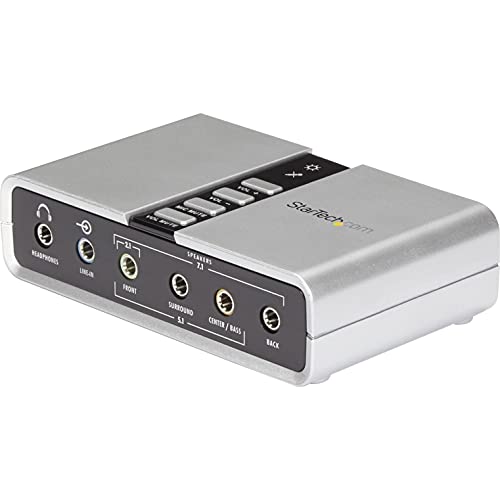
This external USB sound card adds up to 7.1 channel output to laptops or desktops. It supports 7.1, 5.1, and stereo configurations, with Line‑In, microphone input, and a dedicated headphone port. It upgrades an existing PC sound setup with analog and digital output options, and includes a 1m USB cable. Compatible with standard audio workflows requiring multi‑channel monitoring and flexible connectivity.
Cubilux 7.1 USB Surround Sound Card

The Cubilux device provides immersive 7.1 surround sound for gaming and media alongside line‑in and mic inputs. It supports hi‑res headphone output up to 384kHz/24‑bit and 7.1/5.1 surround, making it a strong pick for gamers who value positional audio and broad compatibility. Its full aluminum alloy housing minimizes interference and helps maintain clean signal paths for long sessions.
M‑AUDIO M‑Track Solo USB Interface
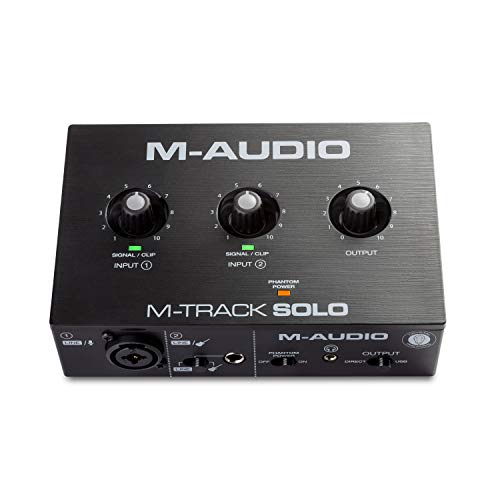
The M‑Track Solo delivers essential recording capabilities in a compact form. It features one XLR/Line combo input with phantom power and a second line/instrument input, along with a headphone output and RCA stereo outputs for monitoring. Its USB/Direct switch enables near‑zero latency monitoring, making it suitable for solo musicians, podcasters, and streamers who need a simple yet capable audio interface with reliable performance.
Buying Guide
- Inputs and compatibility: If you plan to record vocals and instruments, look for interfaces with XLR/Line combo inputs and phantom power. Check that the device works with your computer (PC or Mac) and supports your preferred streaming or recording software.
- Latency and monitoring: Real‑time or zero‑latency monitoring reduces timing issues during vocals and instruments. Direct monitoring features are valuable for live tracking.
- Sample rate and bit depth: Higher rates (like 24‑bit/192kHz) offer better capture detail, especially for vocals and acoustic instruments. Consider whether your monitoring system and software can benefit from this resolution.
- Build and noise handling: Durable housings (aluminum) and shielding help minimize EMI and ground noise, which matters for long sessions and mobile setups.
- Ancillary features: Phantom power availability, gain peaking indicators, and additional inputs (Guitar/Bass insert, 3.5mm mic jack) expand flexibility for multi‑instrument setups and quick on‑the‑fly adjustments.
- Portability and power: USB bus‑powered interfaces are convenient for mobile recording or on‑the‑go streaming, while external power may be preferred for power‑hungry mics.
- Value and upgrade path: If you’re building a home studio, consider starting with a model that covers essential needs now and offers enough headroom for future upgrades.
For buyers prioritizing simplicity and compatibility, options from JOLGOO, XTUGA, and M‑AUDIO provide strong baseline performance with straightforward setup. For users seeking multi‑channel monitoring and enhanced surround capabilities, StarTech and Cubilux offer expanded audio routing and immersive playback. Always verify warranty terms and included software suites to maximize long‑term value.