Whether you’re upgrading a home studio or tightening up your livestream setup, choosing the right XLR mixer to USB path matters. The following hand-picked options cover compact field mixers, USB audio interfaces, and helper cables that bridge XLR gear with USB recording or streaming platforms. Each option emphasizes clean preamps, phantom power where needed, and reliable monitoring so you can focus on content rather than technicalities. Use this guide to compare direct XLR inputs, phantom power, and easy connectivity to PCs, Macs, or streaming software.
| Product | Brand | Type | Key Benefit |
|---|---|---|---|
| FIFINE Gaming Audio Mixer, SC3 | FIFINE | USB/XLR mixer | Individual channel control with 48V phantom power |
| MAONO PS22 Lite | MAONO | USB audio interface | 24-bit/192kHz conversion for clear podcasts and music |
| XTUGA Q-12 | XTUGA | USB audio interface | Ultra-low latency, front-panel XLR input with phantom power |
| M-AUDIO M-Track Solo | M-AUDIO | USB audio interface | Compact, versatile with phantom power and monitoring |
| SNANSHI USB Type C to XLR Cable | SNANSHI | Output cable | High-fidelity DAC for routing USB-C audio to XLR gear |
Across these picks, you’ll find options that fit beginner and intermediate setups, from plug-and-play USB interfaces to more robust mixers with multiple channels. Consider your mic type (dynamic vs. condenser), need for phantom power, monitoring capabilities, and whether you want direct USB-C or USB-A connectivity. The right combination reduces latency, preserves microphone quality, and simplifies the path from input to audience.
FIFINE Gaming Audio Mixer, SC3

The FIFINE SC3 gaming audio mixer provides a dedicated XLR mic input with built-in 48V phantom power, enabling use with condenser mics. It features four independent channels for microphone, line-in, headphone, and line-out, with a smooth volume slider for precise control. Front-panel mute and monitor buttons simplify real-time feedback, helping reduce background noise during live streams. While designed for PC gaming and streaming, the unit acts as a compact interface to route XLR mic signals into your computer via USB, offering direct control without relying solely on software.
Key considerations: XLR input readiness and phantom power (not suitable for USB mics), physical mute/monitoring aids, and real-time monitoring that supports confident speaking. This makes the SC3 a viable bridge from XLR mics to USB-powered streaming environments where quick adjustments matter.
MAONO PS22 Lite USB Audio Interface

The MAONO PS22 Lite delivers high-resolution 24-bit/192kHz recording with a broad dynamic range for clear podcasts, voice-overs, and music. It supports condenser and dynamic mics with up to 56 dB of preamp gain and 48V phantom power, making it flexible for various mic types. This USB audio interface is designed for PC and Mac, pairing well with streaming software and DAWs. It’s a strong choice when you want faithful reproduction and simple setup for desktop recording and live streaming alike.
Key considerations: high-resolution conversion, phantom power availability, and compatibility with a broad range of microphones. The PS22 Lite emphasizes sound accuracy and ease of use, which helps in projects ranging from voice work to music recording.
XTUGA USB Audio Interface Q-12

The XTUGA Q-12 offers an independent volume control per channel with a front-panel XLR input capable of 48V phantom power. It supports recording via USB with low-latency monitoring, and its compact design makes it suitable for desk setups and portable studios. Its instrument input addition also helps guitar or bass recording workflows, making it versatile for multi-source projects. The device emphasizes straightforward routing and monitoring, reducing the learning curve for new users.
Key considerations: latency, phantom power compatibility, and flexible routing between mic, line, and instrument inputs. For those building a multi-source USB recording chain, the Q-12 is a compact option that keeps controls accessible during takes.
M-AUDIO M-Track Solo USB Audio Interface
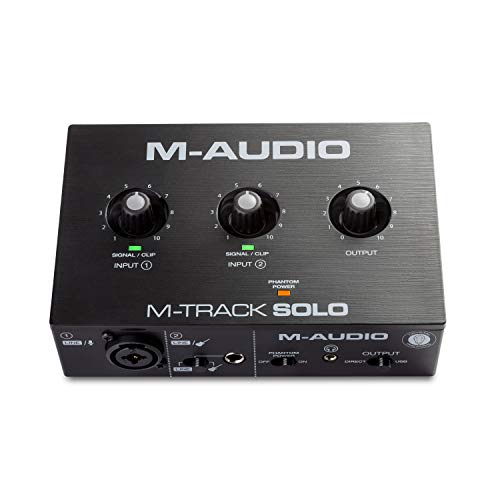
The M-Track Solo provides a compact yet capable USB interface designed for recording, streaming, and podcasting. It includes a combo XLR/Line input with phantom power and a separate instrument input, enabling flexibility for microphones and guitar tracks. The built-in monitoring options deliver zero-latency listening, while the 1/8″ headphone output and stereo RCA outputs support versatile monitoring setups. This model suits users seeking a straightforward path from XLR mics to USB for content creation.
Key considerations: inclusion of phantom power, monitoring options, and ease of integration with DAWs and streaming software. The M-Track Solo focuses on a simple workflow without sacrificing essential audio quality for podcasting and light music production.
Poyiccot USB To XLR Cable

This USB A to Dual XLR cable converts USB A from computers or devices into dual XLR outputs, suitable for feeding power amplifiers, mixers, or active speakers. It’s designed for output-only use and does not support recording, making it ideal for playback routing in a USB-to-XLR path. The two XLR channels are color-coded for left and right channels, and a built-in DAC helps preserve audio fidelity. It’s a practical accessory when you need to drive XLR gear from a USB source.
Key considerations: output-only functionality, compatibility with USB-A devices, and the presence of a DAC for improved sound transmission. This cable is best used as a signal conduit rather than a mic input solution in a live setup.
Buying Guide
When selecting an XLR mixer to USB path, weigh these factors:
- Input type and phantom power: If you plan to use condenser mics, choose devices with 48V phantom power. For dynamic mics, phantom power is often optional.
- Latency and monitoring: Look for zero-latency monitoring or direct monitoring options to prevent delay between speaking and hearing yourself on playback.
- Channel count and routing: A mixer with multiple channels provides flexibility for multi-mic setups, while interfaces focus on single or dual inputs with straightforward routing.
- Compatibility: Ensure the USB standard (USB-A, USB-C) matches your computer or streaming device. Also check DAW and software compatibility if you plan to record.
- Portability versus robustness: Small USB interfaces favor portability; dedicated mixers may offer sturdier controls for live performance.
- Future-proofing: Consider whether you’ll add more mics or instruments later. A modular approach with add-on cables or interfaces can be advantageous.
In practice, users seeking ease of setup may favor USB audio interfaces for single-mic or dual-mic configurations, while those needing more immediate control over levels may opt for a compact mixer with dedicated faders and mute/monitor controls. For playback-focused setups, USB-to-XLR cables provide useful signal routing without involving recording. Compare each option against your mic type, desired workflow, and software ecosystem to identify the best match.