Gamers who switch between Nintendo Switch and Xbox controllers value fast, reliable adapters that minimize latency and maximize compatibility. This guide highlights top adapters that let Xbox Series X|S, Xbox One, and other controllers work smoothly with Switch consoles and related systems. Each pick is evaluated for latency, broad controller compatibility, and ease of use to help you choose the right adapter for your setup.
| Product | Brand | Supported Systems | Notes |
|---|---|---|---|
| 8BitDo Wireless USB Adapter 2 (Black) | 8Bitdo | Switch, Switch 2, Windows, macOS, Steam Deck, Raspberry Pi | Wide controller compatibility; Switch 2 firmware update required |
| 8Bitdo Adapter Switch Controller Adapter 2 USB Wireless | 8Bitdo | Switch (3.0+), Switch 2, Windows, macOS, Raspberry Pi | Multiple modes; firmware updates recommended |
| GuliKit Hyperlink 2 | GuliKit | PC, Switch, Switch 2, Android, SteamOS | HyperLink 2 tech; very low latency |
| AKNES 8BitDo USB Wireless Controller Adapter 2 | AKNES | Switch family, Windows, macOS, Raspberry Pi | Firmware upgrade advised; broad controller support |
| 8BitDo Wireless USB Adapter 2 (Brown) | 8Bitdo | Switch, Windows, macOS, Steam Deck, Raspberry Pi | Similar to Black variant; supports wide controller range |
Below are five product sections pulled from the most relevant items for Xbox controller compatibility with Switch systems. Each entry includes a clickable link to the product page, a product image, and a concise feature overview to help you compare at a glance.
8BitDo Wireless USB Adapter 2 for Switch and More

The 8BitDo Wireless USB Adapter 2 provides broad compatibility across Switch, Switch 2, Windows, macOS, Steam Deck, and Raspberry Pi. It supports Xbox Series X|S controllers, Xbox One Bluetooth controllers, PS5/PS4/PS3 controllers, Switch Pro, and 8BitDo controllers. For Switch 2, ensure the adapter runs the latest firmware to enable full functionality. This option emphasizes versatility for gamers who use multiple platforms and controllers.
8BitDo Adapter Switch Controller Adapter 2 USB Wireless

This second-generation receiver supports 8BitDo Bluetooth controllers, Xbox Series X|S, Xbox One Bluetooth, PS5/PS4/PS3, Switch Pro, Switch Joy-Con, and Wii U Pro controllers. It requires the latest firmware for Switch 2 compatibility. The device offers four modes (X-input, D-input, Mac, and Switch) and supports motion and vibration in selected modes, enabling flexible play across devices.
GuliKit Hyperlink 2 Fast Wireless Adapter

The Hyperlink 2 technology delivers low latency around 2.95ms, reducing input delay compared with traditional Bluetooth. It works with Xbox One Bluetooth, Xbox Series X|S, Elite Series 2, PS5 Dual Sense Edge, PS4, Switch Pro, and more. It’s designed for plug-and-play use with Windows, Android, Switch, Switch 2, and SteamOS. Switch users may need to enable wired connection for Switch 2 via system settings.
AKNES 8BitDo USB Wireless Controller Adapter 2

The AKNES adapter supports Switch 1/2, OLED, Windows, macOS, Raspberry Pi, and Xbox Series X/S and Xbox One Bluetooth controllers. Firmware should be updated to the latest version for optimal performance. It supports 8BitDo controllers and classic Switch accessories, offering low-lag wireless connectivity with vibration in X-input mode and motion in Switch mode on compatible devices.
8BitDo Wireless USB Adapter 2 (Brown)
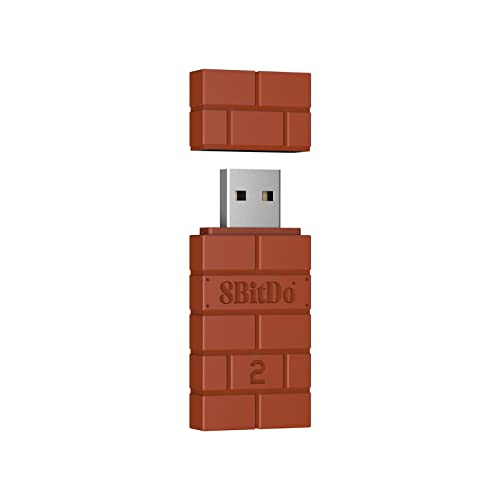
This brown variant mirrors the Black version’s capability set, offering compatibility with Xbox Series X|S, Xbox One Bluetooth, PS5/PS4/PS3, Switch Pro, Joy-Con, Wii Mote, and Wii U Pro. It supports Windows, macOS, Steam Deck, and Raspberry Pi, making it a flexible option for users who rotate between consoles and PC ecosystems. Firmware updates are advised to maintain compatibility with newer controllers and systems.
8Bitdo USB Wireless Adapter 2 for Windows

This adapter focuses on Windows compatibility alongside Switch/Switch 2, macOS, Steam Deck, and Raspberry Pi. It supports Xbox Series X|S, Xbox One Bluetooth, PS5/PS4/PS3 controllers, Switch Pro, and 8BitDo controllers. Firmware updates are important for Switch 2 compatibility. The device emphasizes low-lag wireless connections and supports 6-axis motion on Switch mode and vibration on X-input mode.
Buying Guide: Key Purchase Considerations
- Platform compatibility: Confirm that the adapter supports your primary consoles (Switch, Switch 2) and your preferred controllers (Xbox Series X|S, Xbox One, PS5/PS4, Switch Pro, etc.).
- Latency and performance: Look for adapters advertised with low latency, high polling rates, and “plug and play” setup to reduce input delay during fast-paced games.
- Firmware and updates: Many adapters require the latest firmware to enable Switch 2 compatibility or to maintain broad controller support. Plan for occasional updates.
- Modes and inputs: Some adapters offer multiple modes (X-input, D-input, Mac, Switch) and support for vibration or motion on certain modes. Choose based on your controller and game preference.
- Ease of use: Prioritize adapters that require minimal configuration, especially if you game across multiple devices (PC, Switch, Raspberry Pi, Steam Deck).
- Ongoing compatibility: Consider brands with a history of frequent updates and broad ecosystem support, such as 8BitDo and GuliKit, to maximize longevity.
- Firmware backups and safety: When updating firmware, follow official instructions to avoid bricking devices or losing compatibility with existing controllers.
All selections aim to balance broad controller compatibility with Switch ecosystems while keeping latency low and setup straightforward for American gamers seeking seamless cross-platform play.