For reliable wireless connectivity on desktops, laptops, or compact devices, a compact WLAN 11n mini USB adapter can be a smart upgrade. This guide highlights five well-regarded options, each rooted in the 802.11n standard and designed to plug into a USB port for fast, stable 2.4 GHz networks. We examine performance, compatibility, and setup considerations to help American readers choose adapters that balance speed, size, and ease of use in everyday situations—from streaming to online gaming.
Below is a quick summary table of the chosen products, outlining their brands, key features, and typical use cases.
| Product | Brand | Key Features | Best For |
|---|---|---|---|
| Superwang Mini USB Wifi Wireless Adapter N – 150Mbps | Superwang | 802.11n/g/b, MT7601, 150Mbps, Windows/Mac/Linux compatible, WMM | Budget streaming and light browsing |
| TP-Link USB WiFi Adapter TL-WN725N | TP-Link | N150, 2.4GHz, compact nano design, Windows/Mac/Linux compatible, WEP/WPA/WPA2 | Very small form factor, basic connectivity |
| Edimax Wi‑Fi 4 802.11n Adapter EW-7811Un | Edimax | 150Mbps, nano USB, Plug‑n‑Play, cross‑platform (Windows/Mac/Linux), Ubuntu/Mint support | Tiny footprint with broad OS support |
| FANTIA 300Mbps USB WiFi Adapter | FANTIA | RTL8192EU, 300Mbps, 2.4GHz, Windows/Mac/Linux compatibility | Better performance for HD streaming and gaming |
| Edimax EW-7722UTn V3 | Edimax | N300, 300Mbps, energy saving, Plug-n-Play for Win/Mac/Linux | Mid‑range speed with energy efficiency |
Superwang Mini USB Wifi Wireless Adapter N – 150Mbps
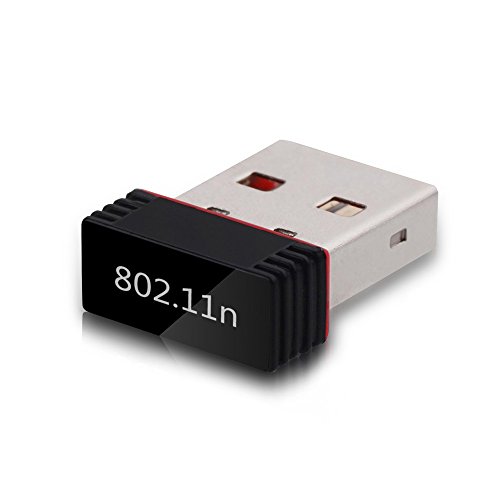
The Superwang adapter uses the MT7601 chipset and supports IEEE 802.11n/g/b networks, delivering up to 150Mbps on the 2.4GHz band. It is compatible with Windows, Mac, and Linux, broadening its usability across different machines. The device prioritizes real-time data transmission through WMM, which can enhance experiences that require streaming or voice/video communication. While its speed is modest compared with newer dual‑band devices, its compact form factor and broad compatibility make it a dependable choice for upgrading older PCs or laptops that lack wireless capability.
TP-Link USB WiFi Adapter TL-WN725N

The TP-Link TL-WN725N is a tiny N150 USB adapter designed for minimal footprint while delivering reliable 2.4GHz connectivity. It’s ideal for adding wireless access to a desktop PC or a compact laptop without a built-in wireless card. The nano design helps it stay out of the way, making it suitable for space-constrained setups. It supports ad hoc and infrastructure wireless modes and offers standard security options (WEP/WPA/WPA2). While it won’t reach gigabit speeds, the device delivers dependable performance for web browsing, email, and standard video calls on older devices that need an upgrade without a hefty investment.
Edimax EW-7811Un N150 Nano USB Adapter

The Edimax EW-7811Un offers a compact N150 wireless adapter designed for straightforward plug‑and‑play use. It supports Windows, macOS, and Linux variants, including Ubuntu and Mint with kernel considerations. The ultra-small design makes it highly portable for travelers and students who need a reliable wireless connection on the go. The adapter’s 150Mbps ceiling is suitable for everyday tasks like video streaming, light gaming, and conferencing, although peak speeds may vary with distance and interference. The product emphasizes broad OS support and easy setup, making it a pragmatic choice for mixed-OS environments.
FANTIA 300Mbps USB WiFi Adapter

The FANTIA 300Mbps adapter utilizes the RTL8192EU chipset to provide up to 300Mbps on the 2.4GHz band. It is designed for better performance in environments with weak signals or walls, helping maintain smoother online gaming and HD video experiences. It supports Windows, Mac, and Linux operating systems, and claims broad compatibility with various routers to maximize speeds. Its USB 2.0 interface makes it suitable for older laptops or desktops that lack modern wireless cards, offering a practical upgrade path for improved network performance in a single, affordable device.
Edimax EW-7722UTn V3

The Edimax EW-7722UTn V3 is a step up with N300 speeds and energy-saving features. This mini USB adapter is easy to carry and supports plug‑and‑play on Windows, Mac, and Linux systems. It provides robust 2.4GHz connectivity and WPA/WPA2 security, making it a solid option for users who want a compact, cost-effective adapter capable of handling daily tasks, streaming, and light gaming without the complexity of newer dual-band devices. The V3 version continues Edimax’s emphasis on compatibility and reliability in a small package.
Buying Guide: Key Purchase Considerations And Comparisons
- Speed and band: If you frequently stream HD video or play online games, a 300Mbps dual‑band adapter offers more headroom than a basic 150Mbps device. For simple web browsing, a 150Mbps adapter is often sufficient.
- Form factor: Nano/mini adapters stay out of the way, which is ideal for portable laptops and compact desktops. Larger sticks may offer antenna variations or slight performance gains, but at the cost of bulk.
- OS compatibility: Check supported operating systems. Many adapters advertise broad support (Windows, macOS, Linux), but driver availability can vary, especially for Linux and Raspberry Pi environments.
- Security: Look for devices that support WPA2 (and WPA3 where applicable) to ensure your wireless connections stay protected. WEP is outdated and less secure.
- Setup and driver availability: Plug-and-play is convenient, but some models may require drivers on certain OS versions. If you frequently update systems, choose adapters with widely documented driver support and easy installation guides.
- Router compatibility and interference: 2.4GHz networks can suffer from interference from microwaves and other devices. If your network environment has heavy congestion, consider a dual‑band USB adapter or check your router’s channel settings for optimum performance.
- Future-proofing: While 11n/MIMO devices are common and affordable, evaluate whether you want to invest in a dual‑band AC or AX adapter for higher speeds as networks evolve. For basic tasks, 11n devices remain a cost-effective option.
- Price versus value: In budget scenarios, selecting a 150Mbps adapter with strong OS support and a small footprint can offer better overall value than a higher-priced model with limited driver support.
Note: This article focuses on 11n mini USB adapters and emphasizes practical buy‑or‑try considerations rather than price dynamics. Actual connection speeds depend on router capabilities, distance, interference, and device hardware.