Finding the right wireless keyboard for a Mac setup blends comfort, compatibility, and efficiency. This guide highlights five top options that pair well with Apple devices, from keyboards with numeric keypads to slim, backlit models designed for multi-device use. Each pick emphasizes Mac-centric features, reliable Bluetooth or 2.4 GHz connections, and easy integration with macOS, iPadOS, and iPhone. Use the product entries below to compare layouts, backlighting, and multi-device capabilities, then consult the buying guide for practical decision criteria.
Summary table of selected products:
| Product | Brand | Key Features |
|---|---|---|
| Apple Magic Keyboard with Numeric Keypad | Apple | Wireless, rechargeable, full-size with numeric keypad |
| ProtoArc Backlit Wireless Keyboard (K110-A) | ProtoArc | Aluminum body, backlit, multi-device, Mac-focused |
| OMOTON Bluetooth Keyboard for Mac | OMOTON | Ultra-slim, stable Bluetooth, Mac compatibility |
| OMOTON Wireless Keyboard with Dual Bluetooth | OMOTON | Dual Bluetooth, 2.4G option, slim |
| Magic Keyboard with Touch ID and Numeric Keypad | Apple | Touch ID, extended layout, numeric keypad |
Apple Magic Keyboard with Numeric Keypad

Brand: Apple. This wireless USB keyboard uses Bluetooth to connect with Mac, iPad, or iPhone and features a rechargeable internal battery, eliminating disposable batteries. The extended layout provides full-size arrow keys and a numeric keypad, making it suitable for spreadsheets and data entry. The typing experience emphasizes comfort and precision, aligning with Apple’s design language and ecosystem.
ProtoArc Backlit Wireless Keyboard for Mac, K110-A
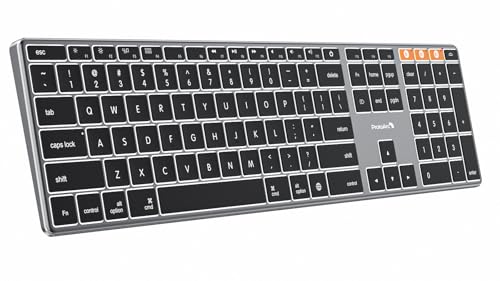
Brand: ProtoArc. Its aluminum unibody design mirrors Mac aesthetics, offering a slim profile at about 0.4 inches thick. It supports macOS, Bluetooth 5.1, and multi-device pairing, with three adjustable backlight brightness levels for dim environments. Note that Windows compatibility is limited, and some older Macs may require system alignment with macOS 10.12 or later.
OMOTON Bluetooth Keyboard for Mac

Brand: OMOTON. This ultra-slim wireless keyboard is designed for Mac devices, offering a stable Bluetooth connection up to 33 feet. It emphasizes compact portability and easy pairing without drivers. Its Mac-focused layout is intended for seamless use with iMac, MacBook Pro/Air, and Mac mini environments, supporting macOS 10.10 and later.
OMOTON Wireless Keyboard for Mac (Silverwhite)

Brand: OMOTON. This keyboard emphasizes MacOS-specific function keys for quick access to ESC, search, and screen capture. It supports Bluetooth 33-foot range and requires no extra USB drivers. It is designed primarily for macOS and is suitable for MacBook Pro/Air and iMac users seeking native Mac shortcuts.
Magic Keyboard with Touch ID and Numeric Keypad

Brand: Apple. This model pairs Touch ID with a numeric keypad in a full-size layout, delivering a comfortable and precise typing experience. The extended layout supports document navigation and gaming-like arrow keys, providing quick access to essential controls alongside secure authentication for macOS.
Buying Guide: Key Considerations For Choosing A Mac-Compatible Wireless Keyboard
When selecting a wireless keyboard for a Mac, consider compatibility with macOS versions, iPadOS, and iPhone ecosystems. Look for a layout that matches your workflow—whether you need a numeric keypad for spreadsheets, dedicated media keys, or full-size navigation keys for editing. Backlighting can help in low-light workspaces, and multi-device connectivity enables switching between a Mac, iPad, and iPhone without re-pairing. Battery type and life, USB-C recharging options, and build material influence daily use and durability. Finally, ensure the keyboard’s design aligns with your aesthetic and typing preferences, whether slim and portable or feature-rich with a robust aluminum frame.
Key purchase considerations at a glance:
- Device compatibility: macOS version support and cross-device usability with iPadOS and iOS.
- Connectivity: Bluetooth versions, 2.4 GHz options, and ease of switching between devices.
- Layout and ergonomics: Full-size versus compact; presence of numeric keypad; key travel and tactile feel.
- Backlighting and visibility: Adjustable brightness and legibility in dim environments.
- Power and convenience: Rechargeable batteries, USB-C charging, and battery life expectations.
- Build quality: Aluminum or plastic chassis, profile thickness, and overall durability.