When you need reliable internet access wherever you are, a wireless USB cellular router offers a compact, flexible solution. This guide highlights five top options that blend portability, coverage, and ease of use for American travelers, remote workers, and hotspot enthusiasts. Each picks up mobile networks and shares connectivity across multiple devices, without requiring a traditional broadband setup. Below is a quick summary of the featured models, followed by detailed sections and a buying guide to help you compare capabilities, supported bands, and deployment scenarios.
| Product | Brand | Key Benefit |
|---|---|---|
| Joytutus 4G LTE Portable WiFi Router | JOYTUTUS | Strong LTE coverage with lightweight portability |
| GL.iNet GL-SFT1200 (Opal) | GL.iNet | AC1200 dual-band with easy setup and compact design |
| GL-X2000 Spitz Plus | GL.iNet | Advanced multi-WAN with dual-SIM and VPN readiness |
| WDINLY 4G LTE USB Modem Dongle Router | WDINLY | Plug-and-play USB modem with SIM slot for quick sharing |
| Estink 4G LTE USB Modem Travel Router | Estink | Unlocked 3G/4G hotspot supporting multiple devices |
Joytutus 4G LTE Portable WiFi Router

The Joytutus portable hotspot focuses on strong LTE signal delivery across multiple bands to maximize coverage and stability. It supports B2, B3, B4, B5, B7, B13, B17, B41 among others, helping maintain a reliable connection in varied locations—from urban offices to outdoor events. A magnetic back cover design enables one‑hand operation and quick docking or undocking, while integrated ventilation supports heat dissipation for sustained performance. Weighing roughly 0.11 pounds, it is highly portable for travel, business meetings, or gym sessions, and it includes a built‑in antenna to boost reception.
Key features include a lightweight form factor, broad LTE band compatibility, and a simple, one‑hand open/close mechanism. The device is designed to be paired with any SIM card (not included) for flexible, on‑the‑go internet. Ideal use cases include desktop or laptop connectivity in transit, backup internet for travel, or use as a spare hotspot for small groups or workgroups.
GL.iNet GL-SFT1200 (Opal) Portable WiFi Travel Router
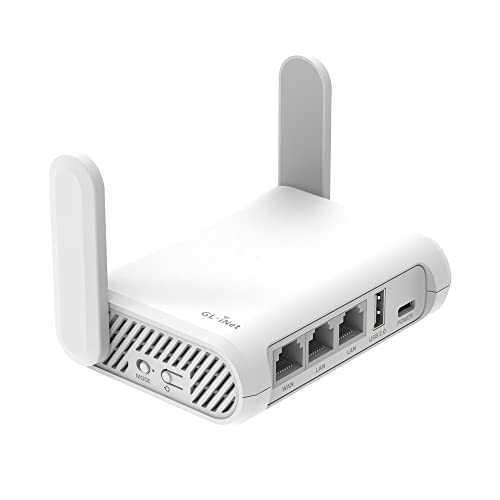
The GL-SFT1200 Opal offers AC1200 dual‑band wireless performance, delivering up to 300 Mbps on 2.4 GHz and 867 Mbps on 5 GHz. This balance suits everyday tasks like email and web browsing on the 2.4 GHz band while accommodating higher‑bandwidth activities such as streaming and light gaming on 5 GHz. Setup is designed to be straightforward, with a focus on quick unboxing and easy Internet access. Its pocket‑friendly weight and compact profile make it a solid companion for travel, business trips, or as a personal travel router at hotels or shared workspaces.
With OpenWrt‑based roots, the device supports flexible networking options and a straightforward setup experience. Its portability does not sacrifice performance, and the hardware is designed to handle daily mobile needs, including a built‑in Wi‑Fi signal enhancing antenna for better reception in challenging environments.
GL-X2000 (Spitz Plus) Cellular Gateway

The GL-X2000 Spitz Plus is designed for more demanding setups. It delivers fast Wi‑Fi 6 within a cellular gateway framework, achieving up to 3000 Mbps combined wireless speed and supporting multi‑WAN connectivity. Dual-SIM capability enables seamless switching to the strongest network, with failover options to maintain connectivity during outages. Its multi‑WAN support includes Ethernet, Repeater, Cellular, and Tethering, and advanced load balancing allows tailored bandwidth distribution between connection methods. This makes it ideal for home offices, RVs, small businesses, or remote work sites requiring robust, resilient internet access.
Key strengths include VPN readiness and the option to configure failover priorities, ensuring continuous service even if a primary link drops. Detachable antennas and OpenVPN/WireGuard compatibility help tailor security and performance to varied networking environments.
WDINLY 4G LTE USB Modem Dongle Router

The WDINLY USB modem router emphasizes plug‑and‑play deployment, driver‑free operation, and USB power connectivity. With a practical 4G LTE modem speed outlook, it supports up to 150 Mbps downlink and 50 Mbps uplink in typical usage scenarios, making it suitable for quick sharing of a mobile data connection across laptops, tablets, and phones. A SIM card slot enables direct cellular access without a separate modem, and the device’s compact form factor supports easy transport and use in travel, conferences, or small offices where a quick hotspot is needed.
Designed to work with major US carriers, the WDINLY unit prioritizes ease of use and broad compatibility, while its compact build supports on‑the‑go productivity in cafes, airports, or co‑working spaces. Users should verify SIM compatibility and network bands for their specific carrier before purchase.
Estink 4G LTE USB Modem Travel Router

Estink’s unlocked travel router emphasizes versatility for users who need a simple, all‑in‑one mobile internet solution. It functions as a USB modem and router, capable of supporting multiple devices simultaneously via a 3G/4G SIM card. The device is compatible with various OS environments and offers plug‑and‑play connectivity, making it a practical option for travelers who want to share a single SIM’s data across laptops, tablets, and smartphones. The built‑in SIM slot and unlocked nature provide flexibility across different networks and plans.
Potential deployment scenarios include hotel rooms, remote work sites, or outdoor events where internet access is intermittent. As with similar devices, confirm carrier compatibility and supported bands to ensure reliable performance in your region and with your chosen plan.
Buying Guide: Key Purchase Considerations
When choosing a wireless USB cellular router, consider the following factors to match your needs and network environment:
- Network bands and carrier compatibility: Look for devices supporting the LTE bands used by your carrier and in the locations you frequent. Unlocked units provide the most flexibility when switching SIMs or carriers.
- Connectivity options: Decide between single‑SIM and multi‑WAN setups, and whether you need USB power, Ethernet ports, or integrated VPN support for secure remote work.
- Wi‑Fi standard and speed: A router with Wi‑Fi 6 (or higher) delivers better performance in busy spaces. Dual‑band (2.4 GHz + 5 GHz) guidelines help balance range and speed for multiple devices.
- Portability and form factor: If you travel often, prioritize lightweight designs with compact housings and integrated antennas for convenient packing and quick setup.
- Security features: VPN compatibility (OpenVPN, WireGuard), firewall options, and guest networks help protect data on public or shared networks.
- Ease of use: Plug‑and‑play operation, clear setup guides, and mobile app support can shorten the learning curve for non‑tech users.
- Battery or power considerations: Some models rely on USB power or built‑in batteries. For desk use, a powered USB hub or portable battery pack can extend uptime.
Performance expectations vary by network conditions. Real‑world speeds depend on carrier coverage, signal strength, concurrent users, and plan limitations. For travelers, having a device with strong band support and robust VPN capabilities often yields the best balance between speed, reliability, and security.
In practice, the Joytutus, GL.iNet GL-SFT1200, GL-X2000 Spitz Plus, WDINLY, and Estink options each target different priorities—compact portability, VPN readiness, multi‑WAN resilience, easy set‑up, and unlocked flexibility. Assess your typical usage patterns—travel frequency, number of connected devices, and need for secure remote work—to select the model that best aligns with your internet needs.