Finding the right antenna cable can boost wireless reach, reduce dead zones, and improve overall network stability. This guide highlights practical cables and pigtails chosen for American homes and small offices, focusing on RP-SMA and RG174/RG178 variants compatible with popular routers, access points, and PCIe wireless cards. Each option balances length, signal integrity, and ease of installation. Read on to compare 5 carefully selected products and learn key buying considerations to maximize WiFi performance in real-world environments.
style=”display:none;”>Summary Table (Selected Products)
| Product | Brand | Connection | Cable Type | Length | |
|---|---|---|---|---|---|
| BINGFU WiFi Antenna Extension Cable 2-Pack | BINGFU | RP-SMA Female Bulkhead to RP-SMA Male | RG174 | 3 m / 10 ft | Router, IP camera, USB adapter |
| Superbat wlaniot N Type Pigtail Cable | Superbat | N Female to mini PCI | RG178 | 6 in | Mini PCIe cards, gateways |
| BINGFU RP-SMA Cable 30 Feet | BINGFU | RP-SMA Female Bulkhead to RP-SMA Male | RG174 | 30 ft | Router, AP, USB adapter |
| QUEENTI 2 x 8dBi Antennas with Pigtails | QUEENTI | IPEX to RP-SMA Female | RG-? (pigtail) | 15 cm / 5.9 in each | Mini PCIe, desktop, router |
| Eightwood Dual Band Antennas with Extension | Eightwood | RP-SMA | Dual-band | 6.5 ft | PC, router, hotpots, extenders |
BINGFU WiFi Antenna Extension Cable 2-Pack

The Bingfu 2-pack uses RP-SMA Female Bulkhead Mount to RP-SMA Male connectors with RG174 coaxial cable for flexible placement of antennas. Available in a 3 m (10 ft) length, these cables are designed to extend wireless reach for routers, security cameras, IP adapters, and USB wireless dongles. They are built for 50 Ohm impedance compatibility and provide a practical solution when the router or AP placement is constrained by furniture or walls. The package includes two cables, making them a cost-effective upgrade for multi-antenna setups or spare cables for future expansions.
Superbat wlaniot N Type Female Pigtail Cable

This 6-inch N-type female pigtail uses RG178 coaxial cable for tight spaces and connectivity to mini PCIe cards or boards with limited mounting depth. The 50 Ohm impedance matches common wireless hardware, helping minimize signal loss in compact installations like high-density routers, gateways, or PCI WiFi cards. Its short length makes it ideal for short-board device connections where internal routing is constrained, while still delivering a reliable extension option for external antennas.
BINGFU RP-SMA Male to RP-SMA Female Bulkhead Mount 30 Feet

This 30-foot extension from Bingfu expands range for wireless networks while maintaining a 50 Ohm impedance with RP-SMA bulkhead connectors. The RG174 coaxial cable supports longer wireless deployments without a significant drop in signal strength, making it suitable for larger homes or offices where devices sit several rooms away from the router. The included single cable simplifies installation for one-location upgrades or on-the-fly reconfiguration of multiple devices.
BINGFU RP-SMA Bundled Extension Coaxial Cable 1m / 3 Feet (2-Pack)

Designed for compact router setups and small form-factor devices, this 1-meter extension effectively bridges short distances between an antenna and a host card or access point. The two-pack provides redundancy and flexibility for multi-device installations, including routers, APs, USB adapters, or PCIe wireless cards. It uses RP-SMA connectors and RG174 cable to minimize loss while preserving compatibility with a broad range of equipment.
CORONIR 33ft WiFi Antenna Extension Cable

The CORONIR 33-foot extension offers substantial range for wireless LAN applications, including routers, access points, and cellular antennas. With a RP-SMA male-to-female configuration, this low-loss extension supports IEEE 802.11a/b/g/n/ac and compatible wireless networks. The extended length enables flexible antenna placement to optimize coverage in larger homes or offices, helping reduce dead spots and improve overall signal quality across multiple devices.
QUEENTI 2 x 8dBi Antennas with Pigtails
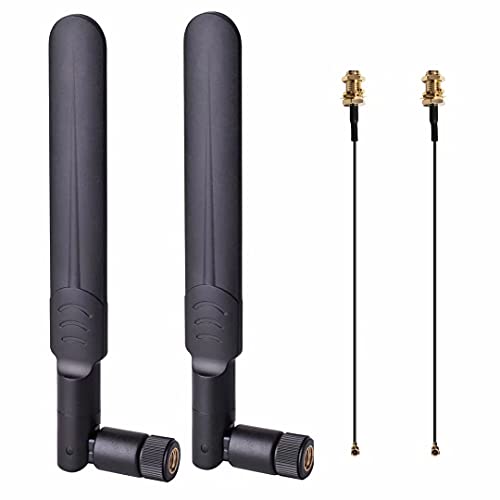
These QUEENTI antennas deliver dual-band 2.4 GHz and 5.8 GHz performance with 8 dBi gain, designed for improving reach in routers, PCIe cards, or WLAN hubs. The included pigtails use an IPEX MHF4 to RP-SMA Female connector, enabling straightforward upgrades for compact devices such as mini PCIe cards and desktops. The high-gain design helps extend wireless coverage to fringe areas without requiring a complete router relocation.
Eightwood Dual Band Antennas with Extension Cable
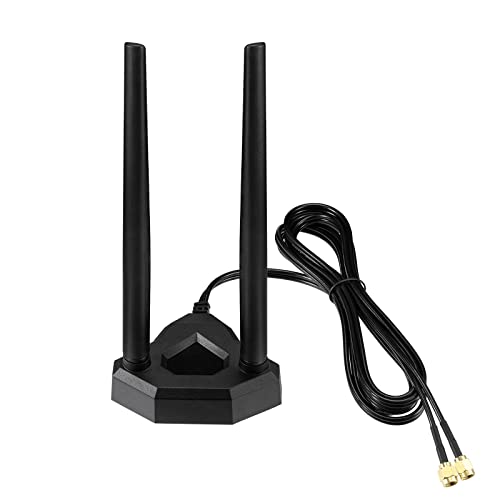
Eightwood’s dual-band antenna set features 2.4 GHz and 5.8 GHz support with an RP-SMA connection and a 6.5-foot extension cable. This combination suits desktop PCs, PCIe WiFi cards, and external USB adapters seeking improved range and stability. The omnidirectional design helps deliver consistent performance in multiple directions, which is useful for home offices and living spaces with variable device placement.
BINGFU 2-Pack 30-Foot Antenna Extension

This longer Bingfu extension pair combines value and range for larger setups, enabling flexible antenna placement around rooms to maximize coverage. The 50 Ohm RP-SMA connectors paired with RG174 coax reduce loss across longer runs, enhancing signal strength where walls or furniture typically degrade performance. Suitable for routers, APs, USB adapters, and mini PCIe network cards.
Buying Guide: Key Purchase Considerations
- Connector compatibility: Most consumer gear uses RP-SMA, but some small devices use N-type or IPEX pigtails. Match the connector to your device to avoid adapters that add loss.
- Cable impedance and type: 50 Ohm RG174 and RG178 cables are common; ensure the cable impedance matches your device’s antenna connector for best performance.
- Length versus loss: Longer cables extend reach but can introduce signal loss. Balance placement needs with acceptable fade, especially in dense homes.
- Outdoor vs indoor use: Some cables are rated for indoor use only; if you require outdoor exposure, select weatherproof-rated extensions and sealed connectors.
- Multiple devices: For homes with several devices, consider a mix of longer runs for main routers and shorter, flexible pigtails for desktops or laptops.
- Quality and shielding: Look for shielding quality to minimize EMI, especially in apartments with many wireless networks nearby.
- Installation ease: Bulkhead mounts and pre-terminated connectors simplify installation; consider bulkhead options when you need clean wall or chassis mounting.
- Cost versus redundancy: Two-packs provide a cost-effective way to upgrade multiple devices or have spare cables for future changes.
In practice, selecting the right antenna extension depends on device type, mounting constraints, and desired coverage. For larger homes, longer RG174 runs can help reach far corners, while compact mini PCIe and desktop setups benefit from short, flexible pigtails. Always verify the exact connector type and impedance before purchase to avoid costly compatibility issues. When used thoughtfully, these cables and antennas can meaningfully improve throughput, reduce dead spots, and stabilize connections across a mixed network of routers, access points, and network cards.
Buying Guide Summary: What to Consider
- Identify device type and connector: RP-SMA, N-type, IPEX/MHF4, bulkhead mounts, and cable length must align with your hardware.
- Assess installation environment: Indoor-only vs outdoor-rated, and whether bulkhead mounting suits your setup.
- Evaluate signal requirements: Longer runs increase exposure to loss; balance with placement goals like centralizing the router or extending to distant rooms.
- Plan for future upgrades: Two-packs or modular components let you expand or reconfigure without buying new cables.
- Consider compatibility with 2.4 GHz and 5 GHz bands: Dual-band cables and antennas can help maximize overall performance in mixed networks.