Guarding loved ones at home requires reliable communication between the person in need and caregivers. The following wireless personal emergency alert devices offer quick alerts, friendlier interfaces, and flexible monitoring options. This article highlights five prominent systems, their strengths, and key considerations to help you choose the right solution for an elderly parent, a patient, or a disabled family member.
| Product | Brand | Connectivity | Best For |
|---|---|---|---|
| WiFi Caregiver Pager System with Emergency Button for Elderly | SanJie | 2.4GHz/WiFi | Home monitoring with app alerts |
| PILSAMAS WiFi Caregiver Pager Smart Call System | PILSAMAS | 2.4G Wi‑Fi + 433MHz | Range plus app-based alerts |
| CallToU Wi-Fi Wireless Caregiver Pager Call Button | CallToU | 2.4G Wi‑Fi | App alerts with optional notifications |
| Daytech Wireless Caregiver Pager Wrist Call Button | Daytech | 433MHz + Wi‑Fi | Simple, splash-proof wearable option |
| CallToU Wi-Fi Wireless Caregiver Pager Call Button (TY01WH-06W) | CallToU | 2.4G Wi‑Fi | Multi-device alert sharing |
The products below were selected for relevance to wireless personal emergency alert needs, including alarm sounds, light indicators, app notifications, and caregiver sharing capabilities. Each section provides a concise overview, key features, and practical considerations for American households.
SanJie WiFi Caregiver Pager System

The SanJie system combines a central receiver with a wearable or wall-mounted alert watch. When a caller button is pressed, the receiver emits a high-pitched alarm and flashing light while the app delivers real-time alerts to your smartphone. It emphasizes dignity and independence for the patient, framing safety as a supportive aid rather than surveillance. An optional paid service can extend alerts to SMS or phone calls if the internet is unavailable, which can be useful in areas with spotty connectivity.
Key considerations: Ensure compatible Wi‑Fi coverage in the home, assess whether the Premium alerts are necessary for your household, and determine how alerts would be shared with caregivers. The device aims to balance quick notifications with a respectful user experience.
PILSAMAS WiFi Caregiver Pager Smart Call System

PILSAMAS offers a 328‑foot range using 433MHz for in-building reliability along with a 2.4G Wi‑Fi hub for cloud access and app notifications. The system includes multiple care buttons or a wearable wristband, with clear identification of who needs help and where. It emphasizes real-time app alerts, device naming, and alert history. A notable benefit is lifetime free updates and notifications, with optional paid plans for SMS or email alerts.
Key considerations: Evaluate whether the 328-foot through-walls range matches your home layout, and confirm that you’re comfortable with optional subscription features for extended notifications. The system supports family sharing to quickly alert multiple caregivers.
CallToU Wi-Fi Wireless Caregiver Pager (TY01WH-US-2-1)
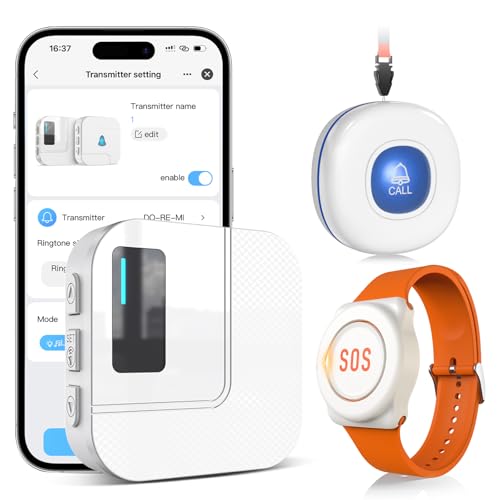
CallToU’s TY01US model integrates a 2.4G Wi‑Fi connection with a 433MHz alarm network for reliable in-home coverage. The receiver connects to Wi‑Fi for global access, enabling instant app notifications when a caregiver button is pressed. Optional phone or text message alerts can be added for broader coverage. The system also supports sharing alerts with family members via the app, making it easier to coordinate support from multiple caregivers.
Key considerations: If you need SMS or phone alerts beyond app notifications, budget for the monthly plan. The sharing feature can be valuable for households with several caregivers, but ensure all family members are comfortable with the Tuya app setup.
Daytech Wireless Caregiver Pager Wrist Call Button
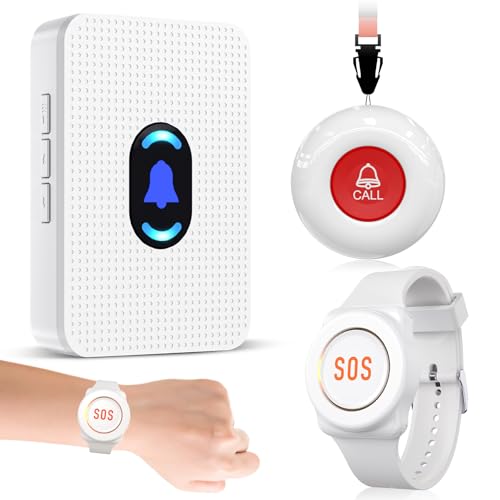
Daytech provides a wrist-worn pager paired with a call button, designed to help users stay independent while enabling caregivers to respond quickly. The system supports up to 100 feet (roughly 30 meters) of range, with a water-resistant button and a neck strap for easy accessibility. The receiver is plug-in powered, while the transmitter uses long-life batteries. This setup is ideal for private homes or facilities seeking a straightforward, easy-to-use alert workflow.
Key considerations: Consider the home layout to ensure the range is sufficient for typical living spaces. Note the splash-proof button design and the need to remove devices before bathing. The simple configuration can be advantageous for users who prefer minimal setup.
CallToU TY01WH-06W Wi-Fi Wireless Caregiver Pager
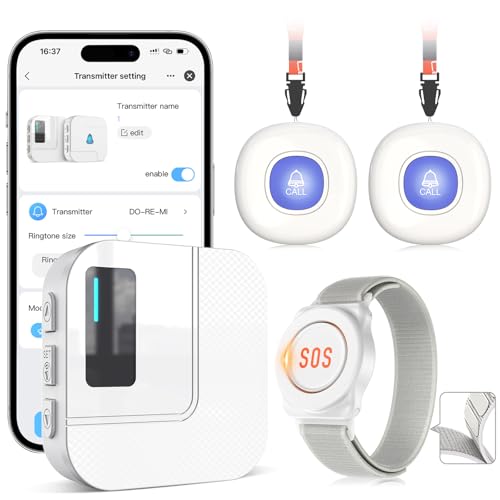
This CallToU model emphasizes 2.4G Wi‑Fi connectivity with a 328ft range, designed to deliver rapid app notifications when a button is pressed. Like other CallToU options, it supports sharing alerts with family members via the Tuya app, enabling broad caregiver coverage. A recurring theme is affordability and straightforward operation, with optional notifications for non-app users through paid services.
Key considerations: If you value shared alerts across multiple caregivers, verify how many devices can be linked and how alerts are managed in the app. For households with variable internet access, consider the reliability of Wi‑Fi during outages and explore any available offline fallback options.
Buying Guide
- Connectivity and coverage: Most systems use a combination of 2.4G Wi‑Fi and 433MHz radios to extend range. Map your home layout to determine the necessary range and whether a central hub is needed.
- Alert options: Look for audible alarms, flashing lights, and app notifications. Some models offer SMS or phone alerts as paid add-ons—assess whether you need multi-channel alerts or just app-based alerts.
- Caregiver sharing and multi-user support: If more than one family member or caregiver needs access, choose systems with easy app sharing and clear alert routing.
- Durability and form factor: Consider waterproof or splash-proof buttons for bathrooms and kitchens, and whether a wearable (wristwatch or pendant) suits the user’s preferences.
- Privacy and dignity: Select devices designed to minimize stigma and preserve user autonomy, avoiding overly invasive monitoring while ensuring rapid response when needed.
- Power and reliability: Check battery life for transmitters and whether receivers require constant power. Review what happens during internet outages and whether local alerts still function.
- Costs and subscriptions: Some systems offer free app alerts with optional paid tiers for SMS or calls. Confirm any ongoing costs before purchasing.
- Ease of setup and maintenance: Prioritize systems with clear setup instructions, intuitive apps, and straightforward maintenance to reduce caregiver burden.
- Compatibility with existing devices: If you already use a home assistant or specific safety ecosystem, verify compatibility or integration options to avoid silos of information.
Overall, wireless personal emergency alert devices provide a balance of independence for the user and peace of mind for caregivers. By evaluating range, alert channels, user interface, and ongoing costs, families can select a system that preserves dignity while enabling rapid assistance during emergencies.