Upgrade your laptop’s wireless capability with the latest tri-band Wi‑Fi 6E and Bluetooth 5.3 network cards. This guide highlights top options that maximize speed, range, and power efficiency for notebooks, ultrabooks, and compact laptops. Below you’ll find a quick product snapshot, followed by detailed sections on five standout adapters and a practical buying guide to help you pick the right one for your setup.
| Product | Brand | Key Features | Interface |
|---|---|---|---|
| Intel AX210 Tri-Band | Intel | Wi‑Fi 6E, BT 5.3, Tri-band (6GHz/5GHz/2.4GHz) | M.2/NGW |
| NICGIGA AX210NGW | NICGIGA | Wi‑Fi 6E, Tri-band, BT 5.3, 5374 Mbps | NGW |
| REKONG RTL8852CE | REKONG | Wi‑Fi 6E, BT 5.3, NGFF/M.2 form factor | M.2 NGFF |
| POINWER 7260HMW | POINWER | Wi‑Fi 802.11ac, 867 Mbps, BT 4.0 | Mini PCI-E |
| GigaPlus AX210NGW | GigaPlus | Wi‑Fi 6E, BT 5.3, Tri-band, 5374 Mbps | NGW |
Intel AX210 Tri-Band Wi-Fi 6E Card For Notebooks

The Intel AX210 NGW wireless card delivers tri-band Wi‑Fi 6E performance with Bluetooth 5.3 to support modern peripherals. This module operates across 6GHz, 5GHz, and 2.4GHz bands, enabling higher throughput and more stable connections in crowded environments. It integrates the latest Bluetooth capabilities for lower latency and improved power efficiency, which can extend battery life in portable devices. The card is designed for notebook use and supports M.2/NGW form factors for straightforward upgrades to compatible laptops.
POINWER 7260HMW Dual-Band Wireless Card

The POINWER 7260HMW is a dual-band wireless card with 867 Mbps on the 5 GHz/2.4 GHz bands and a Bluetooth 4.0 interface. It uses a Mini PCI-E interface, which is common in older notebooks and some compact builds. This card is suitable for upgrading legacy laptops that do not require the latest Wi‑Fi 6E technology. While it lacks tri-band operation and the newest Bluetooth spec, it provides reliable performance for everyday web browsing, streaming, and light online tasks.
WiFi 6E Card By NICGIGA With BT 5.3
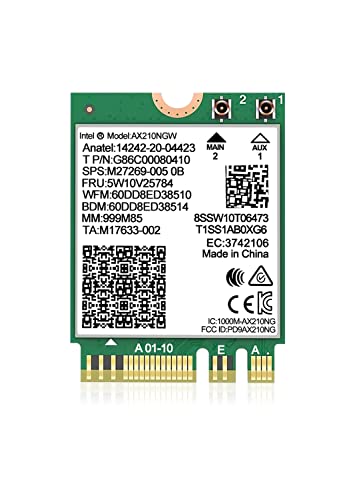
NICGIGA offers a Wi‑Fi 6E NIC with a tri-band setup (2.4GHz, 5GHz, 6GHz) and Bluetooth 5.3. The card supports NGW/NGFF interfaces and promises high theoretical speeds up to 5374 Mbps. Its compact design suits modern thin-and-light laptops, and the 6GHz band can help reduce congestion in dense environments like campuses or home offices. The Bluetooth 5.3 core improves peripheral connectivity, reduces latency, and can help with accessories such as keyboards, mice, and audio devices.
REKONG RTL8852CE Tri-Band Wireless Card

REKONG’s RTL8852CE-based adapter delivers Wi‑Fi 6E with a tri-band configuration and Bluetooth 5.3. This Realtek-based solution is popular for gaming and streaming on compatible laptops and supports M.2 NGFF slots. The RTL8852CE chipset is engineered to optimize data rates across all bands, while maintaining power efficiency for extended notebook use. Users should verify compatibility with their laptop’s slot type and BIOS whitelist status before installation.
GigaPlus AX210NGW Tri-Band Card

GigaPlus presents an AX210NGW module featuring tri-band Wi‑Fi 6E and Bluetooth 5.3. This NGW/M.2 form factor is designed for modern notebooks seeking high throughput across 6GHz, 5GHz, and 2.4GHz bands. The integrated Bluetooth 5.3 enhances peripheral connectivity with lower latency and better power efficiency. It is a suitable option for users upgrading slim laptops or builds that support NGW/NGFF interfaces and require robust wireless performance in busy networks.
Buying Guide
- Form factor and interface: Confirm your laptop accepts the card’s form factor (M.2 NGW, NGFF, Mini PCI-E) and that the system BIOS allows a third-party module.
- Wi‑Fi standard and bands: For the best future-proofing, choose a Wi‑Fi 6E card with tri-band support (2.4GHz, 5GHz, and 6GHz). This reduces congestion and boosts peak speeds in dense environments.
- Bluetooth version: Bluetooth 5.3 offers lower latency and better power efficiency compared to older revisions, beneficial for peripherals and audio devices.
- Driver and compatibility: Ensure driver support for your operating system (Windows 10/11 recommended). Check vendor updates and community feedback for stability on specific laptops.
- Power consumption and cooling: Some high-speed modules may draw more power; verify laptop cooling and USB-C/USB-A power delivery compatibility if powered externally.
- Warranty and return policy: Look for reputable sellers with a clear warranty and return policy in case the upgrade does not fit or perform as expected.
- Use case: If you frequently use crowded spaces (airports, campuses) or require low-latency Bluetooth peripherals, prioritize tri-band with Bluetooth 5.3 for the best experience.
When upgrading, carefully follow installation guides and static safety precautions. If you are unsure about compatibility—especially with older notebooks—consult the device manufacturer’s support resources or a professional technician before purchase.