Find out how Wireless N print servers can convert USB printers into networked devices, enabling shared printing across multiple computers. This guide highlights top options, comparing setup, compatibility, and ease of use to help you choose the right model for your home or small office.
| Product | Brand | Key Benefit | Connectivity |
|---|---|---|---|
| 1-Port Wireless N USB 2.0 Print Server | StarTech.com | Compact, easy setup for home or small office | Wi-Fi 802.11 b/g/n; 10/100 Ethernet |
| LK300W Wireless Print Server | Xiiaozet | Broad compatibility with many printers | Wi-Fi and wired LAN |
| CR202 2-Port Print Server | CHEECENT | Dual USB ports for two printers | Wi-Fi and Ethernet |
| LP-N110W USB Print Server | quxas | Dual-port with SNMP support | 2.4 GHz wireless; two 10/100 wired ports |
| LK100W Wireless Print Server | Xiiaozet | Simple two-step setup for many printers | Ethernet and Wi-Fi |
StarTech 1-Port Wireless N USB 2.0 Print Server

This compact USB print server supports 802.11b/g/n wireless standards and includes a 10/100 Mbps RJ45 Ethernet port for wired connections. It is designed for easy installation with online step-by-step guides and a user-friendly setup process, making it suitable for homes and small offices requiring shared printing capabilities.
Xiiaozet LK300W Wireless Print Server

Share a USB printer across multiple computers on the same local network with automatic print queue management. It supports both wireless and wired connections and does not require a dedicated host computer, reducing maintenance costs while improving efficiency. Note: Mobile printing and AirPrint are not supported.
CHEECENT CR202 Two-Port USB Print Server
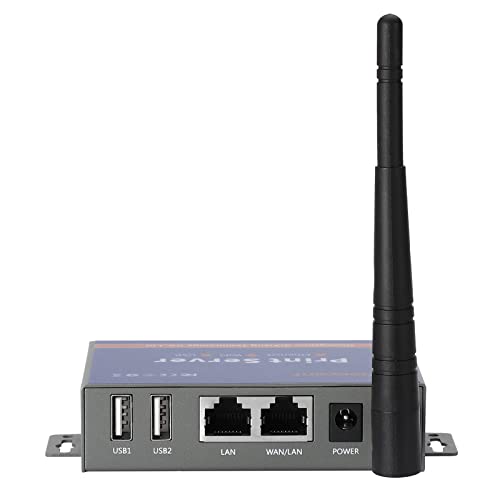
This two-port print server converts wired printers into network printers and supports both Ethernet and WiFi connections. It requires setup via video and manual, and is intended for environments that need shared printing across two USB printers.
LP-N110W Wireless Print Server

Designed for easy USB sharing, this device offers both wireless and wired networking with dual 10/100 Mbps ports. It supports USB 2.0 printers and works with Windows, Mac, and Linux (drivers required on the computer). It acts as a compact network printer hub for multiple computers.
Xiiaozet LK100W Wireless Print Server

Turn a USB printer into a network printer to enable wireless printing for multiple computers. Supports RAW and IPP protocols, broad compatibility across printer brands, and includes setup guidance with manuals and tutorials to assist users. Note that some specific printer models may require additional configuration.
Buying Guide: Key Purchase Considerations
Printer Compatibility and Protocols
Check whether the print server supports your printer model and preferred protocols (RAW, IPP). Wide compatibility helps ensure smooth printing across Windows, macOS, and Linux systems without driver conflicts on every machine.
Number of Printers and Ports
Decide if you need to share one printer or multiple devices. Dual-port units enable sharing of two printers, while single-port models suit smaller setups. Consider whether you also need wired Ethernet alongside Wi‑Fi.
Wireless Standards and Range
Most models use 2.4 GHz Wi‑Fi with 802.11b/g/n. If your office or home has a dense wireless environment, verify range and interference factors to avoid slow prints or disconnects.
Setup and Management
Look for devices with clear online guides, video tutorials, and a user-friendly web interface. Some units require more hands-on configuration and may not be plug-and-play.
Security and Network Segmentation
Consider devices that support secure wireless connections and keep print jobs within your local network. Some models offer SNMP for IT administration, which can help manage multiple devices securely.
Physical Footprint and Placement
Compact designs fit on desks or shelves, while models with mounting holes are easier to install on walls or behind printers. A smaller footprint can simplify cable management and reduce clutter.
Cost of Ownership and Support
Evaluate initial price alongside long-term maintenance, firmware updates, and customer support quality. Access to manuals, FAQs, and active communities can greatly ease setup and troubleshooting.