Discover top wireless Ethernet bridges that convert any wired device into a wireless-enabled workstation or media hub. This guide highlights five reliable options, detailing compatibility, transfer speeds, and setup considerations to help you choose the right bridge for home or small-office use.
Product Summary
| Product | Brand | Max Speed | Key Benefit | Link |
|---|---|---|---|---|
| IOGEAR GWU637 | IOGEAR | 300 Mbps (2.4 GHz) | Simple WPS setup; secure wireless access for Ethernet devices | View |
| BrosTrend AC1200 | BrosTrend | 1200 Mbps (AC1200) | Dual-band versatility; broad device compatibility | View |
| LIVINGTHING AC1200 | LIVINGTHING | Up to AC1200 | Adjustable antennas; broad wireless coverage | View |
| Vonets VAP11N-300 | Vonets | 300 Mbps | Compact mini bridge with power-flex options | View |
| Vonets VAP11G-300 | Vonets | 300 Mbps | 2.4 GHz WiFi bridge with multi-application support | View |
Below are five well-regarded options designed to bridge Ethernet devices to Wi‑Fi networks. Each section outlines setup, performance expectations, and typical use cases to help you compare features effectively.
IOGEAR GWU637 Universal Ethernet To Wi‑Fi Adapter

The IOGEAR GWU637 connects Ethernet-enabled devices to a Wi‑Fi network, turning any wired device into a wireless-capable appliance in home or office setups. It is designed to pair directly with a router, not to create a new hotspot or mesh network. Its dual-antenna 2T2R configuration supports up to 300 Mbps on the 2.4 GHz band, which is sufficient for streaming, file transfers, and light online gaming where 5 GHz networks are unavailable. The device supports common security standards, including WEP, WPA, WPA2, TKIP, and AES, helping to protect data in transit. Note that enterprise authentication and mesh network features are not supported. This model is best when you want a straightforward Ethernet-to-Wi‑Fi bridge without complex network requirements.
Key considerations: compact form factor; reliable 2.4 GHz performance; simple push-button WPS for quick setup; best for single-router environments rather than multi-router or enterprise networks. Ideal use cases include connecting a network printer, Blu-ray player, gaming console, or smart TV to a home Wi‑Fi network without built-in wireless capability.
BrosTrend AC1200 Wireless to Ethernet Bridge
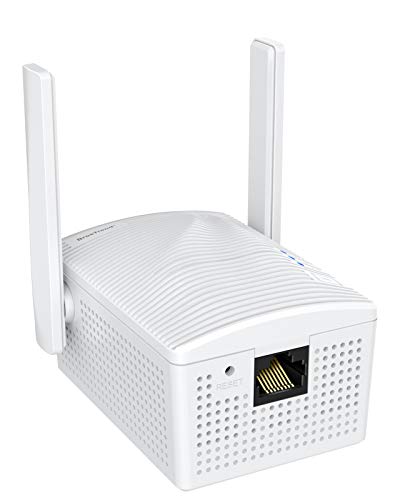
This dual-band adapter converts wired devices to Wi‑Fi via AC1200 speeds (up to 867 Mbps on 5 GHz and 300 Mbps on 2.4 GHz). It is designed for devices like smart TVs, game consoles, Blu-ray players, printers, and Raspberry Pi. It offers a driver-free setup, making it accessible for users who want a plug-and-play experience. Its dual-band capability enables better interference management, which is beneficial in homes with multiple wireless devices. While the 5 GHz performance is strong, it’s important to verify your router’s coverage and the distance to ensure optimal stability for high-bandwidth tasks.
Consider this option if you need robust streaming, gaming, or large file transfers from a wired device, and you value straightforward setup without extra software. This bridge is well-suited for entertainment centers and home offices where multiple devices share a single router.
LIVINGTHING AC1200 Dual Band Wireless Ethernet Bridge

The LIVINGTHING dual-band AC1200 bridge is designed to convert Ethernet devices into wireless clients. It supports 4 external antennas for improved range and stability, and it works with any 802.11ax/ac/a/b/g/n router. Its setup emphasizes versatility for a variety of devices, such as printers, set-top boxes, gaming consoles, and streaming devices. The product emphasizes compatibility with multiple operating systems and supports longer-range connectivity in typical homes where thick walls or multiple floors may hamper signals. This bridge can be a strong choice for users who want enhanced signal directionality and stronger overall performance in larger spaces.
Important considerations: check antenna configuration and room layout to maximize gains; ensure the bridge’s placement aligns with your router’s coverage area; remember that real-world speeds depend on your network and internet plan.
Vonets VAP11N-300 Mini WiFi Bridge

The Vonets VAP11N-300 is a compact, industrial-grade mini bridge that can operate as a wifi-to-wired bridge or wired-to-wifi repeater. It offers a maximum 300 Mbps throughput with 802.11b/g/n compatibility. Power options include DC power via multiple methods, including USB, making it flexible for various deployment scenarios where power outlets may be limited. It is suitable for devices requiring a stable wireless connection to an external network, such as IP cameras, printers, embedded systems, or PLCs. Its small form factor makes it easier to place in tight spaces.
Consider this model when you need a tiny footprint with flexible power options and a straightforward bridge function. It’s useful for monitoring systems or compact network setups where space is a premium.
Vonets VAP11G-300 WiFi Bridge

The Vonets VAP11G-300 provides a 2.4 GHz bridge with up to 300 Mbps, making it suitable for converting wired devices to wireless connections or enabling wireless devices to connect to a wired network. It supports multiple uses, including acting as a Wi-Fi repeater, a bridge, or an AP hotspot, which makes it versatile for home and light commercial setups. The device includes two 1.5 dBi antennas and supports various applications such as IP cameras, printers, and medical devices. Its compact design and flexible placement options help distribute network coverage without requiring major changes to your existing network topology.
Ideal use cases include networked printers, IP cameras, or any device that benefits from a straightforward Ethernet-to-Wi‑Fi bridge in smaller spaces or temporary deployments.
Buying Guide: What to Consider When Choosing a Wireless Ethernet Bridge
Purpose and placement: Determine whether you need a bridge for a single device or multiple devices. Consider where you will place the bridge relative to your router to maximize signal strength and minimize interference.
Speed and bands: If you routinely stream 4K content or game online, prioritize dual-band (2.4 GHz and 5 GHz) bridges with higher combined throughput. For basic printers or legacy devices, a 2.4 GHz-only bridge may suffice.
Security and encryption: Look for devices offering WPA2 or WPA3 support, and consider models with WPS if you want quick setup. Avoid devices with outdated encryption in networks handling sensitive data.
Compatibility and setup: Check compatibility with your operating system and whether the bridge is driver-free or requires software. For a simple home setup, a plug-and-play option is often preferable.
Power options and size: Some bridges are USB-powered or offer alternate power methods. If you plan to place the bridge behind a TV or in a tight space, size and mounting options matter.
Reliability and range: Antenna configuration can influence range and stability. Bridges with external antennas or multiple antennas typically offer more stable connections across larger rooms or multi-story homes.
Use-case alignment: For streaming media players, gaming consoles, or network printers, ensure the device supports constant bandwidth and has stable latency characteristics appropriate for your tasks.