Discover top wireless mouse-powered clickers that blend presentation control with built-in mouse functions. This guide covers five reliable options, highlighting range, battery life, compatibility, and special features to help you pick a device that keeps your slide deck flowing smoothly in any room.
The following table briefly summarizes the chosen products so you can compare them at a glance. Each entry links to the official Amazon product page for full specifications and user reviews.
| Product | Brand | Key Highlights |
|---|---|---|
| Logitech Wireless Presenter R400 | Logitech | Laser pointer, easy slideshow control, long-range wireless |
| DINOSTRIKE Wireless Presenter Remote | DINOSTRIKE | Air mouse, long range, rechargeable, versatile software support |
| DinoFire Wireless Presentation Remote White | DinoFire | Air mouse, USB-C, long range, multiple functions |
| DINOSTRIKE 2 in 1 Type C & USB Presenter | DINOSTRIKE | 2-in-1 receiver, plug and play, cross-compatibility |
| ELISWEEN Presentation Clicker | ELISWEEN | USB-C/USB dual design, bright display, multiple controls |
DINOSTRIKE Wireless Presenter Remote

This DINOSTRIKE device blends a traditional presenter with an air mouse, expanding control beyond slides. It supports forward and backward page navigation, volume adjustments, hyperlink entry, and window switching, making it suitable for PowerPoint, Keynote, PDFs, and more. The 82-foot air-mouse range and up to 164 feet wireless range give you room-to-move while staying connected. A built-in 300 mAh battery charges in about three hours for weeks of use. The device includes a sleep mode to conserve power when idle.
Logitech Wireless Presenter R400
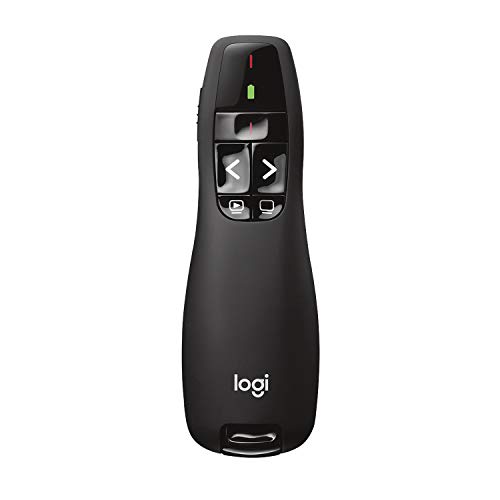
The Logitech R400 emphasizes a straightforward presentation experience with a built-in red laser pointer and intuitive touch keys for slide navigation. It operates with AAA batteries and offers a reliable wireless connection up to about 50 feet, giving you freedom to move around a medium-sized room. The device is praised for its simple setup and clear pointer visibility against most slide backgrounds, making it a practical choice for frequent presenters who value ease of use.
DinoFire Presentation Clicker With Air Mouse

This DinoFire model combines a presentation clicker with air-mouse functionality, enabling the cursor to operate like a handheld computer mouse. It includes shortcuts for label/eraser, volume control, and hyperlink opening, plus full/black screen toggling and page navigation. The 2.4 GHz wireless connection spans roughly 50–165 feet depending on conditions, and a built-in 300 mAh battery supports weeks of use per charge. A dedicated mouse switch helps prevent unwanted cursor movement.
DINOSTRIKE 2 in 1 Type C and USB Presenter

This upgraded DINOSTRIKE model provides both USB-A and USB-C receivers in one package, enabling seamless plug-and-play cross-compatibility across Mac, Windows, and other devices. It functions as a full presenter remote with air-mouse capabilities and intuitive touch keys for page navigation, volume control, and website opening. The ergonomic design focuses on one-handed use, and the two-port compatibility streamlines setup for mixed device environments.
ELISWEEN Presentation Clicker

The ELISWEEN device offers a USB Type-C and USB dual design, allowing quick switching between Mac, laptop, and PC without software installation. It provides a magnetized USB dongle holder, along with essential controls like volume, page up/down, full/black screen, and Windows switching. A bright red indicator light improves visibility against slides, supporting clear emphasis on key points during presentations.
Buying Guide: Key Considerations For Selecting A Wireless Presenter With Mouse
- Compatibility: Check operating systems and software compatibility (Windows, macOS, Linux, Keynote, Prezi, Google Slides). If you switch devices often, a model with USB-C and USB-A receivers offers the broadest compatibility.
- Input Functions: Prioritize a device that combines a reliable presenter with air/mouse features if you want to navigate slides and interact with the computer from a distance. Look for page forward/backward, volume control, hyperlink support, and full/black screen toggling.
- Range: For larger rooms or classrooms, aim for a model with both a long wireless range and an identifiable on-screen pointer (laser or bright LED). Typical ranges span from 30 to 165 feet depending on technology and environment.
- Battery Life and Charging: Rechargeable batteries are convenient, but check if batteries are included and expected standby times. Some models sleep to conserve power automatically, extending usable life between charges.
- Ease of Use: Ergonomic design, intuitive button layout, and a clearly visible pointer color (red or green) help maintain focus during delivery. A one-button-per-function design can reduce confusion during complex presentations.
- Portability: Pocket-sized form factors and a robust case help with travel. If you frequently present on different devices, consider a dual-receiver option (USB-A and USB-C).
- Durability And Build Quality: Look for well-constructed housings and reliable trigger mechanisms. Rechargeable devices with durable shells tend to endure more use in busy environments.
- Software Independence: Most devices are plug-and-play, but some benefit from optional software support for extended features. Decide if you need software integration or strictly hardware-based controls.
When selecting a wireless presenter with an integrated mouse, evaluate how you will use it most—single-room lectures, conference rooms, or flexible classroom settings. The right device should offer seamless navigation, clear on-screen emphasis, and dependable connectivity without distracting delays.