Choosing a wireless mouse that performs well on diverse surfaces can improve productivity, travel convenience, and comfort. This guide highlights five versatile options that excel in multi-surface tracking, battery efficiency, and seamless connectivity. Each product is evaluated for surface compatibility, battery life, and ease of use across Windows, Mac, and tablets.
Summary of Selected Products
| Product | Key Surface Capability | Connection Type | Battery/Power |
|---|---|---|---|
| Logitech MX Anywhere 2S | Flawless tracking across glass and other surfaces | Bluetooth | Rechargeable, up to 3 computers with Flow |
| Logitech MX Anywhere 3S | High-precision on multiple surfaces with 8K DPI | USB-C / Bluetooth | Rechargeable, Quiet Clicks |
| Logitech M196 Bluetooth Wireless Mouse | Precise optical tracking on a variety of surfaces | Bluetooth | 12-month battery |
| TECKNET Wireless Mouse | Stable 2.4G connection for smooth tracking on most surfaces | USB A / Bluetooth 3.0/5.0 | Rechargeable with 6 DPI levels |
| HP X3000 G3 Wireless Mouse | LED multi-surface performance for lag-free movement | USB nano receiver / 2.4 GHz | 15-month battery life |
Logitech MX Anywhere 2S Bluetooth Edition

The Logitech MX Anywhere 2S is designed for multi-device use, enabling control of up to three computers via Bluetooth with Logitech Flow to copy-paste across devices. Its Darkfield high-precision tracking supports smooth cursor control on virtually any surface, including glass, with up to 4,000 DPI. The battery is rechargeable, and the device prioritizes portability for travel between workspaces.
Logitech MX Anywhere 3S Compact Wireless Mouse

The MX Anywhere 3S builds on its predecessor with an 8K DPI sensor for precise movement on diverse surfaces, including glass. It offers quiet clicks and USB-C charging for quick power top-ups. The device supports Bluetooth and USB-C connectivity, enabling flexible setup across multiple devices and platforms.
Logitech M185 Wireless Mouse

The M185 offers a compact, ambidextrous shape with a 1-year battery life and a universal 2.4 GHz connection. While small in size, it provides reliable optical tracking suitable for travel, with broad Windows and Mac compatibility and a value-focused design for everyday tasks on varied surfaces.
TECKNET Wireless Mouse (BT5.0/3.0 & 2.4G)

TECKNET offers dual connection options (Bluetooth 3.0/5.0 and 2.4 GHz USB-A) with six adjustable DPI levels up to 4800. The rechargeable design promises several months of use per full charge, depending on daily usage. It is positioned as a versatile option for mixed environments, from laptops to desktops to tablets.
HP X3000 G3 Wireless Mouse
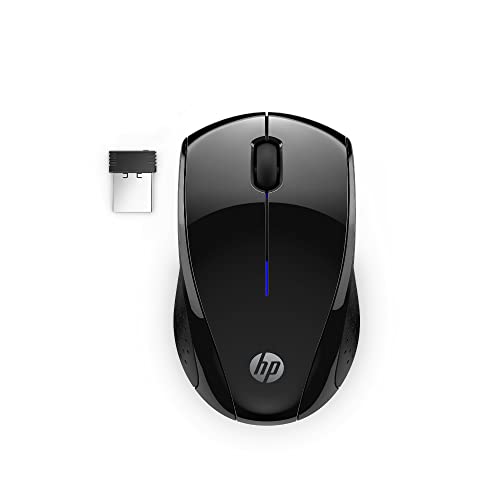
The HP X3000 G3 emphasizes comfort and multi-surface performance with LED lighting and a 1600 DPI optical sensor. It uses a 2.4 GHz USB-A connectivity option and stores the nano receiver inside the mouse for portability. The design supports ambidextrous use and long battery life, suitable for frequent travelers and mixed work setups.
Buying Guide: Key Purchase Considerations And Comparisons
When selecting a wireless mouse for use on various surfaces, consider the following factors:
- Surface compatibility: Look for mice with high-precision sensors that claim good performance on glass or glossy surfaces, such as Darkfield or 4000–8000 DPI sensors.
- Connection options: Bluetooth, USB-C, and USB-A receivers offer flexibility. If you frequently switch devices, models with Flow or multi-device pairing provide seamless control across computers.
- Battery life and charging: Rechargeable models reduce waste and downtime. Check estimated battery life under typical use and whether USB-C charging is available for quick top-ups.
- Ergonomics and weight: Ambidextrous shapes suit both hands, but consider grip style and weight for long work sessions and travel.
- Buttons and customization: Programmable buttons can speed up common tasks. Quiet-click models are preferable in shared spaces to minimize distractions.
- Size and portability: Compact mice fit in bags easily; larger hands may require a broader contour for comfortable use over extended periods.
- Compatibility: Ensure the mouse supports your operating systems (Windows, macOS, Linux) and works with your laptops or tablets.
For travelers or mixed-work environments, prioritize models with multi-surface tracking, rechargeable batteries, and flexible connectivity. For power users working across multiple devices, features like Flow, high DPI settings, and switchable device profiles can boost productivity. Always verify the latest compatibility notes from the manufacturer and confirm that the model supports your preferred surface types before purchasing.