Discover reliable, clutter-free ways to equip your computer desk with a wireless keyboard and mouse combo. The selections below cover full-size layouts, quiet typing, adjustable DPI, backlit options, and long battery life. Each product pairs a dependable 2.4 GHz wireless connection with ergonomic designs suitable for daily work, gaming, or remote learning. Read on to compare top picks and find the best wireless keyboard and mouse set for your computer setup.
style=”display:none;”>Summary Table
| Product | Brand | Key Benefit |
|---|---|---|
| Logitech MK270 Wireless Keyboard and Mouse Combo (Black) | Logitech | Plug-and-play reliability with long battery life |
| Wireless Keyboard and Mouse Combo (Seenda) | seenda | Full-size layout with stable 2.4G connection |
| MARVO Wireless Keyboard and Mouse Combo | MARVO | Ergonomic design with silent operation |
| EDJO Wireless Keyboard and Mouse Combo | EDJO | Ultra-slim design with lag-free performance |
| SABLUTE Wireless Keyboard And Mouse Combo | SABLUTE | Rechargeable with backlit keyboard and RGB mouse |
Logitech MK270 Wireless Keyboard And Mouse Combo (Black)

The Logitech MK270 pair uses a USB receiver for a reliable wireless connection up to about 33 feet. The keyboard features a full-size layout with an arrow key cluster and numeric keypad, plus 8 multimedia keys for quick controls. Battery life is notable, offering up to 36 months for the keyboard and 12 months for the mouse, with on/off switches to reduce maintenance. The design emphasizes comfortable typing with low-profile keys and a standard layout that suits most daily tasks, making it a strong all-around choice for Windows users.
Wireless Keyboard And Mouse Combo From Seenda
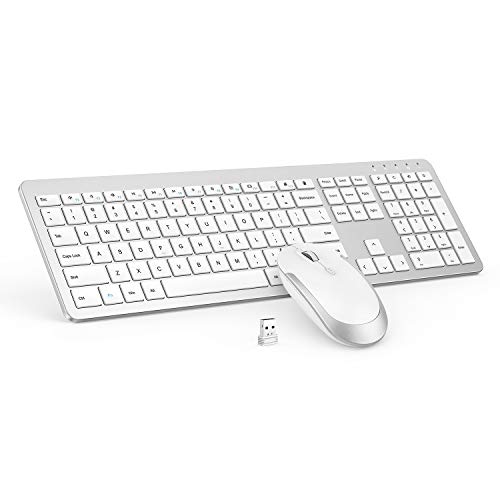
This full-size Seenda kit combines a spacious keyboard with a responsive, quiet mouse. Both devices share a single USB receiver for stable 2.4 GHz connectivity, reducing lag and drop-outs. The set emphasizes a sleek, two-tone finish and generally quieter operation compared with traditional mechanical keyboards. The included DPI switch on the mouse offers flexible sensitivity settings, helping with tasks that range from typing to light gaming or precision work.
MARVO Wireless Keyboard And Mouse Combo
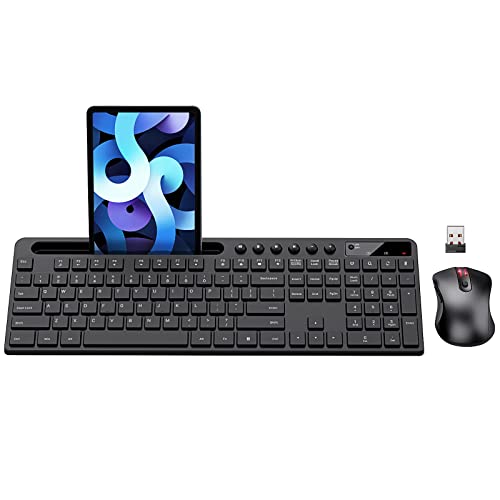
The MARVO package features a 2.4G ergonomic keyboard with a 9.84-inch phone/tablet holder and a silent, six-button mouse with adjustable DPI. The pair focuses on comfort and practicality, offering an easy setup with a single USB receiver and a layout designed to reduce fatigue during long work sessions. If you want a budget-friendly option with ergonomic touches and extra device compatibility, this is a compelling candidate.
EDJO Wireless Keyboard And Mouse Combo
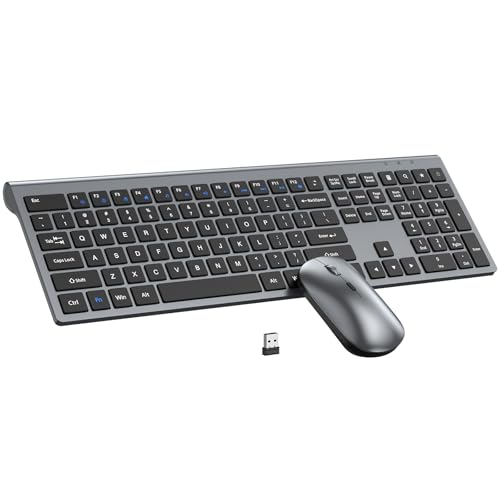
EDJO offers a slim, space-saving wireless contract with a shared USB receiver. The keyboard uses scissor-switch keys for quieter, quicker typing, and the design emphasizes a slim profile that helps reduce desktop clutter. The set positions itself as suitable for offices or home use where desk real estate matters, while remaining straightforward to set up and use across Windows and other platforms that support USB receivers.
SABLUTE Wireless Keyboard And Mouse Combo

The SABLUTE set stands out with backlit keys and a rechargeable design. The keyboard features a 7-color switchable backlight with adjustable brightness, while the RGB mouse cycles through colors. It includes Windows and Mac layouts, accessible via a Fn-based switch. USB-C charging supports extended battery life, and the auto-sleep function helps conserve power when idle. This kit is ideal for users who work in dim environments or want a visually striking desk setup without frequent battery replacements.
Buying Guide
- Wireless range and reliability: Most 2.4 GHz sets provide ample range for typical desk setups. Look for USB receivers with plug-and-play simplicity and direct compatibility with your operating system.
- Battery life and power management: Long battery life reduces maintenance. On/off switches and sleep modes help extend runtime, especially for keyboards and mice used throughout the day.
- Ergonomics and typing feel: Low-profile or scissor-switch keys can reduce fatigue. Consider a layout with a full-sized keyboard (including a number pad) if you frequently input numbers or use many function keys.
- DPI and cursor control: Adjustable DPI on the mouse provides flexibility between precise editing and fast navigation, especially beneficial for mixed work tasks and some light gaming.
- Backlighting and visibility: Backlit keyboards are helpful in low-light workspaces. RGB options are primarily cosmetic but can enhance readability and personalize your setup.
- Compatibility and platform support: Ensure the keyboard and mouse support your OS (Windows, macOS, or both). Some sets offer Mac-specific layouts or Fn-key mappings for quick switching.
- Desk aesthetics and space: Slim designs save space and reduce clutter. If you share a workspace, dual-powered devices with clean, quiet operation improve collaboration without distractions.
- Repairability and easy setup: Plug-and-play hardware reduces setup time. Consider kits with easily replaceable batteries or rechargeable components for long-term savings.
For most users, a keyboard and mouse combo that prioritizes reliability, quiet operation, and long battery life provides the best balance between productivity and convenience. If you prefer a feature-rich ambience, backlit keyboards and RGB mice add personality without compromising performance. Always verify that the selected set meets the operating environment requirements and integrates smoothly with your existing devices.