Finding a compact, reliable wireless keypad with a touchpad can simplify navigating your smart TV, Android TV box, or streaming device. The following five mini keyboards offer 2.4 GHz or Bluetooth connectivity, built‑in touchpads, and backlighting to improve usability in dark rooms. Each option is evaluated for compatibility, battery life, and usability to help you choose the right companion for your smart TV setup.
| Product | Connectivity | Backlight | Touchpad | Notes |
|---|---|---|---|---|
| (Backlit Version) REIIE H9+ Mini Keyboard | 2.4 GHz | Yes | Yes | Works with smart TV boxes; Not Bluetooth. |
| Mini Keyboard With Touchpad (Burhoo) | 2.4G + Bluetooth | Yes | Yes | Dual-mode; USB pairing fallback available. |
| Fosmon Mini Bluetooth Keyboard | Bluetooth | No | Yes | Broad device compatibility; ~33 ft range. |
| BL Mini Wireless Keyboard Remote Control | 2.4 GHz | Yes | Yes | Backlit with multiple colors. |
| PONYBRO Mini Wireless Keyboard | 2.4 GHz | No | Yes | 3‑in‑1 multifunction; rainbow backlight. |
Note: Each product supports plug‑and‑play usage, typically via USB dongle or Bluetooth pairing. Battery charging and standby behavior vary by model; some include built‑in rechargeable batteries and auto-sleep features to extend usage between charges.
(Backlit Version) REIIE H9+ Mini Keyboard

The REIIE H9+ combines a compact 73‑key QWERTY layout with a touchpad and white soft backlight, designed for dark viewing environments. It uses a 2.4G wireless connection and includes a USB receiver, requiring a host device with a free USB port. The keyboard emphasizes plug‑and‑play setup and stable pairing, with emphasis on quick recovery when the battery level is low. Note that Bluetooth is not supported on this model, so compatibility depends on 2.4 GHz USB dongle availability on the TV box or media device.
Mini Keyboard With Touchpad (Burhoo)

The Burhoo mini keyboard offers dual connectivity: 2.4G wireless and Bluetooth. It stores the USB dongle in the back cover for easy transport. It supports automatic pairing by bringing the USB receiver close and pressing Fn+RF if needed. The touchpad flips 90 degrees for horizontal or vertical use and includes left/right mouse buttons for easier navigation. A built‑in rechargeable battery powers the unit, with Type‑C charging and wake/sleep functionality to extend usage between charges.
Fosmon Mini Bluetooth Keyboard

The Fosmon model is a compact QWERTY keyboard with a touchpad and Bluetooth compatibility across a wide range of devices, including Apple TV, Amazon Fire Stick, PS4/PS5, HTPC, Android TV, and more. Its Bluetooth range is approximately 33 feet, with an included USB dongle for non‑Bluetooth devices. The keyboard supports a rechargeable battery and USB charging, offering a balance of modern device compatibility and wireless convenience for media control and typing tasks.
BL Mini Wireless Keyboard Remote Control
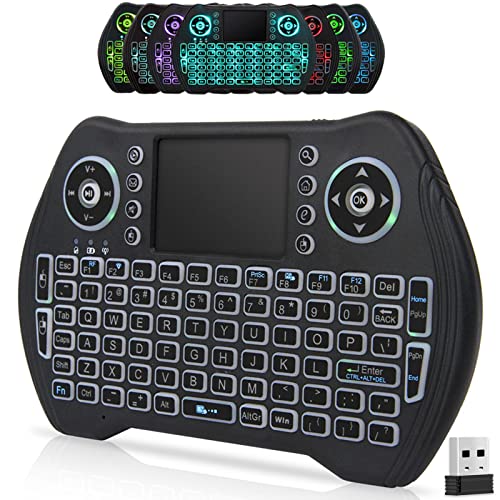
The BL mini keyboard emphasizes compact size with built‑in touchpad support and seven‑color backlighting. This model uses a 2.4 GHz wireless USB dongle for plug‑and‑play connection, along with a rechargeable Li‑ion battery and auto‑sleep functionality to extend battery life. The backlit keys improve usability in low‑light home theater setups, especially for navigating apps or typing usernames on smart TVs or streaming devices.
PONYBRO Mini Wireless Keyboard
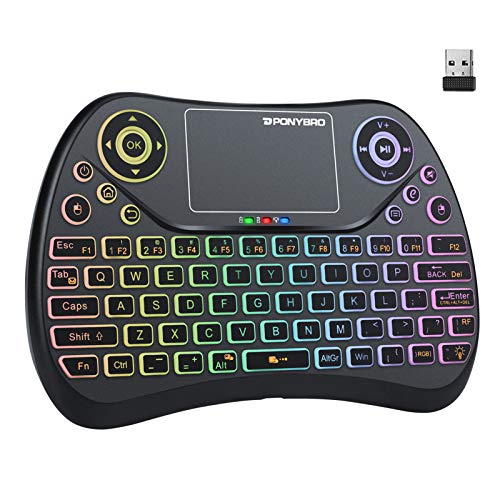
The PONYBRO mini keyboard integrates a 2.4 GHz connection with a built‑in touchpad and full QWERTY layout. Its 3‑in‑1 design supports handheld use as a keyboard remote for smart TVs or TV boxes, and acts as a chatpad/gamepad for compatible consoles. The rainbow LED backlight adds visibility in dim rooms. Compatibility covers Raspberry Pi, Android TV Box, HTPC, PC, Xbox 360, PS3, and more. It is designed for portability and convenience in living room environments.
Buying Guide
- Connectivity: Decide between 2.4 GHz wireless dongle and Bluetooth. 2.4 GHz generally provides broad compatibility with older TV boxes, while Bluetooth suits newer devices with built‑in Bluetooth support.
- Keyboard and touchpad layout: Ensure the keyboard offers a comfortable QWERTY layout and a responsive touchpad. Some models switch orientation or offer multi‑touch gestures for easier cursor control.
- Backlighting: If you frequently use your TV in dark rooms, a backlit keyboard improves visibility of keys and reduces typing errors.
- Power and charging: Look for built‑in rechargeable batteries with red/green indicators or auto‑sleep features. Note charging ports (USB‑C or micro‑USB) and expected standby times.
- Platform compatibility: Verify device compatibility—Apple TV, Fire Stick, Android TV Box, Raspberry Pi, PC, and laptops often have differing pairing requirements. See product manual for pairing steps and compatibility notes.
- Portability and build: For living room setups, choose a compact, lightweight unit that fits comfortably in hand or on a coffee table. Durable builds reduce wear from frequent use.
- Price vs. features: Weigh backlights, dual connectivity, and touchpad gestures against the price to find the best value for your setup.
- Pairing reliability: Some models require manual pairing if the dongle is distant from the device. Keeping the dongle near the TV box helps maintain a stable connection.
All five options are designed to streamline navigation and typing for smart TVs and streaming devices. When selecting, prioritize the connectivity method that matches your device’s inputs, ensure comfortable typing, and confirm battery life and charging compatibility with your home theater configuration.