Wireless keyboard trackball combos combine typing with precise cursor control in a compact, cable-free package. Ideal for living rooms, HTPC setups, or compact desks, these devices reduce desk clutter while offering ergonomic benefits and flexible connectivity. In this guide, five top options are reviewed for versatility, build quality, and compatibility across Windows, macOS, Android, and more. Read on to compare features, sizes, and connectivity to find the best fit for your setup and usage.
| Product | Brand | Key Features |
|---|---|---|
| Fonicer Multimedia 2.4Ghz Wireless Mini Keyboard | Fonicer | QWERTY keyboard, built-in trackball, media controls, plug-n-play |
| JOMAA 78 Keys Dual-Mode Keyboard | JOMAA | 2.4G + Bluetooth 5.0, 3-device pairing, 19mm trackball |
| Mini Ergonomic Keyboard Trackball Air Mouse | JOMAA | 2.4G USB, multimedia keys, integrated trackball, compact layout |
| Banalove 2.4GHz Wireless Mini Keyboard | Goeasily Int’l | Portable, Windows/Mac/Android/PS4 compatible, ergonomic handle |
| Adesso WKB-3100UB Wireless Mini Trackball Keyboard | Adesso | 87-key layout, 800 DPI trackball, 30-foot range |
Fonicer Multimedia Trackball Keyboard
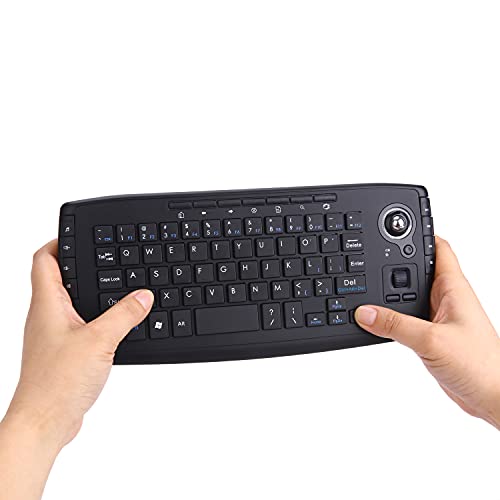
The Fonicer model combines a full QWERTY keyboard with a sensitive trackball and dedicated media controls. It includes F11–F12 keys and additional mouse buttons, making it suitable for sofa browsing, streaming, and light gaming. The device is described as plug-and-play, requiring only the dongle to establish connection. Its compact form is designed for devices like PCs, Macs, Android TV boxes, and HTPC setups, offering convenience when a separate mouse would be impractical.
JOMAA 78 Keys Dual-Mode Keyboard

This model offers dual-mode wireless connectivity—2.4 GHz and Bluetooth 5.0—allowing pairing with up to three devices simultaneously. Its built-in 19mm trackball provides precise cursor control, reducing desk clutter by replacing a separate mouse. The compact 78-key layout prioritizes portability, and the device runs on two AA batteries, balancing performance with energy efficiency for mobile or travel use.
Mini Ergonomic Keyboard Trackball Air Mouse

This compact 2.4G wireless keyboard integrates a touch-friendly trackball and a scroll wheel, combining keyboard, trackball, and air-mouse capabilities. With a USB transceiver stored in the device, it supports plug-and-play use for PCs, TVs, HTPCs, and similar equipment. It features multiple multimedia and shortcut keys for convenient control, aiming to streamline navigation on media centers and desktops alike.
Banalove 2.4GHz Wireless Mini Keyboard
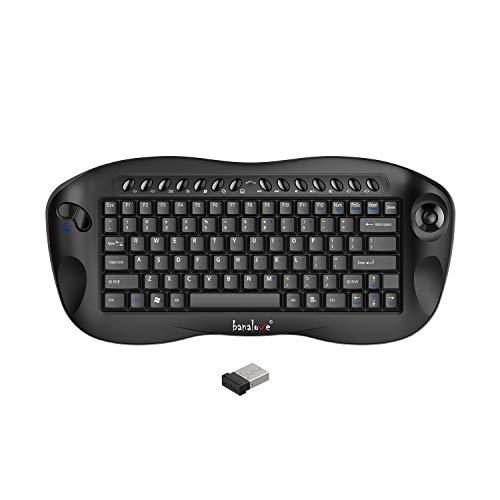
The Banalove unit emphasizes a portable ergonomic design and cross-platform compatibility, including Windows, Mac, Android, and PS4. Its handheld-friendly form factor is intended to prevent accidental key presses during use, with a focus on comfortable keycaps and a compact build for living room and travel scenarios.
Adesso WKB-3100UB Wireless Mini Trackball Keyboard

Adesso’s WKB-3100UB features an 87-key compact layout with an integrated 800 DPI optical trackball. It uses 2.4 GHz RF wireless technology and offers up to 30 feet of range, making it suitable for smaller workspaces, kiosks, or POS stations. The combination of a compact keyboard and built-in trackball is designed to save desk space while maintaining full navigational control.
Buying Guide: Key Purchase Considerations
- Connectivity options: Look for dual-mode (2.4G and Bluetooth) if you need to switch between multiple devices or platforms. Consider the ease of switching between paired devices.
- Trackball size and ergonomics: A 19mm or larger trackball typically offers better precision and comfort for long sessions. Check the button layout to ensure it aligns with your preferred grip style.
- Keyboard layout and size: Compact keyboards save space but can sacrifice certain keys. Verify whether the layout fits your typing habits, especially if you frequently use function keys.
- Power and battery life: Rechargeable versus replaceable batteries impact long-term costs and convenience. Review the stated battery life under typical usage.
- Compatibility and drivers: Confirm compatibility with your operating systems (Windows, macOS, Android, iOS). Some devices are plug-and-play, while others may require software.
- Portability and use case: For living rooms or travel, prioritize models with ergonomic grips and a form factor that feels comfortable in hands while lounging.
- Build quality and durability: Check for sturdy housing and reliable button switches, especially if you will transport the device often.
In choosing the best wireless keyboard trackball, weigh how you will primarily use the device—media control from the sofa, desk-based productivity, or travel-friendly setups. The five options above cover a spectrum from compact, portable devices to feature-rich, multi-device keyboards. Each option provides an integrated trackball to minimize desk clutter while delivering precise navigation and convenient typing capabilities.