Tablet users increasingly need reliable, high-capacity wireless storage that travels with them. The following selection focuses on wireless hard drives and NAS devices that pair well with tablets, offering built-in Wi‑Fi, auto-backup, remote access, and cross‑device sharing. Each option supports multi‑device access, simple mobile apps, and secure data transfer, helping you back up photos, videos, documents, and more from tablets and other devices. Explore features, connectivity, and security considerations to choose a portable storage companion that fits your mobile lifestyle.
Summary of chosen products:
| Product | Brand | Storage | Key Benefit |
|---|---|---|---|
| 2TB Portable NAS External Wireless Hard Drive | SSK | 2TB | High-speed wireless with remote access and private/public areas |
| 1TB Personal Cloud External Wireless Hard Drive | SSK | 1TB | Travel-friendly portable NAS with SD card support |
| 4TB Personal Cloud Network Attached Storage | SSK | 4TB | Network‑level NAS with wired Ethernet and dual modes |
| Portable External SSD 1TB (Wi‑Fi) | SSK | 1TB | High‑speed SSD with Wi‑Fi hotspot for quick backups |
| NewQ Filehub AC750 Travel Router | NEWQ | See features | Portable router that turns any drive into wireless storage |
SSK 2TB Portable NAS External Wireless Hard Drive
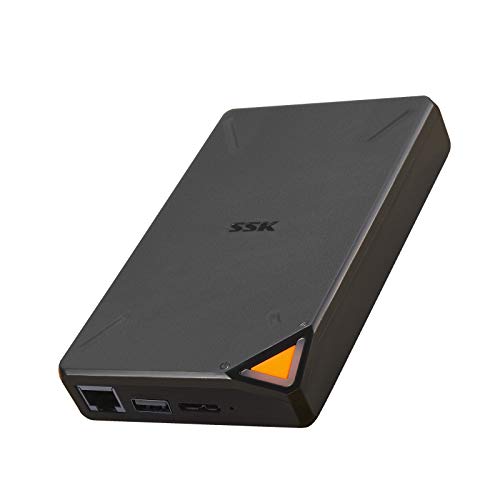
This 2TB HDD-based NAS offers up to 300Mbps wireless transmission and a built‑in Wi‑Fi hotspot. The device enables remote access from PCs, tablets, or smartphones and supports point‑to‑point confidential transmission to safeguard data. A smart app (iOS & Android) handles one‑click backup, smart upload/download, and remote access. Sharing is multi‑user, and the system works with Samba and DLNA protocols so TVs, laptops, and mobile devices can access SSKCloud data. The drive can be divided into Private and Public Areas for enhanced privacy and security, making it suitable for families or small teams. It’s compact enough to carry in a pocket for on‑the‑go access.
Features to note include: remote management anywhere, easy file sharing across devices, and flexible data organization. While 2TB provides ample capacity for photos and documents, users should consider bandwidth needs if streaming high‑resolution video over Wi‑Fi. The device’s portability and user‑friendly app make it a strong option for tablet users who want a personal cloud without a monthly subscription.
SSK 1TB Personal Cloud External Wireless Hard Drive
This 1TB wireless NAS is designed for travel and daily mobility. It provides wireless transmission speeds up to 300Mbps and supports remote access, letting you manage data from a phone, tablet, or PC. A P2P confidential transmission feature adds a layer of data security, while the compact footprint keeps it pocketable. The device integrates with a Smart App for IOS and Android to enable easy backup, uploads, and sharing with multiple users simultaneously. Samba and DLNA support helps connect the NAS with smart TVs, laptops, and other smart devices on the LAN, and the drive can separate data into Private and Public Areas to protect sensitive information.
This model emphasizes travel readiness and easy access, but potential buyers should weigh the tradeoffs between 1TB capacity and the convenience of a larger drive if their media library is extensive. The included features make it well suited for tablet users who want a straightforward, portable cloud solution without a fixed home NAS setup.
SSK 4TB Personal Cloud NAS With Ethernet

This 4TB NAS uses wired Ethernet as its primary connection, offering a higher, steadier network throughput for NAS mode and fast transfers through USB 3.0 in DAS mode. It supports remote access via a network connection and is compatible with Samba and DLNA protocols for broad device interoperability. The device operates in two modes—NAS and DAS—providing flexible storage options for home offices and families. LED indicators differentiate modes and statuses for quick troubleshooting. Centralized data access across iOS, Android, Windows, and Mac devices is advertised, with guidance about browser compatibility during downloads.
For tablet users, the wired Ethernet backplane provides reliable performance in a fixed location, while the device’s dual mode catering to both network and direct access broadens its use cases. However, the absence of built‑in Wi‑Fi means it relies on a separate router or existing network during wireless use, which is a consideration for truly portable setups.
SSK Portable External SSD 1TB With Wi‑Fi

This 1TB portable SSD supports Wi‑Fi tethering, enabling fast wireless backups and remote access from tablets and other devices. The SSD’s capacity and high transfer rates (up to 300Mbps over wireless) make it a practical solution for tablet users who need speed and reliability in a compact form factor. The device emphasizes portability, one‑click backups, and multi‑device sharing within a home network. The SSK Cloud ecosystem allows private and shared space partitioning to keep sensitive data secure, while still offering convenient access on mobile devices.
SSD technology provides durability and performance advantages, though users should verify compatibility with their tablets and operating systems. This option is well suited for users prioritizing speed and travel convenience without sacrificing the ability to back up media from a tablet on the go.
SSK 1TB Portable External SSD With Wi‑Fi Hotspot
This 1TB portable SSD combines a compact size with a built‑in Wi‑Fi hotspot, enabling wireless access to the drive’s contents from tablets and other devices. The drive supports remote access, smart backups, and multi‑user sharing, making it a flexible option for tablet users who want fast data transfers and easy cloud‑style access without network dependence. The device supports Samba and DLNA, allowing seamless integration with smart TVs and other devices in the LAN. Security is addressed through private/public area segmentation and P2P transfer, providing a balanced approach to convenience and protection.
NewQ Filehub AC750 Travel Router
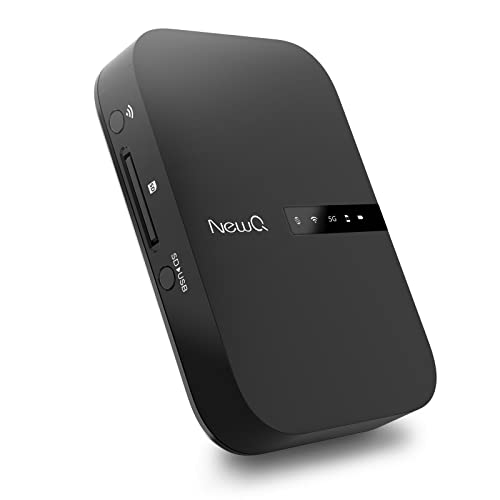
The NewQ Filehub AC750 is a portable travel router that doubles as a wireless storage extender. It operates in AP mode, Router mode, and Bridge mode. Importantly, it supports connecting external drives (hard drives, USB flash, or SD cards) to enable wireless access and file transfer. The Filehub approach allows you to access and transfer files to the attached storage without requiring dedicated apps—browsers can be used for basic operations, though an accompanying app is available for smoother performance. It’s ideal for travelers who want to convert any drive into wireless storage and extend wireless coverage at the same time.
For tablet users, this device offers flexibility when you travel, enabling you to add a portable storage solution to almost any networked environment. The lack of built‑in high‑capacity storage means you’ll need to pair it with your own drive, but the convenience of routing, sharing, and direct file access is attractive for on‑the‑go workflows. Consider your comfort with browser‑based management versus app-based control when evaluating this option.
Buying Guide: How To Choose A Wireless Hard Drive For Tablets
Key purchase considerations help you pick a device that matches how you use a tablet for storage, backup, and sharing:
- Storage capacity and drive type: SSDs offer faster speeds and better durability, while HDDs provide higher capacity at a lower cost. For frequent video backups on the go, a larger HDD may reduce the need to move drives frequently.
- Connectivity and range: Built‑in Wi‑Fi hotspots enable mobile access, while wired Ethernet provides stable performance at home or in an office. Consider a model with a robust wireless standard for reliable tablet connectivity.
- Remote access and security: P2P transmission, private/public space separation, and encryption help protect data accessed from tablets over public networks. Ensure the device supports secure remote access without exposing your information.
- Multi‑device sharing: If multiple family members or colleagues will access the drive, look for devices with multi‑user support and compatible streaming protocols (Samba, DLNA) for smart TVs and laptops.
- App ecosystem and ease of use: A user‑friendly Smart App helps manage backups, transfers, and access from iOS and Android devices. Browser‑based management can be convenient but may lack some features of an app.
- Portability and durability: Pocketable dimensions and rugged construction increase practicality for travel. Consider weight, heat management, and build quality for frequent mobility.
- Compatibility with tablets: Verify OS support (iPadOS, Android) and whether the device supports app-assisted backup, direct streaming, or file browsing from tablets.
In summary, the best choice depends on how much you value speed (SSD vs HDD), portability, and whether you want a built‑in hotspot or reliance on an existing network. For tablet users who need fast backups and easy sharing across devices, models with hotpots and strong app support are especially compelling. If you require the simplest setup for travel, a Filehub‑style router that can turn any drive into wireless storage may offer the most flexibility. Always confirm compatibility with your tablet model and operating system before purchasing.