Discover the best wireless chips and adapters to upgrade a desktop PC. This guide compares dual-band and Wi‑Fi 6 options, highlighting speed, range, and ease of use. Whether you’re streaming, gaming, or working from home, these adapters help you achieve robust, stable connections with minimal latency.
| Product | Brand | Type | Key Benefit |
|---|---|---|---|
| Flimjibg USB WiFi Adapter 600M | Flimjibg | USB WiFi Adapter | Dual‑band, AP mode, driverless setup |
| TP-Link Archer TX55E | TP-Link | PCIe WiFi Card (AX3000) | Wi‑Fi 6, MU‑MIMO, ultra‑low latency |
| TP-Link Archer T2U Plus | TP-Link | USB WiFi Adapter | Long range, dual‑band, easy setup |
| Nineplus AC1300 USB Adapter | Nineplus | USB WiFi Adapter | 1300 Mbps, dual high‑gain antennas |
| TP-Link Archer TX20U Plus | TP-Link | USB WiFi Adapter | AX1800, dual‑band, WPA3 |
Note: This table highlights representative features from the products listed below to help you compare at a glance.
Flimjibg USB WiFi Adapter 600M Dual Band

The Flimjibg USB WiFi Adapter delivers dual‑band wireless capabilities in a compact USB form factor, making it a straightforward upgrade for desktops and laptops. With 5.8 GHz up to 433 Mbps and 2.4 GHz up to 150 Mbps, this adapter supports smooth HD video, online gaming, and reliable video calls. Its AP mode helps you share a single internet connection across multiple devices, while its driverless installation simplifies setup—plug in, let the system recognize the device, and you’re connected. This option is especially suitable for users who want a practical, plug‑and‑play solution without manually installing drivers.
Key features include dual‑band performance, interference reduction through IEEE 802.11ac AP Mode, and automatic driver recognition. It is designed to deliver steady throughput for everyday desktop use and casual streaming, with flexible operation across common home networks. For users upgrading aging PCs or adding wireless capability to a desktop without built‑in WiFi, this adapter provides a balanced mix of speed and ease of use.
TP-Link Archer TX55E WiFi 6 PCIe Card
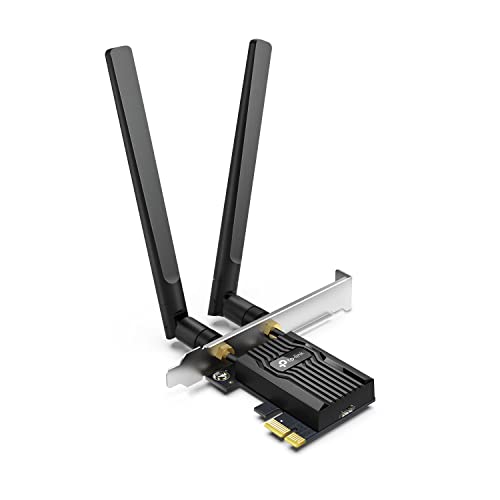
The TP-Link Archer TX55E is a PCIe WiFi 6 card designed for desktop PCs. It supports blazing speeds up to 2.4 Gbps combined (AX3000) with MU‑MIMO and OFDMA to reduce latency in busy networks. The dual high‑gain antennas extend coverage, making it suitable for gaming, 4K streaming, and multi‑device households. Its support for Windows 11 and 10 (64‑bit) ensures broad compatibility, and the card’s low latency makes real‑time applications feel more responsive. If you’re building a future‑proof desktop with heavy network use, this is a leading choice.
Highlights include WiFi 6 performance, reduced lag, and expanded range. The TX55E balances speed and reliability, especially in crowded home networks or small offices where multiple devices compete for airtime. It’s a solid upgrade for enthusiasts seeking the latest wireless technology in a desktop PCIe form factor.
TP-Link Archer T2U Plus – USB AC600 Adapter

The Archer T2U Plus USB adapter provides long‑range dual‑band connectivity with 2.4 GHz up to 433 Mbps and 5 GHz up to 200 Mbps. It is a straightforward upgrade for desktops and laptops, offering three main advantages: improved range to reach distant corners of a home, less buffering for streaming and calls, and simple setup via USB 2.0/3.0 compatibility. The device supports Windows and macOS, making it a versatile solution for mixed OS environments. If you need a budget‑friendly USB option that still delivers solid dual‑band performance, this model fits well.
Nineplus 1300Mbps USB WiFi Adapter

The Nineplus AC1300 USB WiFi Adapter combines dual‑band performance with two 5dBi antennas to maximize signal reception and transmission. With up to 867 Mbps on 5.8 GHz and 400 Mbps on 2.4 GHz, this adapter is well‑suited for fast browsing, gaming, and streaming on desktop systems. The dual high‑gain antennas help overcome weak signals and extend range in larger rooms. The device is designed for Windows, with broad compatibility that covers older and newer PC setups, offering an affordable route to modern WiFi without installing a PCIe card.
TP-Link Archer TX20U Plus USB 6‑Axis WiFi Adapter

The Archer TX20U Plus is an AX1800 USB adapter delivering strong dual‑band performance with a modern USB 3.0 interface for optimized throughput. It supports 2.4 GHz and 5 GHz bands, offering speeds up to 1201 Mbps on 5 GHz and up to 574 Mbps on 2.4 GHz, making it suitable for gaming, streaming, and video calls. The device supports WPA3 for improved security, and its compact design makes it convenient for portable setups or desktops without heavy external hardware. It’s a good option for users who want a USB‑based upgrade that aligns with WiFi 6 technology.
Buying Guide: Key Purchase Considerations
When choosing a wireless chip or adapter for a desktop, consider the following factors to optimize performance and compatibility:
- Interface: PCIe cards typically offer greater stability and performance for stationary desktops, while USB adapters provide flexibility and easy upgrades without opening the case.
- Wireless standard: WiFi 6 (802.11ax) and WiFi 6E deliver higher throughput and better performance in crowded networks. For budget upgrades, AC adapters remain solid choices with reliable speeds.
- Speed and bands: Dual‑band (2.4 GHz and 5 GHz) is standard, while some adapters support 6 GHz with WiFi 6E. Higher combined data rates benefit gaming and HD streaming, especially on networks with multiple devices.
- Antenna configuration: External high‑gain antennas or multiple antennas improve range and reception, particularly in large homes or office spaces.
- Security: Look for WPA3 support for the latest security features, along with backward compatibility with WPA2.
- Driver support and ease of setup: Driverless or one‑click installations simplify setup for non‑tech users; ensure OS compatibility (Windows, macOS, Linux).
- AP mode and shared networks: Some adapters offer AP mode to share an internet connection with other devices, useful for setting up a new network or testing connectivity.
- Longevity and warranty: Consider brand reliability and product reviews to gauge long‑term performance and support.
For most home desktops, a WiFi 5 or WiFi 6 USB or PCIe adapter provides a balance of speed, range, and cost. If future‑proofing is a priority, selecting a PCIe card with WiFi 6 or WiFi 6E support can maximize performance for high‑bandwidth tasks like 4K streaming and competitive gaming. Always verify compatibility with your operating system and motherboard slots before purchase.