Explore the latest wireless display adapters that mirror or cast your phone, tablet, or laptop to a TV, monitor, or projector. This guide highlights five reliable options that support 4K or 1080p streaming, with features like AirPlay, Miracast, and DLNA. Learn how these devices work, what devices they support, and key considerations to help you choose the best wifi video receiver for your home or office setup.
The table below summarizes the featured products to help you compare at a glance.
| Product | Brand | Resolution & Tech | Connectivity | Note |
|---|---|---|---|---|
| 4K 1080P Wireless HDMI Display Adapter | JUCONU | 4K/1080P | AirPlay, Miracast, DLNA | iOS, Android, Windows compatible |
| AIMIBO iOS Wireless Display Adapter | AIMIBO | 4K | AirPlay, Miracast, DLNA | Direct plug & play, no WiFi needed |
| SmartSee HD Wireless Display Dongle | SmartSee | 4K/1080P | AirPlay, Miracast, DLNA | No driver, easy setup |
| UGREEN Wireless USB C Transmitter | UGREEN | 1080P@60Hz | 5G Wi-Fi transmission | PD fast charging supported |
| YAOMAISI G9R Pro Wireless HDMI Extender | YAOMAISI | Up to 4K (implicit) | 2.4G/5G, multi-screen | TX + 2RX kit |
Below, five selections are explored in detail. Each product section provides a concise overview, supported devices, and practical use cases to help you decide which wifi video receiver best fits your needs.
JUCONU 4K Wireless HDMI Display Adapter

This wireless HDMI adapter streams from iPhone, iPad, or a Windows device to a TV, monitor, or projector. It supports 4K streaming for compatible content and can turn a HDTV into a PC-like display for a cinema or home office setup. The device is aimed at cross-platform use, including iOS, Android, and Windows.
Key features include cross-platform streaming, compatibility with streaming apps on iOS devices, and support for Android and Windows devices with encryption-based screen projection. Note that some HDCP-protected apps may restrict casting content from certain services.
Ideal use cases include turning a TV into a large display for presentations, watching videos from mobile devices, or sharing content from a laptop to a larger screen without cables. The device emphasizes simple wireless casting and broad device compatibility.
AIMIBO iOS Wireless Display Adapter 4K 5G
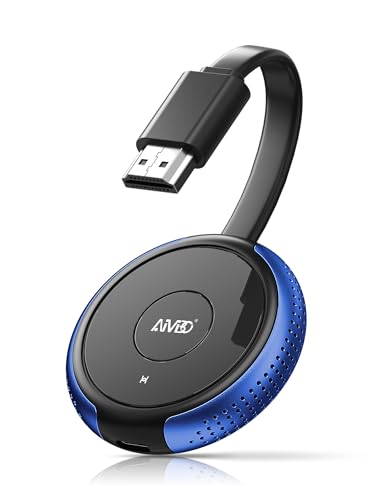
This direct plug-and-play HDMI wireless dongle mirrors screens from iPhone, iPad, or other devices to a TV or projector. It emphasizes a peer-to-peer connection without the need for a traditional WiFi network, making it suitable for hotel rooms, classrooms, or home use where internet access is limited or unavailable.
Compatibility spans iOS, Android, Windows, and macOS with support for AirPlay, Miracast, and DLNA. Setup is quick: insert into HDMI, power, and initiate screen mirroring with a PIN when required. The approach is straightforward for users who want a simple wireless mirror without apps or network setup.
Use cases include quick screen mirroring for lessons, business demos, or personal streaming on a larger screen. Its emphasis on no-network mirroring differentiates it from internet-dependent solutions.
SmartSee HD Wireless Display Dongle Adapter

The SmartSee dongle serves as a 4K/1080P wireless display receiver, mirroring content from smartphones, tablets, or computers to a TV, monitor, or projector via an HDMI connection. It is designed for fast, driver-free setup, enabling quick presentations, streaming, and content sharing.
Setup involves plugging the dongle into an HDMI port, powering it via USB, selecting the correct input channel, and connecting your source device to mirror content. It supports landscape and portrait modes for flexible viewing and is suitable for meetings, classrooms, and home entertainment.
Use scenarios include wireless presentations, media playback, and education demonstrations. Its simplicity and broad compatibility with AirPlay, Miracast, and DLNA support make it a versatile option for mixed device ecosystems.
UGREEN Wireless USB C Transmitter And HDMI Receiver

The UGREEN system enables wireless transmission from USB-C devices to HDMI displays at up to 1080P@60Hz. It uses a 5.8 GHz Wi‑Fi-based link to deliver smooth video over relatively long distances, making it suitable for larger rooms or classrooms.
It includes a pass-through USB-C port for power delivery, supporting PD fast charging on connected devices. This pairing is ideal for presenting from laptops, smartphones, or cameras to a big screen with minimal latency, particularly in professional or educational settings where reliable wireless transmission matters.
Consider power availability and device compatibility when selecting this option, as the transmitter requires a charging solution that supports PD for optimal performance.
YAOMAISI G9R Pro Wireless HDMI Extender Kit

The G9R Pro kit provides seamless multi-screen expansion with one transmitter and two receivers, enabling simultaneous streaming to multiple displays up to 165 feet away. It operates over 2.4G/5G bands and supports plug-and-play setup with minimal configuration.
Important notes cover TX/ RX pairing, the limitation that TX cannot connect directly to a TV, and the lack of reliance on apps or software. The kit is well-suited for events, worship services, or classrooms where synchronized displays across several screens are needed.
When planning multi-display layouts, consider the target distances, the number of displays, and whether you need additional RX units for future expansion.
Buying Guide: Key Purchase Considerations
Below are central factors to weigh when choosing a wifi video receiver for TV:
- Resolution and video quality: Look for 4K support if you plan to mirror high-resolution content; otherwise, 1080p is often sufficient for most living rooms and classrooms.
- Compatibility: Check compatibility with your devices (iOS, Android, Windows, macOS) and the casting protocols (AirPlay, Miracast, DLNA) that your devices use.
- Network requirements: Some adapters require a WiFi network, while others offer direct peer-to-peer mirroring without internet access. Decide which setup fits your space.
- Latency and stability: For live presentations or gaming, a low-latency solution is essential. Review claimed transmission ranges and peer-to-peer performance.
- Setup and ease of use: Consider whether you prefer plug-and-play devices with no apps or more feature-rich options that may require configuration.
- Power and ports: Check if the transmitter or adapter can be powered via USB-C PD and whether your HDMI ports are compatible with the dongle’s input.
- Multi-display capability: If you need several screens, verify whether the kit supports multiple receivers and how easy it is to pair them.
- HDCP restrictions: Some streaming apps restrict content when using screen mirroring; ensure you understand which apps are affected.
- Size and form factor: For home entertainment or travel, compact dongles are easier to place behind TVs or projectors.
In summary, the right wifi video receiver depends on your device ecosystem, the desired display quality, and whether you need single or multi-display support. Consider testing in your setup to confirm compatibility with your favorite apps and content sources.