Discover top WiFi-enabled phones that work well with Skype and other VOIP services. This guide highlights reliable models with strong wireless connectivity, easy setup, and clear calling experiences. Each option supports Wi‑Fi networks, helps you stay mobile during calls, and integrates with business communications for teams and solo professionals alike.
| Product | Brand | Key WiFi/VOIP Benefit | Notable Feature |
|---|---|---|---|
| Grandstream WP826 | Grandstream | Dual‑Band Wi‑Fi 6 for fast, stable wireless calls | Cordless convenience with large color display |
| Ooma T31W with Yealink T31W | ooma | Built‑in dual‑band Wi‑Fi; works with Ooma Office cloud service | Supports videoconferencing and CRM integrations via Ooma |
| OBi2182 WiFi VOIP Phone | Plantronics | 2.4 GHz and 5 GHz Wi‑Fi; 12 lines for business use | Color display; cloud management and robust connectivity |
| NETGEAR SPH200W | NETGEAR | Skype-ready Wi‑Fi phone for calls anywhere on WiFi | Works with major Wi‑Fi hotspot providers |
| AudioCodes C450HD IP Phone | AudioCodes | Wi‑Fi and Bluetooth; SIP/VoIP with multiple lines | Color touchscreen and quick Microsoft Teams/Skype switch |
Note: The list focuses on devices with strong wireless connectivity and VOIP support suitable for Skype usage in small offices, home offices, or mobile work setups.
Grandstream WP826 – Cordless Wi‑Fi IP Phone

Grandstream WP826 offers Dual‑Band Wi‑Fi 6 for faster wireless connectivity and improved coverage. Its cordless design supports movement around the workspace, making it suitable for busy offices or home setups. A large color display aids in easy navigation and call management, while the device supports modern wireless standards to keep calls crisp and reliable.
Ooma T31W VoIP Phone (Yealink T31W Variant)

The Ooma T31W integrates built‑in dual‑band Wi‑Fi and a 2.3” LCD with backlight for clear on‑phone visibility. It is designed to work specifically with the Ooma Office cloud service, providing access to 50+ features and options like videoconferencing and CRM integrations through the Ooma ecosystem. Its mobile and desktop apps enable business users to manage calls from anywhere.
OBi2182 WiFi VOIP Phone
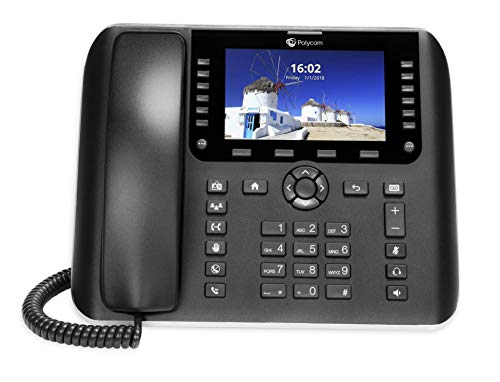
OBi2182 supports up to 48 lines with a large vivid color display. It includes 2.4 GHz and 5 GHz Wi‑Fi, plus 802.11ac compatibility and Bluetooth 4.0, enabling expanded connectivity options. The device is designed for cloud management and robust VOIP deployments, suitable for busy office environments requiring multiple concurrent calls.
NETGEAR SPH200W WiFi Phone

NETGEAR SPH200W enables calls over any available Wi‑Fi network, including providers like T-Mobile hotspots. It supports Skype calls without a PC and is built for flexibility in home or small office settings where wireless access is variable. It emphasizes plug‑and‑play usability with broad compatibility across Wi‑Fi networks.
AudioCodes C450HD IP Phone

The AudioCodes C450HD is a versatile desk phone with Wi‑Fi and Bluetooth, offering SIP, TCP, UDP, TLS, and IPv4 compatibility. It supports multiple line configurations and features a graphical 5″ color touchscreen, with quick‑switch capability between Microsoft Teams and Skype for Business. This makes it suitable for mixed environments where Teams and Skype are in use.
Buying Guide
Key considerations when choosing a WiFi phone for Skype and similar VOIP services:
- Wi‑Fi standards and bands: Look for devices supporting 802.11ac/ax (Wi‑Fi 5/6) and both 2.4 GHz and 5 GHz bands for reliable coverage and reduced interference.
- VOIP compatibility: Ensure the phone supports your preferred service(s) (Skype for Business, Teams, Cisco/UDP/SIP compatibility, etc.).
- Display and usability: A larger color display helps with call controls, directories, and contact management. Consider cordless models for home or small offices.
- Security and encryption: Check for TLS, SRTP, and other standard protections for VOIP communications, especially in business contexts.
- Cloud vs on‑premises: Cloud services (like Ooma Office) can simplify management but may tie you to a provider; on‑premises options give broader control but require more setup.
- Number of lines and scalability: For busy environments, select phones that support multiple lines or can be paired with a base system that scales.
- Power options: Some devices use PoE (Power over Ethernet) or USB power; cordless models add mobility but may require charging bases.
- Compatibility with conferencing: If videoconferencing or CRM integrations are needed, verify support and seamless integration within the device ecosystem.
- Ease of setup: USB or plug‑and‑play options can reduce deployment time; enterprise deployments may benefit from centralized provisioning.
When choosing, balance wireless performance with VOIP features, ensuring the device fits your network, service plan, and collaboration tools. These five options provide a range of connectivity, from cordless portability to desktop reliability, suitable for different Skype and VOIP workflows in American workspaces.