Finding a reliable WiFi-to-Ethernet adapter helps your non-WiFi devices—from printers to gaming consoles—enjoy fast wireless access without running long cables. The following picks cover dual-band, WiFi 6, and classic 2.4/5 GHz options, each enabling a wired device to connect to a wireless network with straightforward setup and solid performance.
| Product | Brand | Key Benefit | Link |
|---|---|---|---|
| BrosTrend AC1200 WiFi to Ethernet Adapter | BrosTrend | Fast dual-band up to 1200 Mbps | View |
| BrosTrend Dual Band 1200Mbps WiFi Bridge | BrosTrend | Reliable coverage with external antennas | View |
| IOGEAR Universal Ethernet to Wi-Fi Adapter | IOGEAR | Push-button WPS setup, 300 Mbps | View |
| BrosTrend AX1500 WiFi 6 Ethernet Adapter | BrosTrend | WiFi 6 with Gigabit Ethernet | View |
| Vonets VAP11N-300 WiFi Bridge | Vonets | Compact bridge with 300 Mbps | View |
Note: The table above highlights representative options that convert wireless networks to wired connections, suitable for printers, TVs, gaming consoles, and more. Availability and features may vary by region.
BrosTrend AC1200 WiFi to Ethernet Adapter
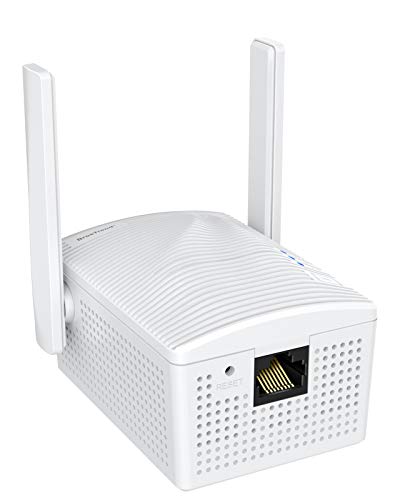
The BrosTrend AC1200 adapter converts a wired Ethernet device to connect via Wi‑Fi, acting as a wireless bridge powered by a normal outlet. It supports dual-band AC1200 speeds—up to 867 Mbps on 5 GHz and 300 Mbps on 2.4 GHz—suitable for streaming, gaming, and online tasks. It requires no driver installation and can work with a variety of Ethernet-enabled devices such as smart TVs, game consoles, printers, and computers. This device emphasizes straightforward setup and reliable wireless access for wired devices.
Key features include: dual-band operation for flexible network choice; compatibility with many Ethernet devices; WPS-friendly setup itself on some variants; and an emphasis on high-speed wireless access to support video streaming and online gaming. Users seeking a plug-and-play solution for turning a wired device into a wireless client may find this option appealing.
BrosTrend Dual Band 1200Mbps Wifi Bridge
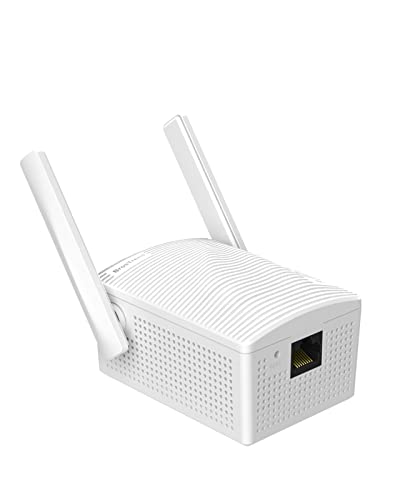
This wireless bridge converts a wired device into a wireless client, delivering up to 1200 Mbps across dual bands. It targets devices like printers, smart TVs, Blu-ray players, game consoles, and network switches. The design emphasizes stable connections via two external antennas, which can help improve signal laterally across rooms where cable runs are impractical. Setup is optimized for easy pairing with a nearby router, reducing the need for complex network maneuvers.
Highlights include universal compatibility with Ethernet-only devices, a robust wireless signal through external antennas, and a focus on simplifying deployment in home environments. It’s suitable for households seeking to minimize cable clutter while maintaining reliable network access for non-wireless devices.
IOGEAR Universal Ethernet to Wi-Fi N Adapter

The IOGEAR GWU637 enables compatible Ethernet devices to connect to a Wi‑Fi network. It’s designed for straightforward use—connect an Ethernet cable from the GWU637 to the device, and it gains wireless access. The adapter supports up to 300 Mbps on 2.4 GHz and uses dual antennas to help maximize bandwidth, making it suitable for streaming, gaming, and HD multimedia applications. Note that it’s not intended for enterprise authentication or creating hotspots; it’s a direct link between one Ethernet device and a router.
Key considerations include compatibility with standard Wi‑Fi routers (not open or hotel networks), 2.4 GHz bandwidth limitations, and a compact, plug‑and-play form factor that appeals to home setups where simple integration is preferred.
BrosTrend AX1500 WiFi 6 Ethernet Adapter

This adapter brings WiFi 6 connectivity to a wired device via a Gigabit Ethernet port, offering up to 1 Gbps speeds and dual-band operation. It’s designed for devices like PCs, smart TVs, gaming consoles, printers, and DVRs. The inclusion of 2 external antennas and high-power amplifiers aims to ensure stronger signal reception, enabling reliable performance for streaming and gaming. It’s suitable for homes upgrading to WiFi 6 networks while preserving wired device simplicity.
Considerations include ensuring your router supports WiFi 6, the need for a wired device to benefit from higher bandwidth, and the balance between price and the additional performance that WiFi 6 delivers in real-world usage.
Vonets VAP11N-300 Mini WiFi Bridge

The Vonets VAP11N-300 offers a compact WiFi bridge option supporting 300 Mbps on 2.4 GHz networks. It can function as a bridge or repeater and is suitable for smaller devices where space is a constraint. Power options include USB or DC input, giving flexibility in powering the device alongside other equipment. It is aimed at users needing a small, portable solution to convert wireless networks into a wired connection for DVD players, printers, and other basic Ethernet-enabled devices.
Key points include its small footprint, USB-powered versatility, and suitability for basic network bridging tasks. Bandwidth and range are typical for 2.4 GHz devices, making it a practical choice for legacy devices or compact setups where larger adapters aren’t feasible.
Buying Guide: Choosing The Right WiFi To Ethernet Adapter
- Network speed needs: If you stream 4K video or game online, prefer dual-band or WiFi 6 options to maximize throughput and reduce bottlenecks. Look for adapters advertised as AC1200, AX1500, or similar speeds for better performance.
- Device compatibility: Ensure the adapter supports your target devices (printers, TVs, game consoles, DVRs, etc.) and has a reliable Ethernet port (RJ45) with Gigabit support where possible.
- Setup experience: For most households, a plug-and-play model with WPS or simple app-based setup speeds up installation. Note if the product requires driver installation or has compatibility caveats with certain routers.
- Range and antenna design: External antennas can improve range and stability in larger homes or difficult layouts. If your signal is weak, prioritize devices with higher TX/RX power and dual antennas.
- Security: Verify WPA2/WPA3 support and reliable encryption standards. Avoid adapters that rely on insecure defaults or lack encryption options.
- Power and placement: Some adapters require constant power from a wall outlet; consider placement flexibility, such as adapters with USB power or low-power designs for near-silent operation.
- Use case scenarios: For printers and simple IoT devices, a compact, lower-cost adapter may be sufficient. For gaming consoles or smart TVs, investing in a higher-speed, WiFi 6 capable model can noticeably improve performance.
- Future-proofing: If planning to upgrade to a faster home network, a WiFi 6 (AX) or higher-capability adapter can provide longer relevance before needing replacement.
Summary: The options above span basic to high-performance needs. For lightweight tasks like printing or basic streaming, 2.4 GHz bridges with solid range are adequate. For high-demand use, select dual-band or WiFi 6 adapters with robust antenna setups and Gigabit Ethernet ports to fully leverage modern routers.