Low WiFi speed on a laptop can hinder work, streaming, and gaming. USB WiFi adapters provide a simple upgrade path to Wi‑Fi 6 or faster dual‑band connections, with multiple antennas and driver‑free setup on many Windows machines. Below are five highly capable options that balance speed, range, and ease of use for American households and small offices.
The following quick-reference table highlights key specs to help you compare at a glance. Note that all products listed support Windows systems; Mac or Linux compatibility varies by model.
| Product | Max Theoretical Speed | Band Support | Antenna | Driver/Setup |
|---|---|---|---|---|
| Nineplus USB WiFi Adapter AX1800 (B0CTFM34P1) | 1800 Mbps | 2.4G/5G | Internal high gain antenna (built‑in) | Plug & Play on Windows 10/11 |
| Nineplus AC1300 USB WiFi Adapter (B07V4R3QHW) | 1300 Mbps | 2.4G/5G | Two high‑gain antennas | Driver‑included; Windows setup |
| EDUP AC600M USB WiFi Adapter (B01CCMUN8C) | 600 Mbps | 2.4G/5.8G | Internal antenna (compact) | Driver download; Windows support |
| Auscoumer USB WiFi 6 AX900 (B0FDVTN3MK) | 900 Mbps | 2.4G/5G | Dual high‑gain antennas | Driver‑free on Windows 11/10 |
| SBFFNOW USB WiFi 6 Adapter AX1800 | 1800 Mbps | 2.4G/5G | Four high‑gain antennas | MU‑MIMO/OFDMA; driver included |
Nineplus AX1800 USB WiFi Adapter for Laptop or Desktop

This device upgrades to Wi‑Fi 6 with AX1800 speeds, supporting dual bands for flexible network access. It is designed for desktop PCs and laptops, offering up to 1201 Mbps on the 5 GHz band and 574 Mbps on 2.4 GHz. The setup is listed as plug and play on Windows 11/10, simplifying deployment in mixed environments, while highlighting it is a WiFi receiver rather than a data card. The emphasis is on boosting everyday tasks—browsing, streaming, and online gaming—with a cost‑effective upgrade path for aging wired connections or built‑in adapters.
Nineplus AC1300 Dual‑Band USB WiFi Adapter

This adapter delivers up to 1300 Mbps by combining 867 Mbps on 5 GHz with 400 Mbps on 2.4 GHz. Two 5dBi high‑gain antennas help extend range and improve wall penetration, making it suitable for rooms farther from the router or setups with multiple walls. It’s positioned as a budget‑friendly upgrade that adds modern Wi‑Fi technology to older desktops or laptops, reducing buffering during streaming and online meetings while remaining easy to install with pre‑loaded drivers.
EDUP AC600M USB WiFi Adapter

Designed for Windows 11/10 with driver support, the EDUP AC600M focuses on straightforward driver installation and reliable 2.4/5.8 GHz dual‑band connectivity. While Mac OS and some other platforms aren’t supported, it remains a practical option for many Windows users seeking to add wireless capability to desktop PCs or laptops without built‑in Wi‑Fi. Its compact form factor and easy setup make it a sensible choice for travelers or spaces with limited USB ports.
Auscoumer USB WiFi 6 Adapter AX900

This AX900 USB WiFi 6 adapter emphasizes longer range and improved efficiency with dual‑band support. It promises up to 900 Mbps and features dual high‑gain antennas to strengthen signal reception and transmission, making it well suited for home offices or study spaces where the router is not in the same room. The driver‑free installation on Windows 11/10 offers a streamlined setup without complicated configuration steps, helping users quickly gain faster network performance and lower latency for streaming and conferencing.
SBFFNOW AX1800 USB WiFi 6 Adapter
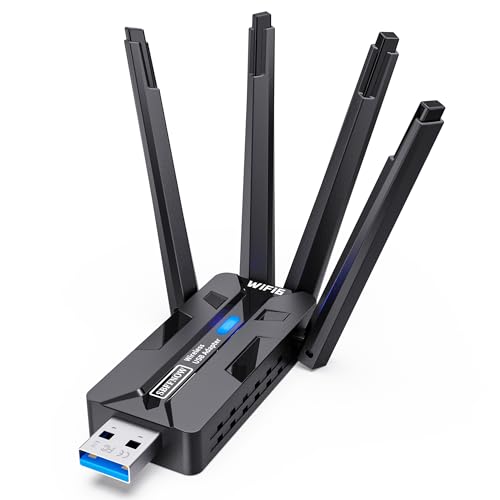
The SBFFNOW adapter highlights MU‑MIMO and OFDMA technologies to support multiple devices simultaneously, reducing contention in busy households. Four high‑gain antennas help with long‑range coverage and wall penetration, and peak speeds approach 1800 Mbps on the 5 GHz band with substantial 2.4 GHz presence. The driver package is included, and the product is positioned as a strong choice for gamers, streamers, and remote workers who need reliable multi‑device performance without sacrificing desk space.
Buying Guide: Key Considerations For Choosing A USB WiFi Adapter
- Speed vs. real‑world performance: Theoretical speeds (e.g., 1800 Mbps) are optimistic; real speeds depend on router capabilities, interference, and distance. For most households, a Wi‑Fi 6 adapter (AX) balances speed and efficiency in crowded environments.
- Antenna configuration: Multiple antennas (dual or quadruple) generally improve range and penetration through walls. External antennas may offer upgrade flexibility, while compact designs are more portable.
- Driver availability and OS compatibility: Windows users benefit from broad driver support and driver‑free options. Check compatibility with your OS version and whether automatic installation is supported.
- USB interface and form factor: USB 3.0/3.1 ports provide faster data transfer and power delivery. Ensure your device has a free USB port and adequate space for the adapter’s footprint.
- Security features: Look for WPA3 or WPA2 support to safeguard wireless connections, especially on shared networks or public locations.
- Multi‑device scenarios: If multiple devices connect simultaneously, consider MU‑MIMO and OFDMA capabilities to minimize buffering and latency during peak usage.
- AP mode capability: Some adapters can create a wireless hotspot from a wired connection, useful for sharing internet in areas with limited Wi‑Fi coverage.
- Driver installation versus plug‑and‑play: Some models auto‑install drivers on Windows 10/11; others require manual driver downloads. Plan for occasional updates.
When evaluating options, align the adapter’s capabilities with your typical usage: streaming HD video, online gaming, or video conferencing all benefit from higher sustained throughput and lower latency. For larger spaces or multiple users, devices with multiple antennas and MU‑MIMO/OFDMA support tend to deliver the most noticeable improvements.