A practical guide to wide-format printers with built-in scanners that suit professional offices, design studios, and expanding home offices. The following top picks balance wide-format capabilities, print quality, and connectivity to keep workflows smooth. Each option supports wide-format media, scanning, and versatile job handling for documents, photos, and creative projects. Below is a quick table of the featured models to help you compare at a glance.
| Product | Brand | Media Size | Special Feature |
|---|---|---|---|
| HP OfficeJet Pro 9730e Wide Format | HP | Wide (up to 13″ x 19″ or equivalent) | AI-enabled print analytics and web-page formatting |
| Epson WorkForce Pro WF-7840 | Epson | 13″ x 19″ | Auto 2-sided print; 50-page ADF |
| Epson EcoTank Photo ET-8550 | Epson | 13″ x 19″ | Cartridge-free, affordable photo printing |
| Epson EcoTank ET-15000 | Epson | 13″ x 19″ | High-volume EcoTank with scanner and Ethernet |
| Epson Expression Photo XP-15000 | Epson | 13″ x 19″ | Ultra-wide color photo printing |
Note: All models support scanning and wide-format printing, with varying ink systems, speeds, and connectivity options. Consider print volume, media types, and the required color fidelity when choosing a model for office or studio use.
HP OfficeJet Pro 9730e Wide Format Overview

The HP OfficeJet Pro 9730e offers professional color for large documents such as floorplans, mood boards, and detailed spreadsheets. It prints up to 18 pages per minute in color and 22 ppm in black, which supports busy office environments. A standout feature is HP AI-powered page formatting that helps remove unwanted content and ensures pages print with clean, precise layouts. The printer also supports wide-format color output with a wide gamut via P3 color inside the device, enabling vibrant results that closely match on-screen designs.
Key features include: broad-wide-format capabilities, AI-assisted page formatting to minimize waste, and robust color accuracy for professional documents. For teams that rely on precise presentation materials, this model aims to reduce touch-ups and reprints while maintaining speed and reliability.
Epson WorkForce Pro WF-7840 Wide-Format Printer

This Epson model combines wide-format printing with a robust multi-function setup. It supports print, copy, scan, and fax, delivering up to 13″ x 19″ wide-format output. PrecisionCore Heat-Free technology helps balance speed with accuracy, while DURABrite Ultra ink reduces smudging and improves durability of documents. A 500-sheet capacity supports office workloads, and built-in wireless enables cable-free operation and mobile printing via Epson Connect Solutions, including email, remote, and smart panel applications for on-the-go management.
Considerations include: a solid paper handling capacity, wide-format flexibility, and a strong ecosystem of Epson Connect tools that streamline remote operation and monitoring from devices.
Epson EcoTank Photo ET-8550 Wide-Format Printer
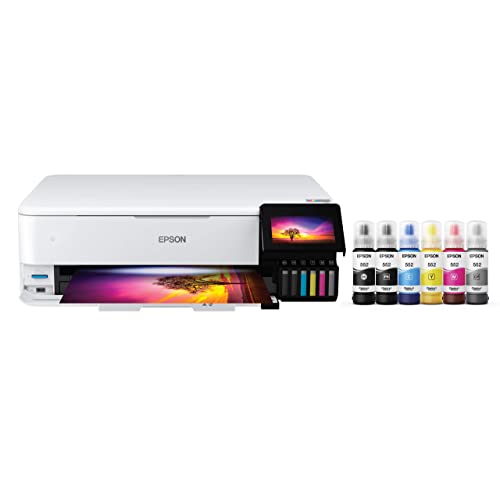
The EcoTank ET-8550 is designed for bold color output with cartridge-free printing for high-volume creative projects. It uses Epson’s Claria ET Premium six-color inks to deliver vibrant photos and sharp graphics, with a claimed 4 x 6″ photo printing speed of about 15 seconds. It supports borderless printing up to 13″ x 19″ and accommodates a variety of media types, including heavier cardstock and specialty media. The model features auto 2-sided printing and a cost-effective in-house photo workflow, reducing the need for frequent ink replacements.
Key considerations include: total cost of ownership with refillable ink tanks, color fidelity for photos and marketing materials, and media flexibility for photos or design proofs.
Epson EcoTank ET-15000 Wide-Format All-in-One

The ET-15000 combines color printing, scanning, and copying in a single wide-format all-in-one package. It features wireless connectivity and Ethernet/USB options, enabling flexible setups in modern offices. The EcoTank line emphasizes low running costs through refillable ink tanks, making it suitable for teams with frequent large-format proofs and posters. The scanner facilitates digital archiving and contract management workflows, while the device supports a range of media types for different marketing and design tasks.
Purchase considerations include: long-term ink cost savings, network integration, and the balance between print speed and color accuracy for large-scale documents.
Epson WorkForce Pro WF-7310 Wide-Format Printer

The WorkForce Pro WF-7310 focuses on fast wide-format output with 13″ x 19″ printing and auto double-sided capability. It emphasizes cost-effective performance with high-speed printing and a compact footprint, making it suitable for busy offices without sacrificing space. The Smart Panel app supports easy setup and management, while the printer works with Epson Genuine Cartridges to ensure compatibility and warranty protection.
Important considerations include: total cost of ownership, reliability with frequent large-format jobs, and software support for network and mobile printing across devices.
Epson Expression Photo XP-15000

The Expression Photo XP-15000 emphasizes professional photo quality in a wide-format form factor. It uses a six-color Claria photo ink system and supports borderless prints up to 13″ x 19″, making it a strong choice for photographers and creative pros who need vibrant color and fine detail. It ships with multiple color cartridges to achieve broader color gamuts and high-fidelity prints, and it is designed for home studios or small offices focusing on visual work. Connectivity options support wireless printing and integration with creative workflows.
Key factors to weigh include: color accuracy for photos, media handling for large prints, and the total cost of ownership with dye versus pigment inks and replacement cartridge strategy.
Buying Guide: Key Considerations For Selecting A Wide-Format Printer With Scanner
- Purpose and print media: Determine whether you need 13″ x 19″ posters, architectural plans, or high-fidelity photo prints. Consider auto-duplexing, borderless printing, and media compatibility (cardstock, photo paper, vinyl, etc.).
- Ink system and cost: EcoTank or cartridge-based systems affect long-term costs. Refillability and ink yield influence total cost of ownership, especially for high-volume printing.
- Scanning and copying features: Check scan resolution, color depth, duplex scanning, and whether the device supports cloud or network scanning to emails or folders. A robust ADF is important for multi-page documents.
- Speed vs. quality: Balance ppm (pages per minute) for large-format jobs against color accuracy and print quality. Some devices optimize for speed, others for vivid color output.
- Connectivity and management: Look for Wi-Fi, Ethernet, and mobile printing support (AirPrint, Google Cloud Print alternatives, vendor apps). Centralized management tools help IT teams monitor usage and status.
- Software ecosystem: Ecosystem support like Epson Smart Panel, iPrint, and remote printing features can streamline workflows for designers and project teams.
- Space and footprint: Wide-format devices can be large. Measure workspace and consider whether the printer will be near a network hub or in a shared office area.
- Warranty and support: Check warranty length, service options, and availability of replacement parts. This is crucial for business-critical printers.
- Color fidelity and proofs: For design and marketing, color accuracy matters. Look for devices with color profiles or calibration options to standardize proofs across teams.