Wide-format printers meet a range of needs—from sharp photo prints to large-format documents and posters. This guide highlights five strong options, covering consumer-grade photo quality, office versatility, and robust wide-format capability. Each selection includes practical features, media support, and connectivity to help you choose the right device for your workflow.
| Product | Brand | Model |
|---|---|---|
| Epson EcoTank Photo ET-8550 | Epson | ET-8550 |
| HP OfficeJet Pro 9730e | HP | 9730e |
| Canon imagePROGRAF TC-21 24″ | Canon | TC-21 |
| Epson Expression Photo HD XP-15000 | Epson | XP-15000 |
| Epson WorkForce Pro WF-7820 | Epson | WF-7820 |
Choosing a wide-format printer requires balancing print quality, media versatility, and ongoing running costs. The following selections offer a mix of photo-centric and document-focused capabilities, with wide-format printing up to 13″ x 19″ or larger where applicable. Read on to compare features, media support, and connectivity that impact daily use in homes and small offices.
id=”product-et8550″>Epson EcoTank Photo ET-8550: All‑In‑One Wide-Format Supertank
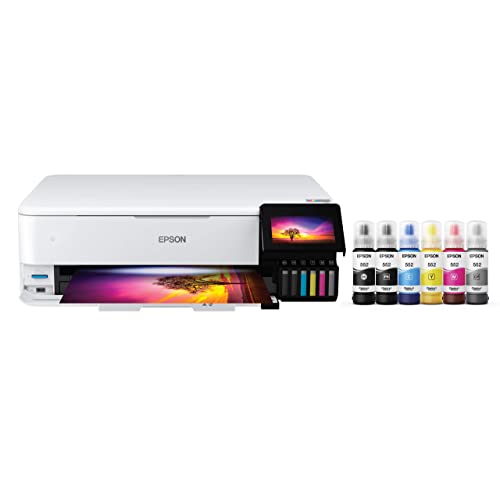
The Epson EcoTank Photo ET-8550 pairs cartridge-free printing with wide-format capability and a 6-color Claria ET Premium ink system for vibrant photos and sharp text. It supports borderless prints up to 13″ x 19″ and handles media up to 1.3 mm thick, including cardstock and CD/DVD media. Automatic two-sided printing helps reduce paper usage, while its in-house photo printing can lower per-print costs on color projects. The device includes a color touchscreen and Ethernet connectivity for shared office use.
Key points
- Cartridge-free design with high-accuracy printhead
- Borderless 13″ x 19″ media support
- Auto duplex; Ethernet; 4.3-inch color touchscreen
- Low-cost photo printing in-house
id=”product-9730e”>HP OfficeJet Pro 9730e Wide Format

The HP OfficeJet Pro 9730e is designed for office workloads requiring color document clarity and wide-format margins. It delivers fast print speeds for color and black documents, supports large-format output, and leverages AI features to optimize layouts for web pages and emails. Its color gamut benefits from HP’s P3 support, helping prints stay faithful to on-screen content, with a focus on professional, formatted results suitable for plans and mood boards.
Key points
- Print speeds up to 18 ppm color, 22 ppm black
- Wide-format capability with improved color accuracy
- Professional formatting and content optimization
id=”product-tc21″>Canon imagePROGRAF TC-21 24″ Large Format Printer

The imagePROGRAF TC-21 is a 24″ desktop-wide printer designed for posters and plotter-style output. It ships with a full ink set (280 ml total) and provides robust media versatility with support for both roll and sheet media via automatic feeders. Its automatic feed, combined with Canon’s color science, helps deliver crisp text and vivid graphics suitable for signage, presentations, and large-format visuals.
Key points
- Automatic roll and cut sheet feeder
- Includes 280 ml ink set
- 24″ print width with sheet and roll media support
id=”product-xp15000″>Epson Expression Photo HD XP-15000

The XP-15000 is a compact, photo-oriented wide-format printer designed for high-quality borderless prints up to 13″ x 19″. It uses a six-color Claria Photo HD ink set for broad color gamut, including red and gray inks for nuanced black-and-white prints. The device is positioned for enthusiasts and hobbyists who need large-format photos with refined detail for albums, galleries, or display projects. The package includes setup media and a detailed user experience overview.
Key points
- Borderless up to 13″ x 19″
- Six-color Claria Photo HD inks, including red and gray
- Compact footprint for home studios
id=”product-wf7820″>Epson WorkForce Pro WF-7820

The WorkForce Pro WF-7820 is a robust option for offices needing wide-format capability with reliable speed. It supports 13″ x 19″ printing, offers two-sided printing, and integrates with Ethernet and wireless networks for shared use. This model emphasizes durability and office workflows, with a focus on fast throughput and compatibility with Epson’s GetFlex management and mobile printing options to streamline day-to-day tasks.
Key points
- Wide-format up to 13″ x 19″
- Fast speeds and DURABrite Ultra inks
- Wireless and Ethernet connectivity for office use
Buying Guide: Key Purchase Considerations
- Print quality vs. cost: Photo-focused models (like XP-15000 and ET-8550) deliver higher accuracy for images but can have higher running costs if using specialized inks. Supertank systems tend to reduce ongoing ink costs.
- Media compatibility: Consider whether you need glossy photo media, heavyweight cardstock, or roll media for banners. Some models only support sheets, while others offer roll loading for banners or wide posters.
- Print width and format: If you regularly print up to 13″ x 19″ or larger, verify the maximum printable width and whether the device supports borderless printing on your preferred media.
- Connectivity: For shared home offices, look for Ethernet, Wi-Fi, and mobile printing support. Some models include cloud integration and apps for printing from mobile devices.
- Maintenance and ink system: Supertank models reduce refill intervals but may require careful handling of tank fills. Consider total cost of ownership and warranty coverage for long-term use.
- Running costs and yield: Compare per-print costs, especially for photo prints. Ink type and color gamut influence image quality and expense.
- Size and footprint: Wide-format units can be large; ensure your workspace can accommodate the printer and access for loading media and maintenance.
- Support for media handling features: Automatic document feeders, roll feeders, and sheet feeders affect workflow efficiency for busy environments.