Wireless display dongles let you mirror phones, tablets, and laptops to TVs, monitors, or projectors with minimal setup. This guide highlights five top options, covering multiple ecosystems (iOS, Android, Windows, macOS) and varied features like 4K support, DLNA, and AirPlay compatibility. Each product section includes a concise overview, key specs, and practical usage notes to help American consumers choose the right dongle for home, classroom, or office use.
Summary of chosen products
| Product | Brand | Key Features | Video Quality |
|---|---|---|---|
| SmartSee Anycast HD Wireless Display Adapter | SmartSee | No app; Miracast, AirPlay, DLNA; multi-device compatibility | 1080P |
| AIMIBO 2026 4K Wireless HDMI Display Adapter | AIMIBO | Plug & play; 4K; multi-mode casting; dual-band WiFi | 4K |
| SOCLLLife Wireless HDMI Display Adapter | SOCLLLife | AirPlay & Miracast; 4K capable; app casting support | 4K |
| XTRONS 4K Wireless Display Adapter | XTRONS | AirPlay & Miracast; 4K output; wide compatibility | 4K |
| XEME 4K Wireless HDMI Display Dongle | XEME | 4K streaming; dual-band WiFi; easy setup | 4K |
Note: The table reflects general capabilities described by each product listing. Availability and supported apps may vary by device and region.
SmartSee Anycast HD Wireless Display Adapter Review
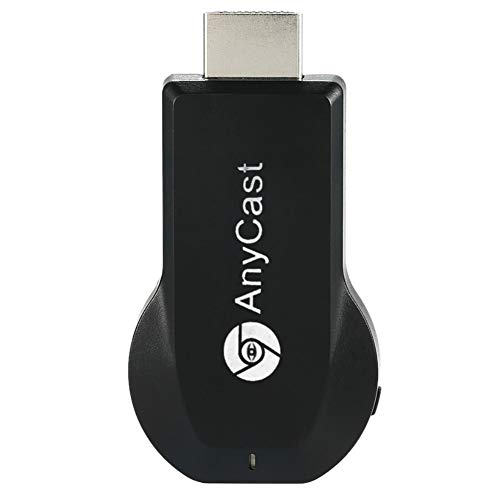
The SmartSee Anycast adapter enables wireless mirroring from phones, tablets, and laptops to TVs, projectors, or monitors. It supports Miracast, AirPlay, and DLNA protocols, allowing screen sharing of videos, photos, and files without apps or drivers. The setup is described as a simple three-step process: plug the dongle into HDMI, power it via USB, then select the correct input channel. It aims to work across Mac, iOS, Android, and Windows devices that support the respective protocols. Notable limitations include certain apps with DRM protections that block casting.
Compatibility and reliability hinge on device support for Miracast or AirPlay. Users should ensure their device firmware is up to date and follow the user manual for system-specific steps. The dongle’s UI is designed to recognize the IP address and adapt to local language automatically, simplifying first-time setup in diverse households or classrooms.
AIMIBO 2026 4K Wireless HDMI Display Adapter

AIMIBO’s 2026 model emphasizes a true plug-and-play experience, removing the need for apps, WiFi, or network setup. It supports three casting modes: Direct Connect, DLNA Connect, and USB-C Wired Connect. The device remains usable whether on a hotspot, home WiFi, or without internet access. It delivers 4K wireless streaming and supports an extended mode for multitasking—use the TV as a display while running apps on the source device. Dual-band 2.4 GHz and 5.8 GHz connectivity improves stability in busy environments, reducing latency during presentations or streaming.
From a practical perspective, AIMIBO’s versatility makes it suitable for business meetings, travel, or home entertainment. The ability to switch between connection types helps in environments with limited or unstable networks. Users should verify device compatibility with their specific OS versions and confirm USB-C power options meet their hardware requirements.
SOCLLLife 4K Wireless HDMI Display Adapter

The SOCLLLife adapter focuses on 4K casting with app support for broader Android and Windows usage. It claims simple three-step setup: plug the HDMI dongle, power it, and enable screen mirroring on the source device. It also notes compatibility with Netflix, Prime Video, Hulu, YouTube, and TikTok on supported devices, making it convenient for streaming content from apps that otherwise pose DRM or licensing restrictions on other devices. iOS devices might require additional steps to connect to the adapter’s wireless signal. This product is suitable for home theaters, classrooms, and small office spaces seeking wireless media sharing.
Potential users should confirm that their streaming apps permit wireless casting to external displays. Since Windows support mentions Windows 10 and below in some cases, users with Windows 11 or newer may need to check for firmware updates or driver requirements. The device’s 4K capability can enhance the viewing experience when paired with a 4K display.
Kuiozet HDMI Wireless Display Dongle Adapter

Kuiozet offers a wireless display dongle that emphasizes ease of use with Miracast, DLNA, and AirPlay support. The product highlights three-step setup: plug in the HDMI dongle, power it, and select the appropriate screen mirroring mode. It markets versatility for home use, travel, meetings, and classrooms, suggesting convenient casting for both personal photos and business content. It notes compatibility across Windows and Android devices, with emphasis on straightforward operation and universal input recognition. Some limitations may apply to devices that do not support certain streaming protocols or HDCP protections.
When evaluating Kuiozet, consider the device’s HDMI input compatibility with your display, the availability of firmware updates, and whether your primary use case requires AirPlay or Miracast support. The potential dual-purpose use in both education and home entertainment increases its practicality in mixed-device environments.
XEME 4K Wireless HDMI Display Dongle

XEME’s 4K wireless display dongle focuses on providing high-quality 4K streaming with a straightforward plug-and-play setup. It highlights dual-band WiFi to minimize interference and latency, which is beneficial for streaming media or presenting in busy network environments. The product supports screen mirroring from laptops, smartphones, and tablets to TVs, projectors, or monitors. Its emphasis on easy installation makes it suitable for users who want quick setup without downloading apps or configuring complex network settings. As with other dongles, check DRM restrictions for streaming apps you plan to cast to the display.
For classrooms or small offices, the buffer-free 4K capability and stable dual-band connection can improve presentation flow. Potential buyers should verify compatibility with their OS versions and ensure their display devices support 4K input to maximize the experience.
Buying Guide: Key Purchase Considerations And Comparisons
What to look for in a wireless display dongle
- Compatibility: Confirm support for your devices (iOS, Android, Windows, macOS) and the wireless protocols you use (AirPlay, Miracast, DLNA).
- Video and audio quality: If you want 4K streaming, ensure the dongle and your display can handle 4K input and the content’s HDCP requirements.
- Plugs and ports: Look for HDMI compatibility, USB power requirements, and whether a built-in or external antenna is included for stronger signals.
Ease of use and setup
- Plug-and-play: Many models advertise true plug-and-play; check if apps or drivers are required for your devices.
- On-device interface: Some dongles present a simple UI to select inputs; others rely on device casting menus. Choose based on your preference for setup steps.
Performance considerations
- Latency: Critical for gaming or real-time collaboration; dual-band WiFi reduces interference in crowded environments.
- Reliability in busy networks: In public spaces or busy households, a stable connection reduces stuttering and dropouts.
DRM and app restrictions
- Some streaming apps block casting to external displays. Verify the apps you use most frequently and their compatibility with the dongle.
- DRM protections may limit certain devices or content types; plan for a mix of personal media and available streaming content.
Portability and use cases
- Travel-friendly design supports on-the-go presentations and hotel-room entertainment.
- Educational settings benefit from quick setups in classrooms or labs without complex wiring.
Overall, the best wireless display dongle depends on your ecosystem, desired resolution, and environment. If you prioritize 4K output and flexible connectivity, the AIMIBO, SOCLLLife, XTRONS, and XEME options provide strong performance in various use cases. For straightforward, app-free mirroring with broad device support, SmartSee and Kuiozet offer practical solutions for quick, reliable screen sharing. Assess your devices, streaming habits, and tolerance for DRM limitations to choose the right model.