For teams and individuals who rely on high-quality video calls, a webcam with remote pan, tilt, and zoom (PTZ) can dramatically improve framing and engagement. This guide highlights five top picks that combine 2K–4K visuals, AI tracking, and user-friendly remotes to keep you in the spotlight during virtual meetings, live streams, and online classes. Each option offers distinct advantages—from auto-framing and fast autofocus to portable designs and privacy features—so you can choose the setup that best fits your workspace and collaboration needs.
Summary table of selected products:
| Product | Resolution/Quality | Remote / PTZ Features | Microphones | Best For |
|---|---|---|---|---|
| Galyimage 2K Webcam | 2K@60fps | AI tracking, auto-framing, 92° wide angle | Dual noise-cancelling mics | Remote meetings with AI framing |
| NexiGo N950P (Gen 2) | 4K, up to 30fps | RF remote, 5X digital zoom | Dual stereo mics | High-detail calls, remote control |
| NexiGo N990 (Gen 2) 4K PTZ | 4K, 30fps | PTZ with remote, position presets | Dual stereo mics, no built-in mic | Conference rooms, dynamic framing |
| DEPSTECH 4K Remote Zoom | 4K, 30fps | Remote with 3X digital zoom | Dual mics, noise cancellation | Home studios, streaming |
| Angetube 1080p + Ring Light | 1080p, 60fps | RF 360° remote, 5X digital zoom | Built-in microphone | Bright, versatile streaming |
Galyimage 2K Webcam With AI Tracking

The Galyimage 2K webcam targets professional-grade video with a true 2K resolution (2560×1440) and 60 frames per second via USB 3.0. It uses seven optical lenses to deliver sharp detail and color accuracy, making it suitable for business meetings and remote teaching. A standout feature is AI tracking and auto-framing, which keeps the presenter centered as the number of attendees changes. The camera includes a 92-degree wide-angle view to accommodate larger rooms, while TOF AF enables faster, clearer focusing to minimize blur during fast-paced discussions. Dual noise-cancelling mics help reduce ambient noise for clearer voices.
Key features include 2K@60FPS, AI humanoid tracking, auto-framing, TOF autofocusing, and a wide field of view. This webcam is ideal for remote collaborations where consistent framing and stable focus are essential during dynamic meetings or lectures.
NexiGo N950P Gen 2 4K Zoomable Webcam
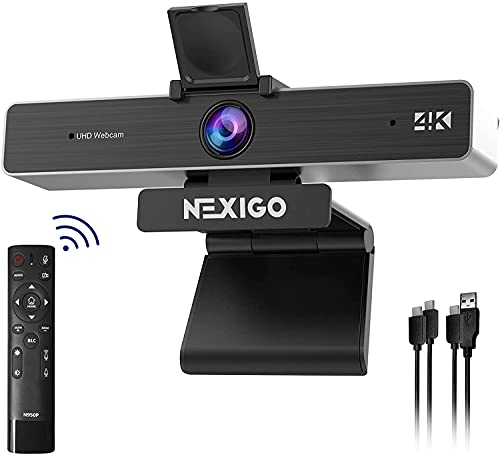
The NexiGo N950P Gen 2 delivers 4K clarity with an 8.5-megapixel Sony sensor, delivering up to 3840×2160 at 30fps. It ships with a remote that supports 5X digital zoom, allowing you to adjust the framing from anywhere. The camera is compatible with USB-A and USB-C, and includes a privacy cover for safety. This model emphasizes convenience for presenters who want precise control during calls without being at the desk, making it well-suited for home offices and small meeting rooms where flexibility is valued.
NexiGo N950P Gen 2 (RF Remote) 4K HD
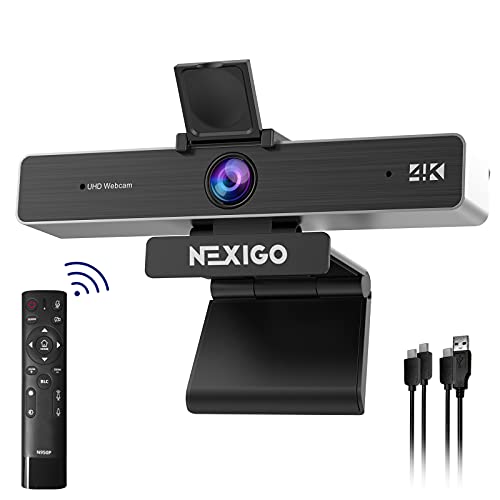
The Gen 2 version expands on the 4K N950P with enhanced remote capabilities and 5X digital zoom at 1080p. Users gain remote control to pan, tilt, zoom, mute, and adjust focus, making it easier to manage presentations or panel discussions from a distance. The camera’s 8.5MP sensor ensures crisp visuals during virtual conferences and online teaching. USB-A or USB-C compatibility adds flexibility for various setups, and the privacy cover helps protect privacy between meetings.
NexiGo N990 Gen 2 4K PTZ Webcam

The NexiGo N990 Gen 2 adds a professional PTZ experience with 4K resolution and a pan-tilt range that supports smooth transitions between presets. It includes a remote and position presets to quickly switch between framing options during complex meetings or lectures. The 8.5-megapixel Sony sensor promises clear, detailed video, while the remote empowers presenters to control zoom and camera direction without returning to the computer. Note that this model is designed for use with additional mics or audio setups, as it’s primarily a video camera with optional external audio.
DEPSTECH 4K Remote Zoom Webcam

The DEPSTECH DW50 Pro webcam brings Ultra HD 4K imagery via a Sony sensor, with 3X digital zoom controlled by a remote. It also features dual microphones with noise-cancellation to capture voices clearly in busy environments. While the zoom is digital rather than optical, the 4K/30fps output remains suitable for professional conferences, online teaching, and streaming. The remote adds convenience for adjusting zoom, volume, and focus from a distance. It is compatible with multiple platforms, including Zoom, Teams, OBS, and Google Meet.
Angetube Streaming Webcam With Ring Light
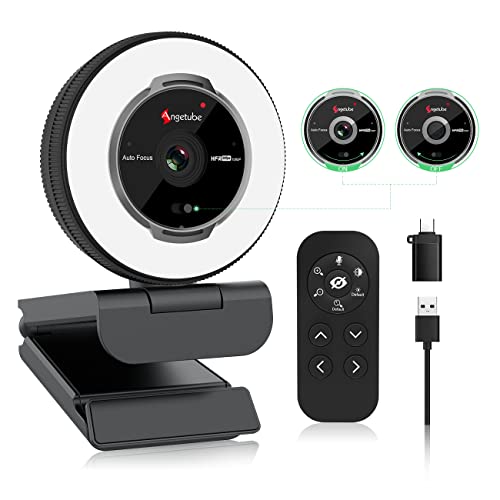
The Angetube 862Pro combines 1080p60 video with an integrated ring light for improved portrait quality in dim environments. It includes a 360° RF remote for quick adjustments, and 5X digital zoom for near-field framing changes during live streams or video calls. The camera is designed for PC, Mac, and streaming software like OBS, offering stable performance for content creators and remote workers who need reliable lighting and flexible remote control without software adjustments.
Buying Guide: Key Considerations and Comparisons
What to look for when choosing a webcam with remote PTZ capabilities:
- Resolution and frame rate: Higher resolution (4K) provides crisper detail, but 2K at 60fps can be more than enough for most meetings and saves bandwidth. Consider your display size and room lighting when choosing.
- Remote control and PTZ performance: A physical remote or app-based control should offer smooth pan, tilt, and zoom with reliable responsiveness. Availability of preset positions is a plus for multi-speaker setups.
- Autofocus and tracking: AI framing and fast autofocus help maintain the presenter in frame as participants join or move. TOF or similar technologies improve focusing speed in varied lighting.
- Microphones and audio processing: Dual mics with noise cancellation improve voice clarity. If the camera lacks a built-in mic, plan for an external mic in your setup.
- Connectivity and compatibility: USB-A or USB-C options increase compatibility with a wide range of devices. Privacy features like a physical cover are important for security.
- Room environment: Consider field of view (FOV). Wider angles accommodate more participants but can distort close-ups if not paired with robust framing features.
- Accessory ecosystem: Ring lights, privacy covers, and remotes enhance usability in home offices and classrooms, especially for content creation or streaming workflows.
- Setup and portability: For remote teams or educators who move between spaces, lighter, plug-and-play models with straightforward control systems are advantageous.
Typical use-case guidance:
- Remote meetings and virtual classes: Prioritize auto-framing, reliable autofocus, and clear audio. A built-in privacy cover adds security between sessions.
- Streaming and content creation: Favor 4K or high-bit-depth sensors, wide FOV with adjustable zoom, and a ring light for flattering illumination.
- Conference rooms: PTZ with presets and multiple input options enable seamless, professional presentations and speaker transitions.
All options listed here provide remote control capabilities in various formats, with several offering PTZ, AI framing, and privacy features designed to enhance professional video collaboration. Selecting the right model depends on your workspace, meeting size, and whether you prioritize 4K detail, remote framing, or integrated lighting for video production.