Choosing the right web camera for a large conference room involves balancing field of view, auto-framing, audio pickup, and compatibility with common platforms like Zoom and Microsoft Teams. The following five models are selected for their wide coverage, robust audio, and enterprise-ready features that help ensure every participant is seen and heard clearly in bigger spaces.
Summary of selected products
| Product | Brand | Key Feature | Platform/Use |
|---|---|---|---|
| WYRESTORM 4K Webcam with AI Tracking | WYRESTORM | AI Framing, presenter tracking, 120° FOV | Zoom, Teams |
| TONGVEO All-in-One Conference Room System | TONGVEO | All-in-one camera + Bluetooth speakerphone | HD/60fps outputs |
| 4K Webcam Conference Call TV Room Web Camera | TONGVEO | 4K, 116° wide, AI framing | Zoom/Teams/OBS |
| j5create 360 Degree Meeting Webcam | j5create | 360° view, omnidirectional mic | Video conferences |
| Owl Labs Meeting Owl 3 | Owl Labs | 360° video, AI-driven speaker tracking | Teams/Zoom/Meet |
WYRESTORM 4K Webcam With AI Tracking

The WYRESTORM 4K webcam delivers sharp 4K video at up to 30fps, designed for high-quality virtual meetings. Its AI framing and tracking keep attendees centered within a wide 120° field of view, and presenter tracking dynamically follows the speaker as they move around the room. The camera is well-suited for large conference spaces and integrates with common platforms like Zoom and Microsoft Teams, ensuring a natural, face-to-face meeting experience even in bigger rooms.
TONGVEO All-in-One Conference Room System

This all-in-one system combines an HD auto-tracking PTZ camera with a Bluetooth conference speaker. Output options include HDMI and USB 3.0, offering flexible integration for small-to-medium conference rooms. With AI-based tracking and full-duplex microphone arrays, it aims to deliver clear video and audio in real-time, helping participants feel as if they are in the same room.
4K Webcam Conference Call TV Room Web Camera

This 4K conference camera from TONGVEO features a 116° wide-angle lens to capture large groups in a single frame. Dual omnidirectional microphones provide clear audio with noise reduction, and built-in high-fidelity speakers deliver balanced sound. It is marketed as compatible with Zoom, Google Meet, and Microsoft Teams, making it suitable for larger meeting rooms that require a more expansive field of view.
j5create 360 Degree All-Around Meeting Webcam
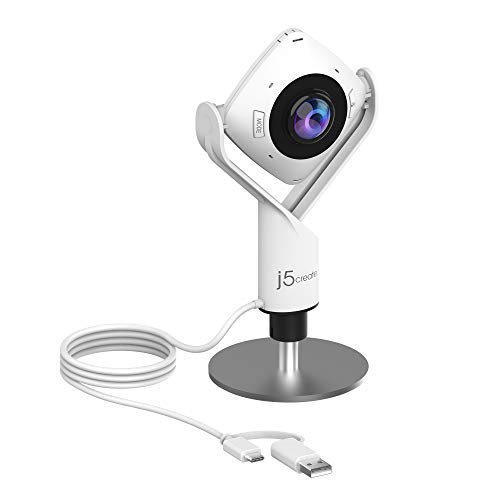
The j5create JVCU360 provides a 360° viewing angle with a built-in omnidirectional microphone for versatile room coverage. It supports Full HD 1080p at 30 Hz and is designed to offer flexible viewing angles for online classes, meetings, and collaborations. The broad field of view helps ensure everyone is visible during group discussions in larger spaces.
Owl Labs Meeting Owl 3

The Meeting Owl 3 provides 360° 1080p video with 360° audio coverage over long-range pickup. Its Owl Intelligence System analyzes cues to automatically focus on in-room speakers, supporting hybrid collaboration. The device is designed for quick, plug-and-play deployment and centralized management, making it suitable for expanding meeting spaces and distributed teams.
Buying Guide
- Field of view and auto-framing: In large rooms, look for cameras with 120°+ FOV and AI framing or presenter-tracking to keep everyone visible without manual adjustments.
- Audio coverage: Large rooms require multiple mics or a robust speakerphone; consider models with multi-mic arrays and echo cancellation to minimize background noise.
- Video quality and frame rate: 4K offers sharper detail, but ensure the system can sustain 30fps for smooth motion. For some setups, 1080p with a wide FOV may suffice and reduce bandwidth needs.
- Connectivity and compatibility: USB3.0/HDMI outputs, PTZ controls, and compatibility with Zoom, Teams, and OBS expand integration options in varied rooms.
- Ease of deployment: Plug-and-play devices with simple management tools help IT teams deploy and monitor a fleet of cameras across floors or campuses.
- Room size alignment: For very large rooms, consider multi-camera setups or devices offering speaker-tracking to capture active participants beyond a single fixed frame.
- Maintenance and reliability: Look for devices with robust build quality, clear mounting options, and stable firmware support to reduce downtime.
- Security and privacy: Prefer USB plug-and-play devices with straightforward hardware privacy features and trusted software ecosystems.