Choosing the right wall-mounted monitor and keyboard arm can transform a cluttered workspace into a streamlined, ergonomic station. The selections below cover a range of configurations—from single-monitor setups with space-saving keyboard trays to full workstations with CPU holders. Each option supports common 17″–32″ displays and offers multi-axis movement for optimal comfort during work or study sessions.
| Product | Screen Size Range | Key Features |
|---|---|---|
| VIVO STAND-SIT1BW | 17″–32″ | |
| VIVO Mount-VWKB1 | 17″–32″ | |
| Mount-It! MI-7905 | Up to 41″ wall extension | |
| Mount Plus MED02 | 17″–35″ | |
| VIVO STAND-SIT1WD | 17″–32″ |
Note: The matrix above highlights general capabilities. Each product below is described with its official features to help you compare mounting options, range of motion, and space-saving benefits for a wall-mounted monitor and keyboard setup.
VIVO STAND-SIT1BW: Wall Mount Keyboard Tray And Monitor Stand

The VIVO STAND-SIT1BW is a wall-mount system designed for 17″–32″ screens up to 17.6 lbs. It features a height-adjustable center pole and full articulation with -35° to +35° tilt, 180° swivel, and 360° rotation. Cable clips help keep cords organized during transitions, contributing to a cleaner setup. This unit emphasizes space savings by mounting directly to the wall and providing a stable, adjustable viewing and typing position.
VIVO VWKB1: Pneumatic Keyboard Tray And Single Monitor Wall Mount

This wall mount and pneumatic keyboard tray combo supports 17″–32″ monitors with VESA 75x75mm and 100x100mm patterns. The pneumatic arm provides comfortable typing angles, while the monitor offers +10° to -10° tilt, 20° swivel, and 360° rotation. Height is adjustable via a sliding mechanism, and the setup stays close to the wall—only about 5.1 cm for the monitor and 11.4 cm for the keyboard tray when folded.
Mount-It MI-7905: Sit-Stand Wall Mount Workstation
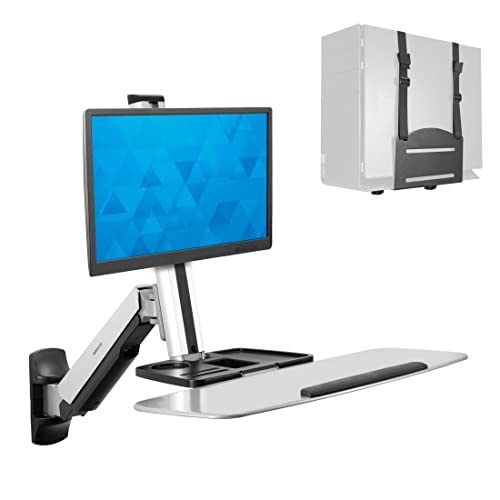
The Mount-It MI-7905 combines a full wall-mounted workstation with an adjustable height stand. It supports monitors up to 41 inches from the wall and includes a monitor arm, a keyboard/mouse tray, and a CPU holder. The gas spring counterbalance system enables easy up-and-down transitions, with a monitor tilt of 15°, 180° arm swivel, and 360° monitor rotation. This system prioritizes space savings for high-traffic areas and shared workspaces.
Mount Plus MED02: Medical-Grade Wall Mount With Keyboard Tray

The Mount Plus MED02 is designed for 17″–35″ screens and features a large sliding mouse pad, a foldable keyboard tray, and a gas-spring monitor arm. Its discursive wall profile supports rotation, tilt, and swivel within a compact footprint (3.5″–16.7″ range). This model focuses on ergonomic typing and extended reach for monitor height adjustment, making it suitable for medical or office environments that require a versatile wall-mounted workstation.
VIVO STAND-SIT1WD: Premium Single Monitor Wall Mount With CPU Holder
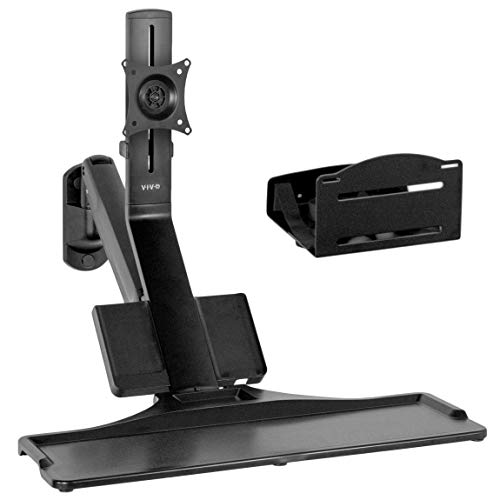
The VIVO STAND-SIT1WD offers a counterbalanced sit-stand workstation for a single 17″–32″ monitor with a built-in CPU holder. The system supports smooth standing transitions with a cable management system to keep cords neat. Its arm and tray can fold up for space-saving storage, making it a solid choice for compact offices or shared spaces where mobility and organization are important.
Mount-It MI: Single Monitor Arm Wall Mount With Keyboard Tray
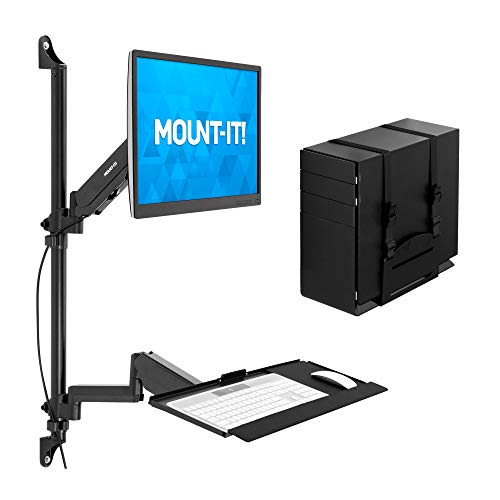
This Mount-It! unit combines a single monitor arm with a keyboard tray and CPU holder for a wall-mounted workstation. It is designed for 17″–32″ displays with VESA 75x75mm and 100x100mm patterns and supports up to 17.6 lbs per arm. The package emphasizes durability and a compact wall installation suitable for medical or industrial settings where space efficiency is crucial.
VIVO STAND-SIT1K…: Wall Mount With Counterbalance
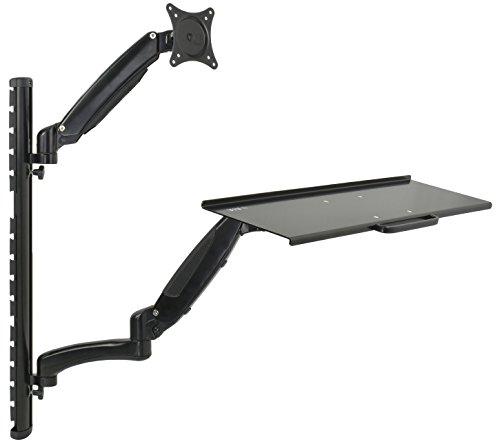
The VIVO STAND-SIT1K… provides a wall-mounted monitor and keyboard workstation with counterbalance springs. It maintains a cable management system and allows folding of arms and tray for storage. This configuration is designed to adapt to varied positions and reduce desk clutter without sacrificing accessibility or ergonomics.
Mount-It! Keyboard Wall Mount With Pole Option

This Mount-It! model focuses on saving space by mounting a keyboard and mouse on the wall or via a pole, freeing desk surface for other tasks. It offers a spring-assisted arm with 85° tilt and 90° swivel, plus a 21.8″ extension. The platform accommodates both keyboard and mouse, with potential to convert the arm into a monitor mount compatible with 75×75 or 100×100 VESA patterns for up to 32″ screens.
Buying Guide: Key Purchase Considerations and Comparisons
- Monitor compatibility: Confirm VESA patterns (75x75mm or 100x100mm) and weight limits match your display. Choose a wall mount with a weight rating that exceeds your monitor’s weight for safe operation.
- Arm mechanics: Decide between gas or pneumatic springs, manual counterbalance, or full-motion joints. Gas/pneumatic systems typically offer smoother height changes and easier adjustments, while manual systems can be simpler and more budget-friendly.
- Range of motion: Look for tilt, swivel, and rotation capabilities to achieve ergonomic angles for typing and viewing. A 360° rotation is valuable for portrait-to-landscape flexibility.
- Space and profile: If you have limited wall depth, choose low-profile mounts. Keyboard trays that fold or slide away help maximize floor space and reduce clutter.
- CPU and storage: If you need a CPU holder, verify compatibility with your chassis size and mounting options. A dedicated CPU shelf helps keep the desk clear and improves airflow.
- Cable management: Built-in cable clips or channels reduce cord chaos during movement and repositioning, contributing to a cleaner look and safer operation.
- Installation constraints: Consider your wall type (stud, concrete) and the required mounting hardware. Some units require larger wall supports or additional braces for stability.
- Maintenance and lifetime costs: While many options are robust, check warranty terms and support resources in case of adjustments or replacements.
- Use-case orientation: For shared or multi-user spaces, prioritize adjustable height and quick transitions between standing and sitting to accommodate different users.