Discover top wall-mounted mounting solutions designed for flat screen TVs and monitors. This guide highlights five highly compatible, easy-to-install options, detailing fit, weight tolerance, and installation nuances to help you choose the best no-stud or low-profile mount for your space.
| Product | Brand | Compatibility | Weight Capacity | VESA Range |
|---|---|---|---|---|
| Auoace No Stud TV Wall Mount | Auoace | 13–55″ TVs, up to 99 lbs | Up to 99 lbs | 100×100–400×400 mm |
| HangSmart TV Wall Mount | Hang Smart TV | Most LED/LCD Flat Screens, up to 100″ TVs | Up to 150 lbs | Varies by model |
| PERLESMITH Fixed TV Wall Mount | PERLESMITH | 26–60″ TVs | Up to 115 lbs | 75×75–400×400 mm |
| QualGear QG-TM-001 | QualGear | 37–70″ TVs and Monitors | — | Typically up to 400×400 mm |
| Mounting Dream MD2163-K | Mounting Dream | 42–84″ TVs | Up to 132 lbs | 600×400 mm & many variants |
Auoace No Stud TV Wall Mount: Quick, No-Drill Setup
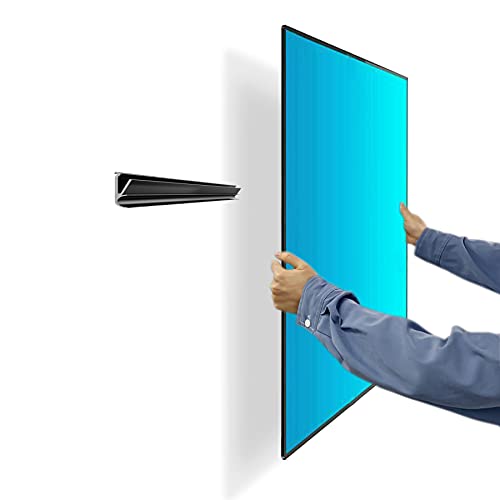
The Auoace wall mount is designed for drywall installations without studs, screws, or drilling. It supports TVs from 13 to 55 inches and up to 99 pounds, with VESA patterns from 100×100 mm to 400×400 mm. The mount includes all hardware and a detailed installation guide to facilitate a fast setup. It is suitable for reducing wall clutter while preserving a clean, gap-free look with about 1.1 inch clearance from the wall. This option is ideal for renters or those avoiding wall damage.
HangSmart TV Wall Mount: Patented No-Stud Solution

HangSmart TV offers a fully DIY no-stud mounting experience, ideal for renters or DIYers seeking a simple installation. The mount accommodates a broad range of flat screen LED or curved TVs and supports up to 100-inch models weighing as much as 150 pounds. Its design emphasizes ease of use, robust support, and broad compatibility, making it a versatile choice for larger TV setups where wall integrity and space optimization matter.
PERLESMITH Fixed TV Wall Mount: Ultra-Slim, Space-Saving

This low-profile fixed mount positions TVs as close as 1.18 inches to the wall, maximizing space efficiency. It supports most 26–60 inch TVs with VESA patterns up to 400×400 mm and a weight capacity of 115 pounds. The mount’s stainless steel construction emphasizes durability, while its tight profile adds a sleek, modern aesthetic to living rooms, bedrooms, or offices.
QualGear QG-TM-001: Ultra Low Profile for 37–70-Inch TVs

QualGear QG-TM-001 features a sleek, ultra-low profile suitable for most 37–70 inch TVs and monitors. It notes VESA compatibility up to 400×400 mm and emphasizes the need to verify suitability before purchase. This mount is offered in a silver finish and is designed for a minimal gap between the screen and wall, supporting a clean, uncluttered look while maintaining secure anchoring.
Mounting Dream MD2163-K Fixed Mount: Heavy-Duty, Wide Range
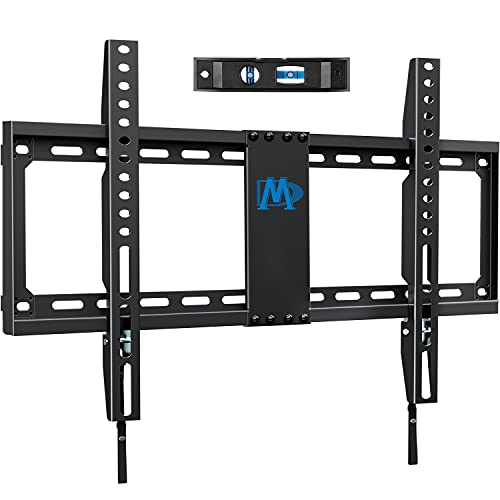
Mounting Dream MD2163-K is a fixed mount designed for larger TVs, supporting 42–84 inch screens up to 132 pounds. It offers a low-profile build and compatibility with a range of VESA patterns, including up to 600×400 mm. The kit includes essential hardware and is compatible with various stud configurations, making it suitable for both wood stud and masonry installations with appropriate anchors.
Buying Guide: Key Purchase Considerations for Wall-Mounted TVs
- TV size and weight: Ensure the mount supports the screen size and weight exactly. Mismatched capacity risks wall damage or failure.
- VESA compatibility: Check the distance pattern on the back of your TV. A mount with a compatible VESA range is essential for a secure fit.
- Wall type and installation method: No-stud or fixed mounts work best on drywall or plaster with proper hardware; tilting or full-motion mounts may require more robust installation on studs or masonry.
- Distance from wall: Low-profile mounts save space but have limited adjustability; full-motion mounts offer tilt, swivel, and extension but require more wall clearance.
- Orientation and viewing angle: Tilt or swivel features help reduce glare and improve ergonomics from different seating positions.
- Security and accessibility: Consider locking mechanisms or quick-release features if the TV is in a shared or public area.
- Cable management: Look for mounts with channels or clips to route cables neatly, reducing strain on connections over time.
- Installation difficulty: Some mounts come with clear guides and ready-to-use hardware, while others may require professional help for optimal safety.
When selecting a wall mount for a “wall hanging flat screen TV,” consider space constraints, wall structure, and future TV upgrades. The five options above cover a spectrum from no-stud and ultra-slim designs to fixed and tilting configurations, offering reliable performance for American living rooms and home offices.