For video professionals, converting SDI signals to HDMI or HDMI to SDI is a common workflow need. The following selections cover multiple input and output configurations, including loop-out options, 1080p support, and multi-channel audio handling. The list emphasizes reliability, compatibility, and ease of integration with cameras, monitors, projectors, and streaming gear.
| Product | Type | Inputs | Outputs | Key Benefit |
|---|---|---|---|---|
| SHUITING SDI to HDMI Converter with Loop Out | SDI to HDMI | SDI (BNC) | HDMI | Loop-out for SDI monitoring |
| ACHAVE 4×4 SDI to HDMI Video Converter | SDI to HDMI | 4 SDI | 4 HDMI | Bulk simultaneous feeds |
| SHUITING HDMI to SDI Converter | HDMI to SDI | HDMI | SDI | Dual SDI outputs |
| FERRISA SDI to HDMI Converter with Loop Out | SDI to HDMI | SDI | HDMI + SDI loop | Flexible monitoring |
| Anber-Tech SDI to HDMI Converter | SDI to HDMI | SDI | HDMI | Auto format detection |
Note: The featured devices primarily convert SDI to HDMI or HDMI to SDI, with various loop-out and multi-output capabilities. Always verify signal format compatibility and cable length requirements for your specific setup.
SHUITING SDI To HDMI Converter With Loop Out

This converter translates HD-SDI, 3G-SDI, and SD-SDI signals to HDMI for displays, projectors, and HDTVs. It supports full 1080p output with synchronized audio and video, making it suitable for camera feeds, live monitoring, and classroom presentations. Important: It only converts SDI to HDMI and requires a SDI source with a BNC male connector.
ACHAVE 4 In 4 Out SDI To HDMI Converter

Equipped with four SDI inputs and four HDMI outputs, this device enables simultaneous routing of multiple HD-SDI/3G-SDI sources to HDMI displays. It supports HD-SDI and 3G-SDI formats with built-in equalization and clock recovery, delivering reliable 1080p@60Hz output across displays. Suited for control rooms, multi-camera setups, and live events.
SHUITING HDMI To SDI Converter

HDMI to SDI conversion enables displaying HDMI sources on SDI-capable displays or transmitters. It supports high-bit-rate transmissions and multiple SDI formats, with robust performance at ranges suitable for studio or live event environments. Note: Not bi-directional; intended for HDMI to SDI only.
FERRISA SDI To HDMI Converter With Loop Out
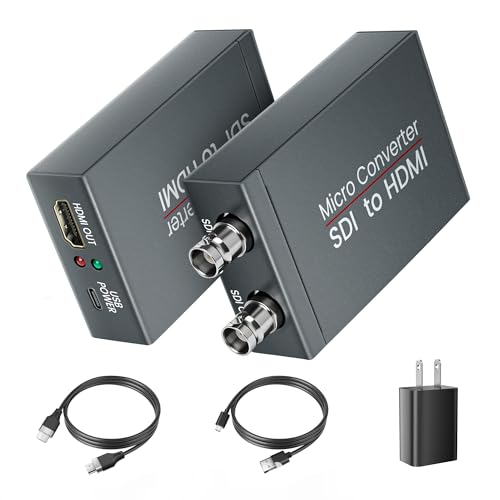
FERRISA’s unit converts SDI signals to HDMI and provides an SDI loop-out, enabling concurrent monitoring while transmitting to HDMI displays. It supports SDI formats up to 3G-SDI with HDMI output at up to 1080p60, making it suitable for surveillance setups, classrooms, and broadcast environments. Ensure the source uses SDI, not RF or CVBS formats.
Anber-Tech SDI To HDMI Converter

Auto format detection supports 3G-SDI, HD-SDI, and SD-SDI inputs, delivering 1080p-level HDMI output. The device is designed for long SDI cable runs and provides loop-out for additional monitoring or distribution. It’s a straightforward SDI-to-HDMI solution for cameras and control rooms, with noted emphasis on SDI input compatibility.
KLEAWARTE SDI To HDMI Converter With Loop Out

The KLEAWARTE unit supports HD-SDI and 3G-SDI signals, delivering up to 2.97 Gbps with no signal loss and a built-in SDI loop-out. It provides high-definition HDMI output up to 1080p and includes a loop-out for SDI monitoring, making it useful for live production and broadcasting workflows. Note that 4K is not supported.
Blackmagic Design Micro Converter HDMI To SDI 12G

Blackmagic Design’s Micro Converter handles HDMI to SDI with 12G-SDI, expanding capabilities for high-bandwidth workflows. It comes with a power supply and multiple adapters, suitable for broadcast environments requiring robust conversion from HDMI to SDI. It supports professional broadcast-standard outputs and integrates with other Blackmagic gear.
Buying Guide: Key Considerations For Video To SDI Converters
- Signal direction and format support: Confirm whether the device is SDI-to-HDMI, HDMI-to-SDI, or bidirectional, and ensure it supports the exact SDI formats you use (HD-SDI, 3G-SDI, SD-SDI).
- Resolution and frame rate: Check that the converter handles your target resolution and frame rate (commonly 1080p60 in many setups; some devices cap at 1080p60 or 1080p50).
- Loop-out and multi-output: If you need to monitor or distribute signals to multiple displays, look for loop-out or multiple HDMI/SDI outputs and compatibility with your monitoring workflow.
- Cable and distance considerations: Pay attention to recommended cable lengths for SDI runs (coaxial, BNC) and any equalization or clock recovery features that improve signal integrity over long runs.
- Audio handling: Some models embed or de-embed audio; verify whether you need audio signals to be embedded in HDMI or extracted for separate audio paths.
- Power and portability: Consider power requirements (AC adapter, USB-C) and form factor for field use, studios, or mobile workflows.
- Compatibility with existing gear: Ensure inputs/outputs align with your cameras, monitors, switchers, and streaming encoders. If using control rooms, verify compatibility with NDI, SRT, RTMP, or other production protocols if relevant.
- Reliability and support: Choose products with positive reliability histories and available manufacturer support, especially for critical live workflows.