If you’re connecting older video gear or DV camcorders to a modern computer, a reliable FireWire (IEEE 1394) adapter can make all the difference. This article compares five top-rated USB/FireWire adapters and cables that bridge FireWire with USB-equipped devices. Each option prioritizes compatibility, ease of use, and data transfer performance to help you move video files efficiently.
| Product | Brand | Key Benefit |
|---|---|---|
| LÓVFEIFAN USB 2.0 to IEEE 1394 Mini 4Pin | LÓVFEIFAN | Simple camera-to-USB solution with 480 Mbps transfer |
| Herfair Firewire To USB Adapter Cable 6-Pin | Herfair | Plug-and-play, 480 Mbps, broad device compatibility |
| MAYWILLA Firewire To USB Adapter Cable 6 Pin | MAYWILLA | Plug-and-play, easy 1394 to USB connection for DV devices |
| PASOW Firewire Cable 4 Pin to 6 Pin | PASOW | Versatile 6-pin to 4-pin with up to 400 Mbps |
| Cuxnoo FireWire Cable 6 Pin to 4 Pin | Cuxnoo | Reliable 1394 400 Mbps transfer with broad device support |
Note: These options focus on hardware that facilitates data transfer for older video gear. Some products explicitly mention that they do not support video capture, which is common for many FireWire–to–USB adapters. Always verify device compatibility with your DV camcorder, printer, scanner, or hard drive before purchase.
LÓVFEIFAN USB 2.0 to IEEE 1394 Mini 4Pin Adapter Cable

This USB 2.0 to IEEE 1394 Mini 4-pin FireWire DV cable serves as a practical bridge between a camcorder with a Mini 4-pin FireWire port and a computer’s USB port. It transfers data at up to 480 Mbps, enabling quick file movement for many standard-definition DV workflows. The cable features a Mini 4-pin FireWire (IEEE 1394) connector on one end and a USB 2.0 plug on the other, making it compatible with a wide range of consumer devices that support USB input. Use this when you need a compact, straightforward connection for basic DV transfer tasks.
Herfair Firewire To USB Adapter Cable 6-Pin IEEE 1394

Herfair’s 6-pin Firewire to USB adapter is designed for devices with IEEE 1394 6-pin ports. It converts FireWire 400 signals to USB 2.0, enabling data transfer to a computer. This cable supports plug-and-play operation and up to 480 Mbps transfer speed, allowing quick media transfers from compatible cameras, camcorders, and external drives. Note that capturing DV video directly may not be supported by all configurations, so verify your software’s capture capabilities if needed.
MAYWILLA Firewire To USB Adapter Cable 6 Pin

MAYWILLA’s 6-pin FireWire to USB adapter creates a direct path from FireWire-enabled devices to a computer’s USB port. The cable emphasizes plug-and-play convenience and supports hot-swapping. It’s designed for use with DV camcorders, digital cameras, and other 1394 devices that rely on a USB host. The note for users: USB interfaces do not inherently provide video capture, so this cable is best for data transfer and viewing, not direct DV capture in all setups.
PASOW Firewire Cable 4 Pin to 6 Pin
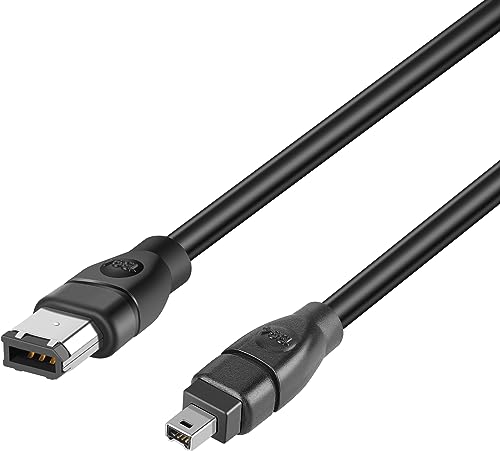
PASOW offers a versatile FireWire cable that converts between 4-pin and 6-pin connectors, enabling compatibility across a wide range of devices. This 6-foot cable targets applications like camcorders, digital cameras, and printers with FireWire ports. It supports up to 400 Mbps data transfer, which is typical for FireWire 400 interfaces. This option is helpful when a device only offers a 4-pin port, but your computer has a 6-pin input.
Cuxnoo FireWire Cable 6 Pin to 4 Pin
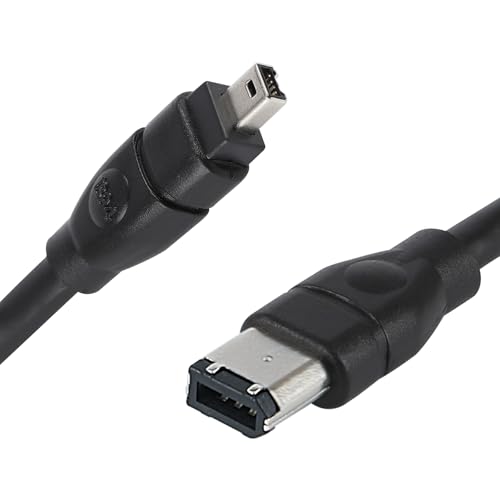
The Cuxnoo FireWire cable provides a 6-pin to 4-pin arrangement, designed for computers and devices that require different FireWire port configurations. It maintains a stable 1394 data path with an emphasis on snug connectors and broad device support, including cameras, camcorders, printers, and external drives. The 6-foot length offers flexible setup Space for video transfer workflows that rely on legacy FireWire connectivity.
Buying Guide: Key Considerations for FireWire Adapters
- Device compatibility: Confirm whether your DV camcorder or device uses a 6-pin or 4-pin FireWire port and whether your computer supports FireWire input via USB adapters. Some adapters do not support video capture and are intended for data transfer only.
- Transfer speed: FireWire 400 (1394a) tops out around 400 Mbps; FireWire 800 (1394b) supports higher data rates. Most consumer adapters in this list target up to 480 Mbps USB-1394 bridges, adequate for standard-definition DV transfers but not high-end HD capture.
- Power considerations: Some FireWire devices draw power from the host USB port. If you’re using older camcorders, ensure the adapter provides sufficient power or use an external powered hub if needed.
- Plug-and-play vs. driver needs: Many adapters are plug-and-play, but some may require drivers or software compatibility checks with your operating system (Windows, macOS, or Linux).
- Video capture capability: If you need direct DV capture, verify that the adapter and your recording software can perform real-time capture. Several cables are designed for viewing or file transfer rather than live capture.
- Cable length and build quality: Longer cables can introduce signal degradation for some FireWire devices. Choose a length appropriate for your setup and consider shielded cables for interference-sensitive environments.
- Future-proofing: If you anticipate needing FireWire access to multiple devices, consider a reversible setup with adapters that support both 6-pin and 4-pin configurations or a multi-connector option.
In practice, the best choice depends on your existing hardware and intended workflow. If you primarily need to transfer video from a FireWire camcorder to a USB-equipped computer, any of these adapters can help bridge the gap. For archival efforts or high-volume transfers, prioritize models with clear compatibility notes and reliable signal integrity. Always test with your specific device and software to confirm capture and transfer behavior before committing to a long-term setup.