Keep gaming gear neatly organized with purpose-built storage cabinets designed for consoles, controllers, and discs. This guide highlights five top picks that maximize space, improve accessibility, and blend with living room or entertainment setups. Each option offers unique features such as modular expansion, cable management, LED accents, and durable construction to suit different room sizes and aesthetics.
| Product | Brand | Key Feature |
|---|---|---|
| RASOO Media Cabinet | RASOO | Vertical PS5/Xbox storage with drawers and hooks |
| Hongtamoya 4-Tier AV Stand | Hongtamoya | Four tiers with two hooks; versatile media rack |
| YAMAZAKI Home Tower Rack | YAMAZAKI | Large capacity, pull-out shelf, cable management |
| Qupui 4-Tier Cabinet with Lighting | Qupui | LED lighting, USB ports, built-in outlets |
| Aquzee 4-Tier Shelf with Outlets | Aquzee | Outlets, RGB light strips, compact 4-tier design |
The following sections present each cabinet with a concise overview, notable features, and how it supports a tidy gaming space. Read on to compare setup flexibility, storage capacity, and cable management options across styles—from modular and wall-friendly units to open-shelf organizers with decorative lighting.
RASOO Vertical Media Cabinet

Designed for vertical PS5 and Xbox Series X/S consoles, this cabinet emphasizes space efficiency with built-in shelves and two drawers for game discs, controllers, and cables. Its modular design supports single or double configurations, making it adaptable for growing setups. Detachable hooks offer flexible placement to keep peripherals within reach, reducing desk clutter without sacrificing accessibility.
Hongtamoya 4-Tier AV Stand

This four-tier entertainment rack accommodates a variety of devices beyond gaming consoles, including Blu-ray players, speakers, and media accessories. A fabric-drawer provides discreet storage for small items, while two sturdy hooks can be mounted on either side to hang headsets or remotes. Brass handles enhance pull-out usability, supporting a tidy living room or game room aesthetic.
YAMAZAKI Home Tower Rack

YAMAZAKI’s tower rack blends minimalism with practical storage. A spacious top shelf holds two controllers, while a pull-out lower shelf keeps consoles accessible. The back features silicone cable holders and multiple ventilation holes to help prevent overheating and cable tangling, supporting a clean and efficient gaming setup that’s easy to maintain.
Qupui 4-Tier Cabinet with Lighting

This living-room friendly cabinet features four adjustable shelves with protective doors and built-in USB ports plus power outlets for easy device charging and power management. RGB lighting provides six brightness levels and 22 dynamic modes, enabling customizable ambiance that complements gaming sessions and entertainment time.
Aquzee 4-Tier Shelf with Outlets
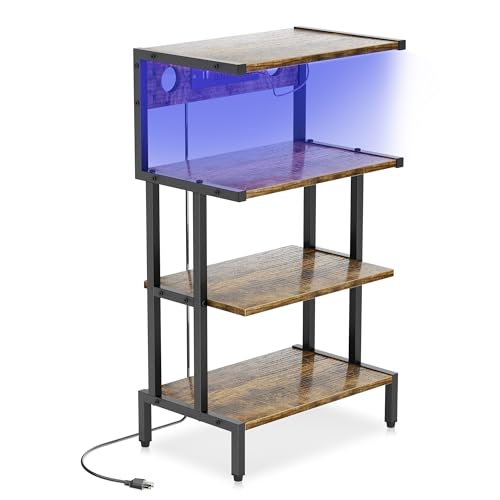
The Aquzee stand combines practical outlets with RGB lighting for an engaging setup. Its four-tier design accommodates consoles, media players, and audio components, while the back board design and cable routing holes help keep cords organized and out of sight. It is sized to fit compact spaces yet offers ample room for everyday gaming gear and accessories.
Buying Guide: Choosing the Right Console Storage Cabinet
Key factors influence the best cabinet for a given space and gaming routine. The following considerations help compare options objectively and tailor a purchase to real-world use.
- Storage capacity and layout: Assess the number of consoles, controllers, discs, and accessories you need to house. Vertical designs save floor space; four-tier shelves maximize open storage for media devices and game cases.
- Modularity and expansion: If you anticipate adding new consoles or gadgets, prefer modular or expandable units that can reconfigure without replacing the whole setup.
- Cable management: Look for built-in cable holes, grommets, and cable ties or channels to reduce tangling and overheating risks. Silicone holders and ventilated backs are a plus.
- Accessibility: Pull-out shelves or front-facing drawers speed up access to frequently used devices and controllers, enhancing daily usability.
- Aesthetics and materials: Choose finishes and designs that align with room decor—modern metal and wood blends work well in living rooms, while minimalist styles suit home offices or bedrooms.
- Lighting features: RGB or LED accent lighting can elevate ambiance and assist with locating items in low light, but ensure it’s not overly distracting during gameplay.
- Durability and stability: Check weight ratings for shelves and the overall stability of the frame, especially in active living spaces or households with pets and kids.
- Assembly and maintenance: Consider ease of assembly and whether the unit uses common hardware. Removable drawers and washable components simplify upkeep.
When selecting a cabinet, weigh how often you upgrade your gaming hardware, the room footprint available, and whether you prefer a closed cabinet with doors or an open-shelf design that prioritizes quick access. For small spaces, vertical or corner-friendly units maximize square footage, while larger rooms can accommodate wider, multi-shelf configurations with more storage options.