Turning old home movies and analog recordings into modern digital formats is easier with the right video converter device. This guide highlights five reliable options that support MPEG-2 encoding or strong analog-to-digital capabilities, helping you preserve memories and create shareable files. Each product below explains core features, compatibility, and how it fits typical tape-to-digital workflows for Windows, Mac, and external storage needs.
| Product | Brand | Key Capability | Output Formats |
|---|---|---|---|
| StarTech USB Video Capture Adapter Cable | StarTech.com | Composite/S-Video to USB capture with MPEG-1/2/4 encoding | MPG/MPEG-4, SD resolutions |
| Little World USB 2.0 Video Converter | Little World | VHS/analog to digital capture via USB 2.0 | NTSC 720×480, PAL 720×576 |
| ClearClick Video to Digital Converter 2.0 | ClearClick | Standalone digitalizing device for VCR/VHS/DVR without PC | SD 640×480 / 720×480 (records to USB/SD) |
| Portta VHS to Digital Converter | Portta | VHS/VCR to USB, also RCA to HDMI pass-through | MP4, USB/SD storage |
| DigitPro VHS to Digital Converter 2.0 | DigitPro | One-touch analog-to-digital recording with built-in display | MP4/MP3/WAV |
Introduction text continues: The products above cover a range of needs—from PC-based capture with MPEG-2 options to standalone devices that record directly to USB or SD. Depending on whether you want to edit later in software, stream live, or simply archive memories, these devices offer accessible paths from analog tapes to modern formats.
StarTech USB Video Capture Adapter Cable
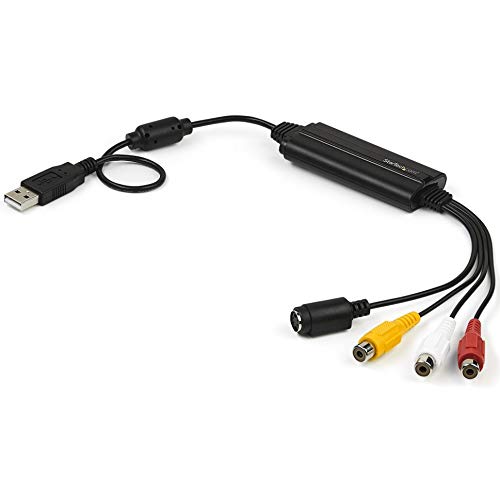
The StarTech S-Video/Composite to USB 2.0 adapter converts analog video signals into digital media, supporting 30fps at 720x480i (NTSC) or 25fps at 720×576 (PAL/SECAM) with MPEG-1/2/4 encoding. It includes TWAIN-compatible drivers for Windows 7–10 and works with third-party software (OBS, etc.) for capturing standard-definition video and sharing online. This option is well-suited for users who plan to edit with desktop software or stream recorded footage after capture.
Little World USB 2.0 Video Converter
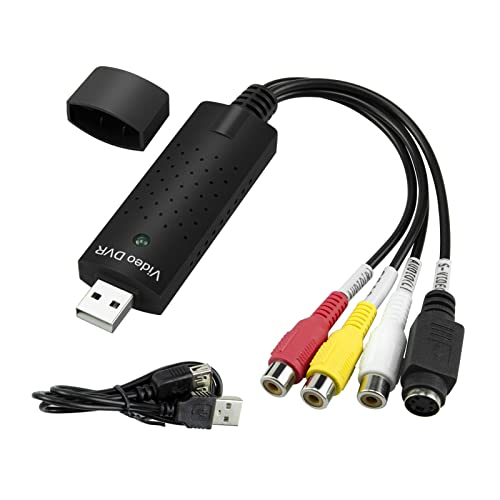
The Little World USB 2.0 device provides a simple bridge between analog sources (VHS, VCR, TV) and a Windows PC or Mac. It supports common formats and can capture video at NTSC 720×480 @ 30fps or PAL 720×576 @ 25fps, enabling a practical workflow for archiving to digital files. It’s a straightforward option for those who want a compatible capture path without heavy software dependencies.
ClearClick Video to Digital Converter 2.0
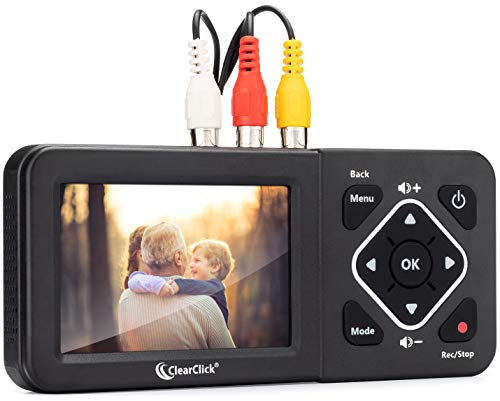
The ClearClick 2.0 model records directly to USB flash drives or SD cards without a computer or software. It supports SD 640×480 or 720×480 recording and is designed for a variety of legacy sources, including VHS/VCR, AV, RCA, Hi8, and Camcorder inputs. A critical feature is its standalone operation, which is ideal for quick digitization tasks where a PC setup isn’t convenient.
Portta VHS to Digital Converter

Portta’s device combines VHS to digital conversion with RCA to HDMI pass-through for real-time viewing on a TV while recording to USB or SD. It supports multiple video formats and NTSC/PAL standards, with a straightforward plug-and-play approach. Users can capture video and milk out MP4 files while maintaining playback on a display, making it a versatile option for mixed media setups.
DigitPro VHS to Digital Converter 2.0

The DigitPro 2.0 offers one-touch digital conversion with a built-in 3.5-inch LCD for real-time preview and playback. It supports 1080p 30Hz capture and records to MP4, MP3, or WAV formats onto USB drives or SD cards. Features like auto-pause on signal loss, time stamping, and scheduling provide flexible options for batch archiving or longer sessions without requiring a computer.
Buying Guide: Key Purchase Considerations
- Input formats and compatibility: Most units support CVBS (composite), S-Video, and RCA audio. Verify PAL/NTSC support and whether the device handles analog-to-digital conversions in MP4, MP4 variants, or MPEG-2 for editing compatibility.
- Output options: Decide if you want USB capture (PC-based workflow), standalone recording to USB/SD, or HDMI pass-through for real-time viewing. Standalone devices simplify setups without a computer.
- Storage and file formats: Check storage limits (USB drives or SD cards) and supported formats (MP4, WAV, MP3). Larger capacities are helpful for longer tapes and batch conversions.
- Software compatibility: If you plan to edit after capture, ensure drivers and software (TWAIN or vendor-provided) work with your preferred editing suite (OBS, PotPlayer, Adobe, etc.).
- Resolution and frame rate: Common SD resolutions (720×480, 720×576) and 30fps/25fps are typical for aging tapes. For higher-quality needs, confirm whether the device can upscale or output at higher bitrates.
- Stand-alone vs. PC-based: Stand-alone units reduce complexity but may offer fewer editing features. PC-based capture allows direct editing, streaming, or uploading to social networks.
- Ease of use and reliability: Look for straightforward setup, clear indicators, and reliable hardware build for long-term archiving projects.
- Future-proofing: Consider devices that support multiple input types (HDMI in the future, USB-C compatibility) or that can be replaced easily if your legacy equipment evolves.
- Customer support and documentation: Access to manuals, setup guides, and responsive support can be decisive for first-time digitization.