Turning aging VHS, Hi8, and DV tapes into sharp digital copies has never been easier thanks to versatile USB video capture devices. This guide highlights top USB VHS to digital converters that work with PCs and Macs, delivering reliable video capture, simple setup, and broad compatibility. Each option converts analog signals from VHS, VCR, DVD players, and game consoles to digital formats for archiving, editing, and sharing. Below, discover five standout picks, how they perform, and what to consider when choosing your converter.
Summary of selected products:
- Brand: VIXLW — USB video capture with plug-and-play setup and RCA/AV input options.
- Brand: avedio links — 1080p capture with USB2.0/Type-C support and NTSC/PAL compatibility.
- Brand: Portta — full digital recorder with LCD preview, USB/SD storage, and AV/RCA compatibility.
- Brand: DigitPro — versatile USB 2.0 capture supporting multiple formats and easy operation.
- Brand: Techigher — 2-in-1 VHS to digital converter and RCA to HDMI display output.
VIXLW USB Video Capture Card: Quick VHS To Digital

The VIXLW USB Video Capture Card is designed to digitize analog video from VHS, VCR, Hi8, and DV tapes with a straightforward plug-and-play approach. It converts RCA composite video input to HD 720p USB output and captures audio without requiring a dedicated sound card. This device emphasizes ease of use, with automatic driver installation once connected to a PC and no external power needed. It aims at families looking to preserve memories with minimal setup and reliable results.
Key considerations:
– Video input: RCA composite (CVBS) plus analog audio
– Output: USB video capture to PC, 720p resolution
– Compatibility: Windows and Mac with driver-free setup
– Usability: Plug-and-play, portable, no extra power required
avedio links VHS to Digital Converter
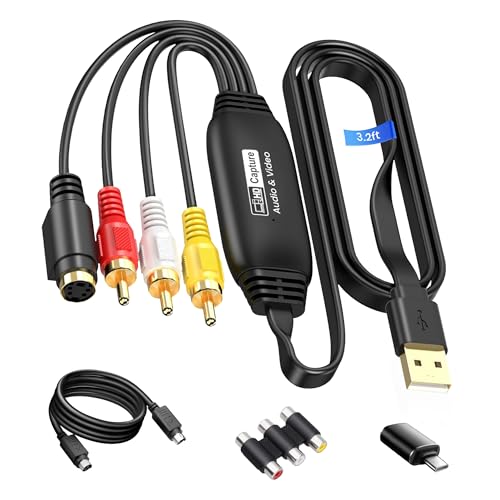
The avedio links USB2.0 Video Capture Card emphasizes 1080p/30Hz output from RCA or S-Video inputs. It captures video from VHS, VCR, DVD, VCD, DV camcorders, and other devices, with NTSC/PAL compatibility. The package includes a USB 2.0/Type-C interface for broad laptop compatibility and a 1-meter USB cable to reduce signal issues and improve flexibility during digitization. It suits shoppers who want a straightforward, high-definition digital conversion with flexible cable options.
Key considerations:
– Maximum resolution: 1080p @ 30Hz
– Inputs: RCA composite and S-Video; USB 2.0/Type-C
– Storage/transfer: Works with current laptops; stable capture
– Setup: Driver-free operation on supported systems
Portta VHS To Digital Converter

Portta’s model doubles as a video-to-digital recorder. It converts AV/RCA, S-Video, and AUX inputs into digital formats up to 1080p 30Hz, and features a 3.0″ LCD preview screen with built-in speaker for direct playback. It supports USB and SD card storage, enabling direct recording and playback on the device itself. It’s ideal for users who want an independent unit that avoids PC-based workflow while keeping high-quality output options, including MP4 and MP3 formats.
Key considerations:
– Recording resolution: up to 1080P 30Hz
– Storage options: USB drive or TF card; built-in preview LCD
– Inputs: AV/RCA, S-Video, AUX
– Independent playback: direct on-device viewing without a computer
DigitPro VHS To Digital Converter

DigitPro’s USB 2.0 capture card emphasizes broad format support, linking a PC with RCA/AV/S-Video inputs to capture VHS, VCR, DVD, and other analog sources. The device supports NTSC, PAL, and PAL/60 formats, and records in MP4 or similar digital formats to facilitate editing. It touts driver-free operation on compatible systems and aims to deliver a reliable, easy-to-use capture experience for those pursuing quick digitization and post-processing with common software.
Key considerations:
– Format support: NTSC/PAL/PAL60 with MP4 output
– Connection: USB 2.0; plug-and-play; driver-free
– Software compatibility: works with OBS, PotPlayer, QuickTime, etc.
– Target audience: users seeking simple, no-fuss digitization and editing
VIXLW USB Video Capture Card (Second Listing)

This VIXLW model presents an additional listing focused on high-performance capture with similar capabilities: RCA/AV input, USB 2.0 interface, and a plug-and-play workflow. It emphasizes rapid rendering and compatibility with standard editing workflows, making it suitable for users digitizing family footage or preserving older recordings for web sharing. The emphasis remains on straightforward operation and broad compatibility across Windows and Mac ecosystems.
Key considerations:
– Input types: RCA/AV; optional S-Video compatibility
– Output: USB 2.0 to PC or laptop
– Software synergy: supports common editing suites
– Power: USB-powered; no external supply required
Buying Guide: How To Choose The Right VHS To USB Converter
Core capabilities to compare
Resolution and frame rate: Look for devices that offer 1080p capture or better. If you intend to archive tapes for future editing, higher resolution and smoother frame rates help preserve detail. Consider 30fps as a baseline for standard video; 60fps is ideal for smoother motion in fast-action content.
Inputs and outputs: Ensure the converter supports RCA composite, S-Video, and, if you have newer gear, USB-C. Check whether the device can output directly to MP4 or MOV formats and whether it supports audio capture without a separate sound card.
Storage options and portability: Some units provide internal previews, built-in storage, or SD/USB expansion. Decide whether you want a PC-centric workflow or a standalone device that can record to USB drives or memory cards without a computer.
Ease of use and software compatibility
Plug-and-play setups save time, especially for non-technical users. Confirm driver availability and compatibility with your operating system (Windows, macOS, or Linux) and your preferred editing software (OBS, QuickTime, Final Cut, etc.).
Reliability and support
Read user reviews about stability during long captures and after-sales support from the brand. A robust user manual and included setup guides can be a big help when you’re digitizing an entire archive. Consider whether the device offers firmware updates or improved drivers over time.
Use case considerations
Casual home use often benefits from devices with built-in previews and straightforward recording. If you’re archiving a large library of tapes or planning to share openly on social media, prioritize models that deliver clean digital outputs with reliable color reproduction and noise reduction features. For gaming nostalgia, models with low-latency capture and good compatibility with streaming software can be advantageous.
Comparative verdicts
- Best overall for simplicity: Models with plug-and-play operation and reliable 720p/1080p capture that work on both Windows and macOS.
- Best for high-definition archiving: Units offering 1080p capture with NTSC/PAL support and robust USB interfaces (USB 2.0 or USB-C).
- Best standalone option: Devices with built-in LCD previews and storage options for direct playback without a computer.
- Best for retro gaming and live editing: Configurations that pair well with OBS/QuickTime and can capture audio without external hardware.
When selecting a VHS to USB converter, align the device’s capabilities with your primary goals—ease of use, output quality, and total workflow compatibility. Each product in this guide provides a viable path to preserving cherished memories and game footage, transforming aging tapes into accessible digital files ready for editing, sharing, and long-term storage.