Whether you’re delivering a business presentation or streaming media from a laptop to a projector, a reliable VGA connection is essential. This guide highlights five top cables that convert modern digital outputs to legacy VGA displays, ensuring crisp visuals and easy setup. Each option supports common high-definition resolutions and emphasizes durability, plug-and-play simplicity, and compatibility across devices such as laptops, desktops, tablets, and projectors.
Summary of chosen products:
| Product | Brand | Connection Type | Key Benefit |
|---|---|---|---|
| HDMI To VGA 6 Feet | BENFEI | HDMI Male To VGA Male | Strong stability with 1920×1080@60Hz support |
| DisplayPort To VGA 1.8M | BENFEI | DisplayPort Male To VGA Male | High-definition streaming up to 1080p |
| USB C To VGA 3ft | LBSC | USB-C Male To VGA Female | Plug-and-play with modern laptops |
| HDMI To VGA 3 Feet | BENFEI | HDMI Male To VGA Male | Compact, reliable for travel and meetings |
| HDMI To VGA 6ft | PANPEO | HDMI Male To VGA Male | Gold-plated connectors for stable signal |
BENFEI HDMI To VGA 6 Feet Cable

This uni-directional HDMI to VGA cable connects devices with an HDMI output to monitors, projectors, or TVs with VGA input. The compact design makes it easy to carry for presentations. It supports resolutions up to 1920×1080@60Hz (1080p) and 720p, 1600×1200, or 1280×1024. A built-in IC chip converts the digital HDMI signal to analog VGA, and the gold-plated HDMI connector helps resist corrosion and improve signal transmission. The molded strain relief adds durability for frequent use.
BENFEI DisplayPort To VGA Cable 1.8M
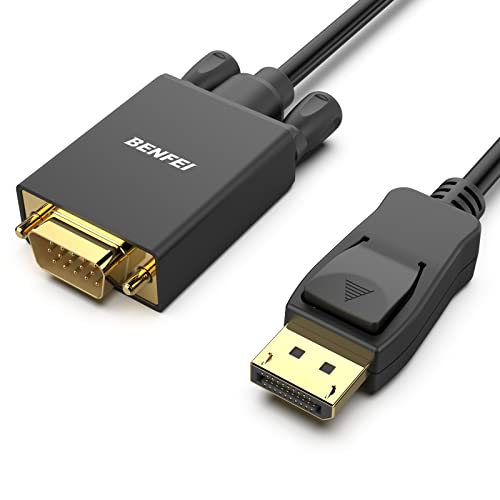
The DisplayPort to VGA cable transfers from DisplayPort sources to VGA displays, ideal for desktops or laptops with a DP output. It uses a dedicated chip and shielding to deliver stable, accurate data streaming. The cable supports up to 1080p at 60Hz and includes a gold-plated DisplayPort connector to improve durability and signal integrity. Note this is not a bidirectional converter and cannot convert VGA to DisplayPort. Molded strain relief enhances longevity for regular use.
LBSC USB C To VGA Cable 3ft

This USB-C to VGA cable is designed for modern laptops and tablets with USB-C ports. It offers plug-and-play operation with no extra drivers required. The durable housing fits securely into USB-C ports and provides stable VGA output for displays and projectors up to 1920×1200 at 60Hz. Note that charging or power delivery is not supported through this adapter, so it should be used solely for video output.
BENFEI HDMI To VGA 3 Feet Cable
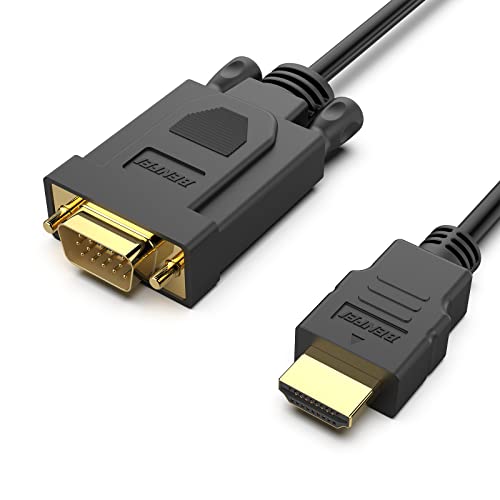
This compact HDMI to VGA cable provides a reliable bridge from HDMI sources to VGA displays and projectors. It supports up to 1080p at 60Hz and features a built-in IC chip for stable signal conversion. The gold-plated HDMI connector reduces corrosion and improves transmission, while molded strain relief helps withstand bending and daily use. The short length makes it especially suitable for desk setups and intimate meeting spaces.
PANPEO HDMI To VGA Adapter Cable 6ft
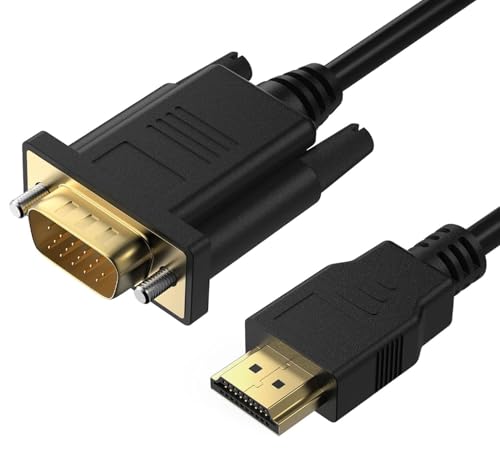
This HDMI to VGA adapter cable offers lossless HD signal conversion, bridging modern HDMI sources with older VGA displays. Gold-plated connectors help resist oxidation and reduce signal interference for clearer images. It’s a true plug-and-play solution that requires no external power or drivers, making it a reliable option for laptops, gaming consoles, and streaming devices needing VGA output. The 6-foot length provides flexible setup for classrooms or conference rooms.
UVOOI VGA Cable 3ft

This VGA cable provides a straightforward, male-to-male connection for a wide range of devices, supporting resolutions up to 1920×1080 at 60Hz. It emphasizes an improved screw design for easier, more secure connections and compatibility with PCs, laptops, monitors, and projectors. The cable does not carry audio, which is typical for VGA setups, so ensure your system uses a separate audio pathway if needed.
Moread HDMI To VGA Adapter

This Moread adapter offers a compact, uni-directional HDMI to VGA conversion with a silver finish and reliable signal conversion up to 1080p at 60Hz. It is designed for straightforward plug-and-play use on laptops and desktops, with a focus on portability and ease of setup for presentations or small meetings. Note that it is not bidirectional and requires a VGA display with compatible input.
BENFEI HDMI To VGA Gold-Plated Female

This Benfei model provides a compact, portable solution for converting HDMI source outputs to VGA. The device is uni-directional and features a gold-plated HDMI connector for improved signal transmission and corrosion resistance. It is suitable for connecting laptops or desktops to VGA displays or projectors and includes robust strain relief for durability in frequent-use environments.
Buying Guide
- Device compatibility: Verify that your source device has HDMI, DisplayPort, or USB-C outputs and that the display accepts VGA input. Some devices require dedicated adapters for proper signaling.
- Signal direction: Most adapters are uni-directional (HDMI/DP/USB-C to VGA). They do not convert VGA to HDMI. Ensure you choose the correct direction for your setup.
- Resolution support: Look for adapters that support at least 1080p at 60Hz for clear visuals. Some cables also support 1920×1200 or higher depending on the standard.
- Power and drivers: Plug-and-play options are ideal. Some adapters require external power or drivers; check the product details to avoid compatibility issues.
- Durability: Favor adapters with gold-plated connectors, molded strain relief, and sturdy housings for long-term use in classrooms, offices, or travel.
- Length and flexibility: Choose a cable length that minimizes desk clutter while providing enough reach for comfortable setups. Shorter cables reduce signal loss in some cases, but longer cables offer flexibility for room layouts.
- Audio considerations: VGA carries video only. If audio is needed, plan an alternate audio path or use HDMI with audio support where possible.