Finding a reliable USB 3.0 external card reader can streamline photo and video workflows, whether you’re a photographer, videographer, or casual creator. This article highlights five top options that offer fast transfers, broad compatibility, and easy plug-and-play use. Each choice supports common memory cards and multiple interfaces, helping you move files quickly between cameras, laptops, and mobile devices. Read on to compare features and find the best match for your setup.
Summary of the chosen products:
| Product | Brand | Card Support | Interface | Notable Benefit |
|---|---|---|---|---|
| SmartQ C368 USB 3.0 Card Reader | SmartQ | SD, Micro SD, MS, CF | USB 3.0 | Four-in-one design with plug-and-play portability |
| BENFEI 4in1 USB-C/USB 3.0 Card Reader | BENFEI | SD, Micro SD, MS, CF | USB-C/USB 3.0 | Dual-interface compatibility for modern devices |
| UGREEN SD Card Reader USB 3.0 | UGREEN | SD, Micro SD, CF, MS | USB 3.0 | All-in-one design with four-card simultaneous read/write |
Note: The table above lists selected models commonly used with USB 3.0/USB-C equipped devices. Additional models in the lineup may offer similar features and broader compatibility.
SmartQ C368 USB 3.0 Card Reader

The SmartQ C368 is a four-in-one card reader designed for versatility and travel-friendly use. It supports Micro SD, SD, MS, and CF cards, allowing quick access to files across different formats. The device operates as a plug-and-play accessory, with data can read independently without requiring drivers. Its USB 3.0 interface promises fast transfer speeds suitable for transferring photos and videos during on-the-go shoots. It remains compatible with Windows, Mac OS, and Linux systems, broadening its usability in mixed environments.
This reader emphasizes portability and straightforward operation. The combination of multiple card slots reduces the need for adapters, making it a practical choice for photographers who frequently switch between cameras and memory card formats. Its compatibility with older and newer systems helps ensure a smooth workflow across devices.
BENFEI 4in1 USB-C/USB 3.0 Card Reader

The BENFEI 4in1 card reader combines USB-C and USB 3.0 interfaces in one compact unit to support SD, Micro SD, MS, and CF cards. The design allows simultaneous use of different card formats and supports high-speed transfers, with UHS-I performance on compatible cards. The reader is compatible with USB 3.0 capable devices and USB-C/Thunderbolt 3 ports, making it suitable for newer laptops and iPad setups. Users should note that actual speeds depend on card type and system configuration.
Its integrated dual-interface approach makes it a strong choice for users who frequently switch between desktop, laptop, and mobile devices. The ability to work with USB-C connections alongside USB 3.0 expands compatibility with modern gear while retaining access to older USB ports.
UGREEN SD Card Reader USB 3.0
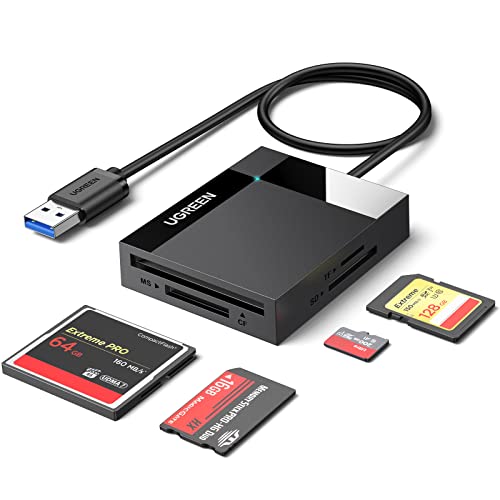
UGREEN’s card reader offers an all-in-one solution with SD, Micro SD, CF, and MS slots. The USB 3.0 interface achieves transfer rates up to 5 Gbps, enabling quick movement of large photo and video files. The device can read and write across four memory cards simultaneously, reducing the need to shuffle cards between devices. This model is widely compatible with Windows, macOS, and Linux systems and supports high-capacity memory cards, including 2 TB cards in some configurations.
In practice, the UGREEN reader is a balanced option for users who value speed and convenience. The simultaneous read/write capability helps streamline multi-card workflows, such as when backing up a day’s shoot or organizing media from multiple cameras. Its compact form factor and straightforward plug-and-play setup appeal to both professionals and enthusiasts.
Acer SD Card Reader USB 3.0

Acer’s SD Card Reader emphasizes high-speed data transfer with a USB-A 3.0 connection. It supports SD and Micro SDXC/SDHC cards and remains backward compatible with USB 2.0 devices. The dual-slot design enables simultaneous reading and writing, which is beneficial for busy workflows such as photographers who quickly move media from cameras to a laptop. Its aluminum construction offers durability while maintaining a slim profile for travel use. Note that some thicker cases may affect full card insertion.
The Acer reader is a practical option for users who need reliable, broad compatibility in a simple package. Its emphasis on speed and dual-slot functionality aligns well with photo and video editing pipelines that require quick file access and organization on the go.
uni SD Card Reader (USB 3.0/USB-C)

The uni card reader focuses on speed and versatility with USB 3.0 and USB-C interfaces. It supports SD, Micro SD, SDHC/SDXC, MMC, and various RS-MMC formats, allowing two cards to be read and written simultaneously. The device is plug-and-play and compatible with Windows and macOS without drivers. Its design emphasizes portability and ruggedness, with a compact chassis and a protective cover on both ends to guard against dust and moisture in travel scenarios.
For users who rely on a mix of USB-C and USB-A devices, the uni reader offers a flexible, driver-free option that minimizes setup friction. The simultaneous dual-card capability also helps in fast data transfer workloads where multiple cards are active in a session.
WARRKY 7-in-1 SD Card Reader Hub

WARRKY’s 7-in-1 reader combines four standard card slots with multiple USB ports, offering a comprehensive hub for large transfers and device compatibility. It supports SD, SDXC/SDHC, Micro SD, and MS/CF formats, along with USB 3.0 and USB-C connections. The device is designed for fast data transfers up to 5 Gbps, enabling quick backups and large-file workflow. Its dual connector approach—USB-A and USB-C—provides flexibility for laptops, desktops, cameras, and mobile devices. The 2.5-foot braided cable adds durability for frequent travel.
This model stands out for users who want a single docking unit to manage multiple media types and external peripherals. It is particularly attractive for workflows that demand simultaneous data access across several cards and USB devices while staying organized in a single hub.
Buying Guide: Key Considerations and Comparisons
- Interface and compatibility: USB 3.0 and USB-C support maximize transfer speeds. Ensure the reader works with your computer’s ports (USB-A, USB-C, or Thunderbolt) and with your operating system (Windows, macOS, Linux).
- Card format support: Look for readers that cover SD, Micro SD, MS, CF, and MMC if you use multiple cameras or devices. Some models handle all four cards simultaneously, reducing swapping time.
- Speed and reliability: While stated speeds reach up to 5 Gbps with USB 3.0, real-world performance depends on card type, USB port, and file size. For raw photos and 4K video, prioritize higher sustained write speeds and stable operation.
- Power and bus architecture: Some hubs and readers draw power from the USB port. If you connect multiple devices, ensure there is sufficient bandwidth and that the device stays powered during transfers.
- Durability and design: Aluminum housings, braided cables, and dust protection covers help extend life in field work. Portability matters for on-location shoots or travel.
- Simultaneous read/write: If you regularly move data from several cards at once, select a model that supports multi-card simultaneous access to avoid constant swapping.
- Future-proofing: USB-C/USB 3.0 compatibility and support for newer card formats can extend the usefulness of the reader as devices evolve.
When selecting a USB 3.0 external card reader, match the device to your typical workflow: the number of card formats you use, how many cards you read at once, and whether you need USB-C compatibility. For photographers who back up shoots daily, a high-speed, multi-slot option reduces downtime. For travelers, a compact, durable design with plug-and-play simplicity offers the best balance of reliability and convenience. All five highlighted models provide strong performance across common card types and devices, making them solid choices for American readers seeking efficient data transfer solutions.