This guide highlights top USB 3.0 PCIe expansion cards that add fast, reliable USB-A ports to desktop PCs. All selected models support up to 5 Gbps transfers and are designed to work with common operating systems, including Windows, macOS, and Linux. The listed cards use independent power provisioning where available and feature protection mechanisms to safeguard connected devices. See below for a quick product snapshot, detailed sections, and practical buying advice.
| Product | Brand | Key Benefit |
|---|---|---|
| FS-U2S-Pro | FebSmart | 2-port, self-powered, broad OS support |
| 7-Port USB 3.0 Card | ELUTENG | Seven independent ports, PCIe x1, no external power |
| YEELIYA 7-Port USB 3.0 | YEELIYA | 2x Type-C, 5Gbps, front-panel adaptability |
| 4-Port USB 3.1 Card | ELUTENG | 4 ports, USB 3.1 Gen2 up to 10Gbps, self-powered |
| 8-Port USB 3.2 Card | ELUTENG | 8 ports, 2x Type-C, PCIe 3.0/2.0 compatibility, independent power |
| 4-Port PCI-E USB 3.0 Card | SINEFINE | 2x USB-A + 2x USB-C, no external power, 5Gbps |
FebSmart 2-Port Superspeed USB 3.0 PCIe Card

The FS-U2S-Pro adds two USB 3.0 Type-A ports via a PCIe X1 interface. It targets desktop PCs, workstations, and NAS setups needing fast data transfers across USB devices such as keyboards, mice, printers, external drives, and KVM switches. Built-in self-powered technology means no external power cable is required, with per-port power limits to support high-demand devices. The card uses the ASMedia ASM1042 controller and includes safety features such as fuse protection and capacitors to stabilize voltage and protect connected equipment. It emphasizes compatibility across Windows, macOS, and Linux platforms and supports high-power USB devices within its 5V/2A per-port limit (5V/4A total).
Key features: 2x 5Gbps USB-A ports, self-powered design, broad OS compatibility, built-in protection, and a PCIe X1 form factor for easy installation.
What to consider
- Power delivery: Self-powered designs improve compatibility with high-draw devices.
- Bus bandwidth: Two ports share the 5Gbps bandwidth; performance scales with connected devices.
- System compatibility: Check driver requirements for older OS versions if needed.
ELUTENG PCIE USB 3.0 Card, 7 Ports

This seven-port PCIe USB 3.0 expansion card uses a 2-phase independent power module that powers each port separately, avoiding power shortages. It supports USB 3.0 speeds up to 5Gbps and provides a stable 5V/2A per-port supply for external devices, with NEC regulators controlling power delivery. The design emphasizes independence among ports, reducing interference and ensuring stable performance for devices like external drives, hubs, printers, and VR accessories. Compatible with Windows, macOS, and Linux, this card is suitable for systems that require multiple USB-A connections without sacrificing speed.
Key features: 7 independent ports, self-contained power per port, high-speed USB 3.0, NEC controller tech, no external power adapter needed.
What to consider
- Number of ports: Choose based on the number of devices you plan to connect.
- Power management: Independent ports help manage multiple devices without power sag.
- Compatibility: Verify driver needs for older operating systems.
YEELIYA 7-Port USB 3.0 Expansion Card
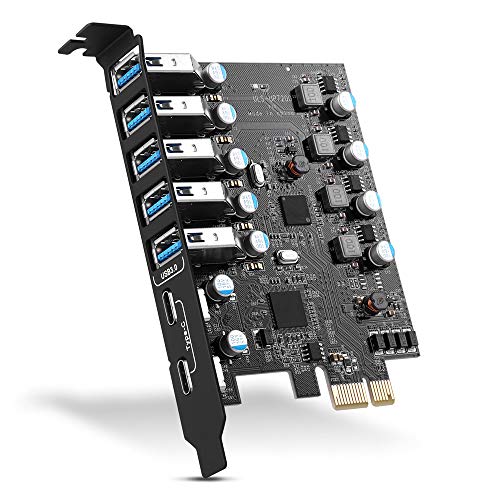
This card adds seven USB 3.0 ports, including 5 Type-A and 2 Type-C ports, with the option to extend the internal 19-pin connector to a front-panel setup. It supports up to 5Gbps transfers and is compatible with Windows, macOS, and Linux, though some Windows versions may require driver installation (drivers provided on disc or via download). The design focuses on expanding USB access for peripherals and external drives while maintaining overall system stability and energy efficiency. It suits users seeking both Type-A and Type-C connectivity through a single PCIe card.
Key features: 5x Type-A + 2x Type-C, front-panel adaptability, up to 5Gbps, broad OS support, PCIe compatibility.
What to consider
- Front-panel extension: Useful for accessible USB ports on the case front.
- Driver requirements: Driver-free operation may vary by OS version.
- Port mix: Ensure the included Type-C ports meet your device needs.
ELUTENG 4-Port USB 3.1 PCIe Card

This four-port card adds two USB-A and two USB-C ports with USB 3.1 Gen2 capability up to 10Gbps. It is powered by an integrated controller (NEC720201/NEC720210) with independent capacitors per port to stabilize power delivery. The card does not require an external power adapter, and each port can operate independently to maximize stability for connected devices such as external drives, printers, and cameras. It is compatible with Windows, macOS, and Linux, and supports PCIe x1, x4, x8, or x16 slots, making it flexible for most desktop motherboards.
Key features: USB 3.1 Gen2 up to 10Gbps, 2x Type-A + 2x Type-C, self-powered, independent port operation, broad OS compatibility.
What to consider
- Data rate expectations: Real-world speeds depend on connected devices and bus load.
- Power distribution: Independent per-port power helps with high-draw USB-C devices.
- System compatibility: Confirm driver requirements for your OS version.
ELUTENG 8-Port USB 3.2 Card

The 8-port ELUTENG card combines USB 3.2 Gen2 technology with a mix of Type-A and Type-C interfaces, offering 6 USB5G speeds and two Type-C ports for versatile device pairing. It uses a trio of independent power modules to ensure stable power across ports and supports PCIe 3.0/2.0 motherboards with compatibility across a wide set of Windows, macOS, and Linux systems. The design emphasizes protection against over-current and short circuits and supports automatic recovery after faults, making it suitable for dense USB ecosystems like media production setups and gaming rigs.
Key features: 8 ports (A and C), up to 10Gbps on Gen2, independent power modules, PCIe 3.0/2.0 compatibility, robust protection.
What to consider
- System bus: Ensure available PCIe slots and power budgeting align with your motherboard.
- Device mix: Plan port distribution between USB-C and USB-A devices.
- OS support: Confirm the driver model if you are on older Windows versions.
SINEFINE 4-Port PCI-E USB 3.0 Card
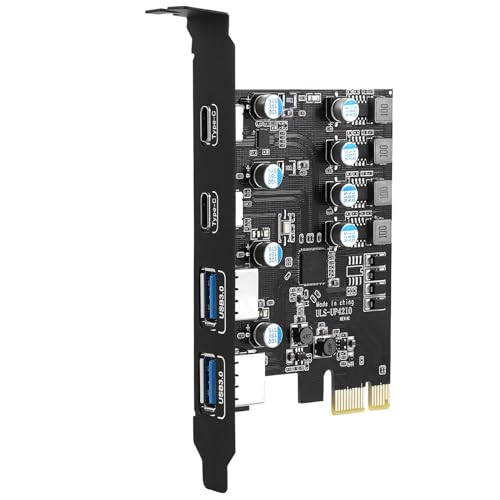
The SINEFINE UP4210 card provides four USB 3.0 ports via PCI Express (1X). It offers a balanced mix of two USB-A and two USB-C interfaces with a total shared bandwidth of up to 5Gbps. The design emphasizes no external power requirement, delivering 5V/12A max across the ports (not supporting BC 1.2 charging). It includes a built-in power module with current protection and data-safety features to prevent device damage. It is compatible with Windows and Linux in driver-supported configurations, with broader compatibility noted for modern systems.
Key features: 4 ports (A and C), 5Gbps total bandwidth, no external power needed, protective circuitry, broad OS support.
What to consider
- Power constraints: The card handles per-port power internally, suitable for a range of USB devices.
- Device mix: Evaluate whether you need more Type-A or Type-C ports for your setup.
- Driver needs: Some older Windows versions may require drivers; others may work plug-and-play.
Buying Guide: Key Purchase Considerations For USB 3.0 PCIe Cards
When choosing a USB 3.0 PCIe card, consider the following factors to ensure you get the best match for your setup and workflow.
-
<li Port count and type: Decide how many USB-A vs USB-C ports you need. Some cards mix Type-A and Type-C, which is beneficial if you have modern devices alongside older peripherals.
- Speed and bandwidth: USB 3.0 and newer standards offer up to 5Gbps or higher. Real-world speeds depend on device capabilities and system bottlenecks, but Gen2/Gen3 cards significantly improve throughput for large file transfers.
- Power delivery: Self-powered designs with independent port power minimize device failures due to insufficient power. Fully powered cards may be better for high-drain devices like external NVMe enclosures.
- Controller and chipset: Cards typically use ASMedia or NEC controllers. These chips influence compatibility, driver availability, and stability across Windows, macOS, and Linux.
- Motherboard and PCIe slot compatibility: Most cards use PCIe x1, but check if your motherboard supports the required slot type and bandwidth. Some cards support multiple PCIe generations and wider x1/x4/x8/x16 compatibility.
- Driver requirements: Newer operating systems often support these cards without drivers, while older versions may need driver installation from included media or manufacturer websites.
- Physical layout: Consider card length, bracket space, and whether cable management or front-panel access is important for your build.
- Protection features: Look for fuses, capacitors, and protection circuitry that safeguard both the USB devices and the computer from power irregularities.
- Use case alignment: For data-heavy tasks (video editing, large backups), prioritize higher port counts and stable power per port; for general peripherals, fewer ports with robust reliability may suffice.
Bottom line: The best USB 3.0 PCIe card for you balances port mix, power stability, and system compatibility. The models listed above provide a range of port configurations, from compact 2-port options to multi-port hubs, enabling faster data transfers and expanded USB access across typical desktop setups.