Discover top USB wireless modems that turn any laptop into a portable hotspot or wired-free hub. These compact devices deliver 4G LTE connectivity, plug-and-play setup, and wide compatibility for VPNs, video streaming, and remote work. Below are five standout picks with build-in antennas, global compatibility, and easy sharing across multiple devices. This guide compares design, usability, and performance to help you choose the right USB modem for travel, commuting, or a small office.
| Product | Brand | Key Benefit |
|---|---|---|
| Goshyda 4G LTE USB Modem | Goshyda | 150Mbps with built-in antenna for stable coverage |
| WDINLY 4G LTE USB Modem Dongle Router | WDINLY | Driver-free, plug-and-play with broad compatibility |
| XTRONS 4G LTE USB Dongle | XTRONS | Dual role as USB modem and Wi‑Fi router |
| Joytutus 4G LTE Portable WiFi Router | JOYTUTUS | Magnetic back cover and portable design |
| Verizon MiFi USB730L | Novatel Wireless | Global 4G LTE modem with foldable USB connector |
Goshyda 4G LTE USB Modem With WiFi Hotspot

The Goshyda USB modem offers up to 150 Mbps 4G LTE connectivity, making it suitable for everyday browsing, streaming, and online chat. It functions as a wireless network adapter that can share a connection with multiple devices, ideal for laptops and portable workstations. Installation is plug-and-play, enabling immediate internet access without complex setup. An integrated antenna improves signal strength and coverage, reducing dead zones and providing reliable connections in varied environments.
WDINLY 4G LTE USB Modem Dongle Router With WiFi Hotspot

WDINLY emphasizes a high-speed 4G LTE experience with up to 150 Mbps download and up to 50 Mbps upload. The device is designed for broad compatibility across carriers and supports portable Wi‑Fi sharing. A key advantage is its driver-free, plug-and-play setup, so users can deploy with minimal configuration. Its compact form, combined with a built-in SIM slot (for some models), makes it suitable for travel, business trips, or temporary office setups without needing a separate router.
XTRONS 4G LTE USB Dongle Wireless Wi‑Fi Modem

The XTRONS dongle combines four functions in one: a 4G USB modem, a Wi‑Fi router, and simple “plug and play” operation. Inserting a SIM card enables portable wireless routing for laptops, tablets, and other Wi‑Fi devices. It’s designed for quick sharing on the go, letting multiple users connect without complex setup. Note that SIM card must be purchased separately. It’s a practical choice for car rides or fieldwork where a quick internet relay is needed.
Joytutus 4G LTE Portable WiFi Router

The Joytutus portable router supports 4G LTE networks with speeds up to 150 Mbps, covering both US bands and multiple LTE variants. A magnetic back cover design simplifies operation and durability. Its lightweight profile and built-in antenna enhance signal reception, making it suitable for business meetings, travel, or temporary office setups. The device is intended for use with compatible SIM cards and emphasizes travel-friendly, compact design for on‑the‑go connectivity.
Verizon MiFi USB730L U730L 4G LTE USB Modem
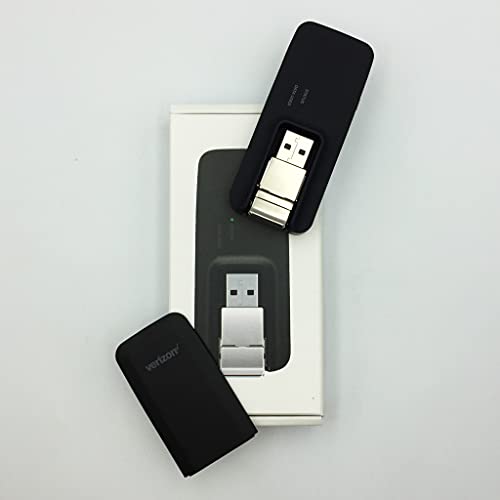
The Verizon MiFi USB730L offers universal USB connectivity with a foldable USB connector designed for portability. It’s built for easy carry in a laptop bag or pocket and supports a compact, swiveling USB interface for versatile port orientation. SIM card compatibility is a consideration, as some configurations require a separate SIM. The device focuses on reliable LTE performance with a simple form factor suitable for travelers and mobile professionals who need dependable on-the-go access.
Buying Guide: Key Purchase Considerations
- Network speed and coverage: Look for devices that advertise 4G LTE performance with realistic speeds (100–150 Mbps ranges are common). Consider the carriers supported and whether you need global roaming or nation-specific plans.
- Plug-and-play vs. driver requirements: Driver-free models offer instant setup, which is advantageous for travel or multiple devices. If a driver is required, check compatibility with your operating system and device.
- Sharing capabilities: If you need to connect multiple devices, select a model with an integrated Wi‑Fi hotspot feature and stable signal across several clients.
- Antenna design and reception: Built-in antennas help reception in weak-signal areas. Some devices offer adjustable or external antennas for enhanced coverage.
- Portability and form factor: For frequent travelers, compact, pocketable designs with a retractable or foldable USB connector reduce bulk in bags and laptops.
- SIM card requirements: Some devices require a separate SIM or SIM card slot. Confirm whether your chosen device supports the SIM you plan to use and whether a data plan is needed.
- Security and privacy: Direct cellular connections reduce reliance on public Wi-Fi networks, improving data privacy and reducing exposure to shared networks.
- Device compatibility: Ensure the modem works with your laptop’s OS and USB ports (USB-C vs USB-A) and supports the desired band frequencies for your region.
- Pricing and support: Consider warranty, customer support, and ease of replacement parts or accessories when evaluating total ownership.
These factors help compare how each USB modem aligns with your work style—whether you require occasional mobile browsing, secure VPN access, or heavy streaming while traveling. Always verify current carrier compatibility and any regional restrictions before purchasing.