For anyone expanding a workspace across multiple screens, a USB triple monitor adapter can simplify setup while delivering strong performance. This article reviews five popular adapters that support three-monitor configurations, focusing on Windows and Mac scenarios, power delivery, and compatibility with common laptop brands. Each option is evaluated on expansion capabilities, display quality, and ease of use to help you choose the best fit for productivity, design, or development workflows.
| Product | Platform | Key Gain | Approx. Display Count |
|---|---|---|---|
| StarTech USB 3.0 to Quad HDMI Adapter | Windows | Extends up to 4 external HDMI displays from a single USB 3.0 port | 4 external displays |
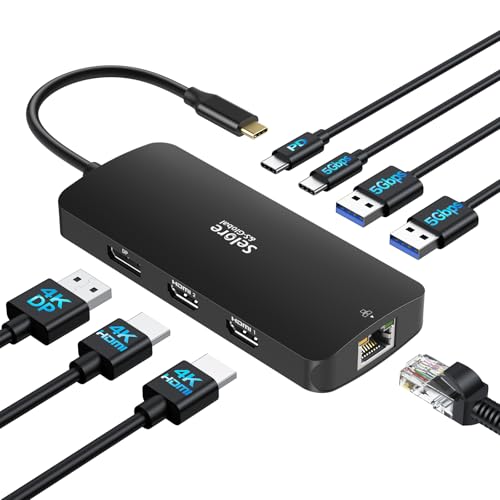
| Selore&S-Global USB C Docking Station (3 Monitors) | Windows | Triple 4K capability with 2x HDMI, 1x DisplayPort | 3 displays |
| UANTIN USB C to 3 HDMI Adapter | Windows | Triple independent HDMI outputs up to 4K@60Hz | 3 displays |
| THANDBLE USB C to 3 HDMI Adapter | Windows | Three 4K@60Hz HDMI outputs with 100W PD support | 3 displays |
| WAVLINK 3 Monitor Docking Station | Windows | Triple 4K@60Hz across HDMI/ DisplayPort with 95W PD | 3 displays |
Note: OS limitations vary by device. Mac users often encounter mirror-only modes for some hubs, while Windows users generally gain true extended desktops. Driver availability and power delivery specifics can influence performance during demanding tasks like video editing, design work, or large spreadsheets. The products below are selected for broad compatibility, strong display support, and practical power handling.
StarTech USB 3.0 To Quad HDMI Adapter

The StarTech adapter converts a USB 3.0 port into four HDMI outputs, enabling up to four 1080p displays at 60 Hz and up to five displays in extended mode when combined with a laptop screen. It is designed for Windows systems and requires administrator rights for driver installation. The device is USB bus-powered, so no external power supply is needed. It supports a 2-channel audio pass-through via HDMI and is compatible with x86/x64/ARM Windows platforms from Intel, AMD, and Snapdragon-based PCs.
Selore&S-Global USB C Docking Station (3 Monitors)

This docking station extends a Windows setup to up to three displays using 2x HDMI and 1x DisplayPort. It supports 4K on the HDMI outputs in extended mode on Windows, while macOS may mirror the second external monitor. It provides PD charging up to 100 W, USB 3.0 ports, a USB-C input, and Gigabit Ethernet. It expands a single USB-C/Thunderbolt port into a complete multi-monitor workspace, ideal for laptops from Dell, HP, Lenovo, and others.
UANTIN USB C To 3 HDMI Adapter

The UANTIN adapter delivers triple independent 4K HDMI outputs via USB-C, with MST technology to extend to three screens at up to 4K@60Hz and HDR. It includes a built-in 100 W PD pass-through to help power compatible laptops, reducing the need for extra chargers. The chassis is aluminum for heat management and durability, with a braided USB-C/HDMI connection to minimize wear and ensure signal stability across sessions.
THANDBLE USB C To 3 HDMI Adapter

THANDBLE’s USB-C to 3 HDMI adapter supports three 4K@60Hz outputs and includes 100W PD charging. It targets Windows environments with MST/SST support and claims compatibility with USB 4.0, Thunderbolt 3/4/5, enabling users to drive three 4K monitors while charging the host device. Note that Mac OS may limit to mirror mode for triple displays, depending on system constraints and drivers. This solution is suited for multi-monitor workflows in design and productivity tasks.
WAVLINK 3 Monitor Docking Station
WAVLINK offers a triple-monitor docking setup with 4K@60 Hz support across HDMI and DisplayPort, plus 95 W PD charging for compatible laptops. It is designed for Windows systems and provides a flexible mix of connection types, enabling two HDMI outputs and one DisplayPort alongside USB, Ethernet, and audio features. While Mac users may encounter limitations in extending rather than mirroring, this dock aims to deliver a robust triple-display experience for demanding workloads.
Buying Guide: Key Considerations When Choosing a USB Triple Monitor Adapter
- Operating system compatibility: Many adapters are optimized for Windows and may offer varying support on macOS, ChromeOS, or Linux. If macOS is essential, verify whether the product supports extend mode or only mirror mode on your specific Mac model.
- Display capabilities and MST vs SST: MST (Multi-Stream Transport) often enables true extended desktops across multiple monitors, while SST (Single Stream Transport) can mirror or limit expansion on some OS combinations. Check the number of independent displays and maximum resolutions per port.
- Power delivery and bus power: Determine whether the adapter requires an external power supply or is powered by the USB bus. PD charging can be important for keeping laptops charged while running multiple displays, especially with 4K outputs.
- Video outputs and port types: Ensure the adapter provides the right mix of HDMI and DisplayPort ports for your monitors. Some models offer dual HDMI and one DP, while others provide three HDMI outputs. Confirm compatibility with your monitors’ input options.
- Driver installation and performance: Some adapters require driver installation with administrative rights. Look for products with stable drivers and good support channels, especially for business environments or complex setups.
- Device power and heat management: Aluminum chassis and good heat dissipation help maintain performance during long sessions. Consider the enclosure quality if you plan to run three 4K displays concurrently.
- System acceleration and team use: For design, gaming, or multi-task workloads, verify that the adapter maintains smooth frame rates and color accuracy across all displays at your chosen resolutions.
- Compatibility with laptops and docking ecosystems: If you already own a USB-C dock or a USB-A to USB-C hub, ensure the new adapter can integrate without conflicts, especially on ultrabooks with limited power delivery.