In today’s multi-monitor environments, a reliable USB to VGA graphics adapter can turn a single laptop into a capable multi-display workstation. This guide highlights five highly compatible options that deliver HD output, easy setup, and broad Windows support, with some models also working on macOS. Whether you’re presenting, teaching, or managing multiple reference windows, these adapters provide flexible display expansion without heavy internal upgrades.
Overview table of selected products
| Product | Brand | Max Resolution | Operating System Compatibility | Notes |
|---|---|---|---|---|
| Plugable USB 2.0 to VGA Video Graphics Adapter | Plugable | 1920×1080 | Windows, macOS, ChromeOS | Supports up to six external VGA displays on Windows |
| StarTech USB 2.0 to VGA Adapter | StarTech.com | 1920×1200 | Windows | TAA compliant; requires drivers; USB-A |
| Groodo USB to VGA Adapter | Groodo | 1920×1080 | Windows | USB 3.0 capable; compact |
| ELECABLE USB 3.0 to VGA Adapter Cable | ELECABLE | 1920×1080 | Windows (Not macOS Monterey+) | USB 3.0 interface; direct cable; 6.5 ft |
| Plugable USB 2.0 to VGA Video Graphics Adapter (Second Model) | Plugable | 1920×1080 | Windows, macOS, ChromeOS | Single USB connection; up to six displays total |
Plugable USB 2.0 to VGA Video Graphics Adapter

This Plugable adapter provides a straightforward way to add a VGA display via a single USB connection. It supports resolutions up to 1920×1080 (1080p) and serves well for presentations, remote work, or classroom setups. The device is designed for easy plug-and-play use with Windows, macOS, and ChromeOS, reducing the need for a dedicated graphics card. It can be used to mirror or extend a desktop, making it practical for meetings, training sessions, or temporary displays in offices.
The adapter’s multi-display potential is notable: when paired with additional USB adapters, users can expand their workspace across multiple external VGA monitors on Windows, helping to keep reference materials visible alongside main work streams. Its compact form factor adds portability for travelers and students who need more screen real estate without bulky gear.
StarTech USB 2.0 to VGA Adapter

This StarTech adapter converts a USB 2.0 port into a VGA display connection, enabling a simple external monitor hookup for Windows desktops and laptops. It supports a maximum resolution of 1920×1200 and is designed to work across various Windows X86/X64/ARM platforms. The package includes a 19-inch cable length for flexible placement, and the device is TAA compliant, which can matter for certain procurement programs. Note that macOS and some non-Windows platforms are not supported, so compatibility should be verified prior to purchase.
Administrators will want to ensure driver installation is completed on first use, which is typical for USB-to-VGA adapters. The external nature of this solution means no internal graphics card upgrades are required. For mixed-device environments that primarily run Windows, this adapter offers a reliable route to add an extra display without major hardware changes.
Groodo USB to VGA Adapter

The Groodo USB to VGA Adapter offers a compact, portable solution for extending or mirroring a workstation to an external VGA monitor. It uses a built-in DisplayLink chipset to convert USB signals to VGA, supporting resolutions up to 1080p. The design prioritizes portability and ease of use, making it suitable for classrooms, conference rooms, and on-the-go presentations. USB 3.0 compatibility helps improve signal reliability and latency, especially for dynamic content like video or detailed graphics.
Setup is straightforward: connect to a USB port on your computer and to a VGA display, then select the display mode you prefer. When paired with other adapters, this model can contribute to a larger multi-monitor setup. While it is especially popular in Windows environments, users should verify that their specific system supports the required drivers for optimal performance.
ELECABLE USB 3.0 to VGA Adapter Cable

The ELECABLE USB 3.0 to VGA Adapter Cable is a full-featured external graphics option that comes as a visible cable rather than a separate dongle. It supports up to 1920×1080 at 60Hz and is targeted at Windows 11/10/8.1/8/7 users. The device is not compatible with macOS Monterey or later, ChromeOS, or Linux systems that require driver installation. The 6.5-foot cable length provides flexibility in setup, making it a practical choice for classrooms, small offices, or home workstations where a longer reach is beneficial.
Users should consider USB 3.0 availability on their host machine to maximize performance, particularly for video playback or graphic-intensive tasks. The adapter’s external nature means it can be removed or relocated without altering computer hardware. For environments with mixed OS deployments, compatibility should be carefully reviewed to avoid driver-related issues.
Mindorlen USB to VGA Adapter
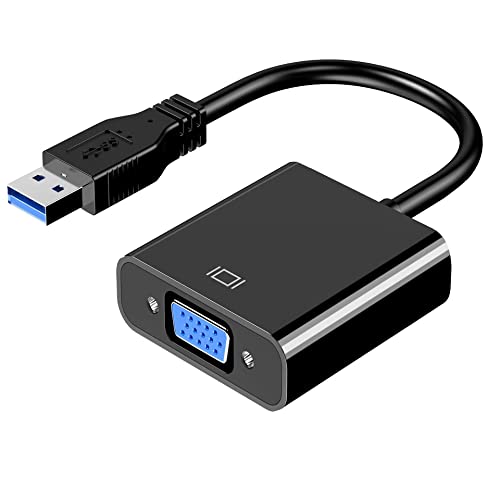
The Mindorlen USB to VGA Adapter is designed to connect USB-enabled devices to monitors, projectors, or TVs with VGA inputs, enabling multi-display configurations in professional and educational settings. It supports up to 1920×1080 resolution when the host USB port provides adequate bandwidth. The adapter positions itself as a versatile solution for extending or mirroring workspaces, particularly suitable for classrooms, conference rooms, and training sessions where additional display space enhances engagement and information sharing.
As with other USB-to-VGA options, performance is influenced by the host system’s USB ports and driver support. Users should ensure USB 3.0 ports are available and that driver installation is permitted. The Mindorlen model adds to a growing set of tools for teaching and collaboration where space and accessibility matter, offering a low-cost path to a more efficient display workflow.
StarTech USB 3.0 to VGA Adapter
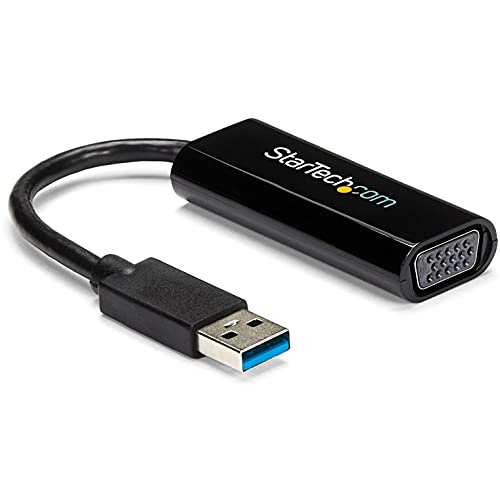
This StarTech USB 3.0 to VGA Adapter extends the capabilities of modern devices by providing a reliable external VGA connection via USB 3.0. It delivers up to 1920×1200 resolution and is designed for Windows platforms, with driver installation required. The adapter emphasizes compatibility with a wide range of Windows systems while maintaining a compact form factor. It is a strong option for users who need higher resolution on a VGA display and are operating within Windows-centric environments.
When planning a multi-monitor setup, consider the bandwidth demands of USB 3.0 and ensure adequate USB ports are available for multiple adapters. This model’s emphasis on Windows compatibility makes it a solid choice for corporate or educational settings that predominantly rely on Windows machines and require stable, reliable external displays without internal GPU upgrades.
Buying Guide: Key Considerations For USB To VGA Adapters
– Compatibility: Check operating system support (Windows versions, macOS, ChromeOS) and driver requirements. Some adapters are Windows-only, while others offer broader support.
– Resolution and Video Quality: Ensure the adapter supports at least 1920×1080 (1080p). Some models offer up to 1920×1200. Consider whether 60 Hz is sufficient for your use case or if higher refresh rates are needed for video or gaming.
– USB Version and Bandwidth: USB 3.0 provides better performance and is preferable for streaming video or multi-monitor setups. USB 2.0 can work for basic displays but may have limitations with higher resolutions.
– Display Count and Expandability: If you plan to run multiple external displays, choose adapters known to scale across several monitors. Some brands advertise up to six displays on Windows with multiple adapters.
– Portability and Setup: Look for compact designs that fit in backpacks and do not require external power. This is especially important for travelers and students.
– Driver and Administrative Requirements: Some adapters require administrator rights or driver installation. Ensure your environment allows these installations before purchasing.
– Cable Length and Connectivity: For cable-based adapters, confirm the included length meets your room layout. VGA-only displays vs. mixed HDMI/DVI options can influence cable needs.
By weighing these factors against your typical workflow—whether you’re giving presentations, teaching, or managing a multi-monitor workstation—you can select a USB-to-VGA adapter that delivers reliable, scalable display expansion without overhauling your hardware.