Users often need to bridge old PS/2 devices with modern USB-enabled systems. This guide highlights practical USB-to-PS/2 adapters that support keyboards, mice, and even KVM setups, along with key buying considerations. Each product below is evaluated for compatibility, ease of use, and versatility across Windows, macOS, and Linux environments. Explore options from trusted brands to extend the life of your peripherals while maintaining reliable input performance.
| Product | Brand | Key Use | |
|---|---|---|---|
| Perixx PERIPRO-401 | Perixx | PS/2 to USB for keyboard and mouse | Built-in USB-IC; PS/2 ports; supports KVM PS/2 port |
| 4 Pcs PS/2 to USB A Adapter (4-Pack) | Fyntave | USB to PS/2 conversion for keyboard/mouse | Plug-and-play; driver-free; four-pack |
| Gtziqa PS/2 to USB Cable | Gtziqa | Dual PS/2 to USB conversion | Wide compatibility; plug-and-play |
| E-outstanding USB to PS2 Adapter | E-outstanding | USB to PS/2 for mouse/keyboard | 2-pack; durable build |
| UCEC PS/2 to USB Adapter | UCEC | PS/2 to USB for peripherals | Two PS/2 ports; broadly compatible |
Note: This article focuses on adapters used to connect PS/2 keyboards and mice to USB ports on modern PCs and laptops. Always verify compatibility with your specific device model and operating system before purchase.
Perixx PERIPRO-401 PS2 to USB Adapter
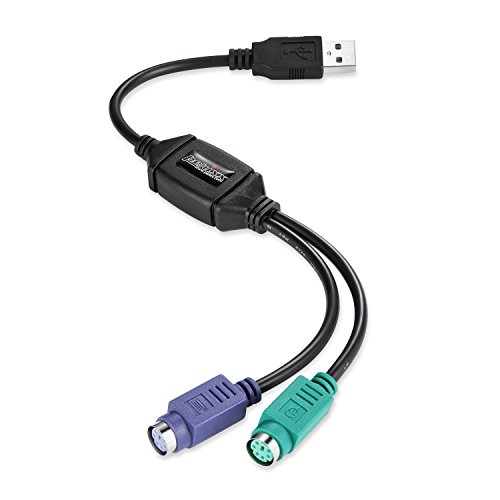
The Perixx PERIPRO-401 offers a built-in USB controller to connect PS/2 keyboard and mouse through a single USB port. It provides two PS/2 female ports (purple for keyboard, green for mouse) and a USB male port. This solution is suitable for users who want to continue using PS/2 devices with newer systems, including support for PS/2 ports on KVM switches. It is particularly useful for preserving older peripherals while maintaining compatibility with USB-centric desktops and laptops.
Key considerations include the need for a functioning PS/2 interface on the device side, potential limitations with newer deployments that rely on USB-driven features, and ensuring that your PS/2 devices have compatible signaling. The built-in USB-IC helps streamline setup without requiring additional driver software.
4 Pcs PS/2 to USB A Adapters (Fyntave)

This 4-pack provides versatile PS/2 to USB A adapters, compatible with most PS/2-enabled mice and keyboards. It offers a driver-free, plug-and-play experience, ideal for freeing up USB ports or stabilizing PS/2 connections in environments where older peripherals are preferred. While compatibility is generally broad, users should verify that their devices have the necessary PS/2 signaling and chipsets for reliable operation.
Practical value comes from having multiple adapters for different machines or shared workstations. The product emphasizes ease of use and quick deployment without software installation, making it suitable for both home and small office setups.
Gtziqa PS/2 to USB Cable

The Gtziqa adapter pairs dual PS/2 ports with a USB interface, enabling quick conversion for PS/2 keyboards and mice on modern USB-enabled systems. It emphasizes wide compatibility and instant recognition—plug in the PS/2 device and begin using it without delay. This makes it a common choice for legacy hardware users, small business environments, or setups requiring straightforward, driver-free operation.
Considerations include ensuring your PS/2 devices are compatible with legacy USB signaling and confirming the operating system support. The compact design supports straightforward transportation and usage across multiple computers where PS/2 peripherals are still in service.
E-outstanding USB to PS2 Adapter (2-Pack)

The E-outstanding 2-pack provides a simple USB-to-PS/2 conversion for mice and keyboards. Built to be durable, these adapters are positioned as reliable options when USB ports are limited or unstable, offering a practical way to maintain PS/2 peripherals in a USB-dominant setup. They emphasize solid materials and straightforward operation for daily use in desktops or notebooks.
Pros include a compact build and ease of use, while potential limitations involve broad compatibility claims that may vary by device. Verifying the compatibility of your specific PS/2 devices with these adapters helps prevent connectivity issues.
UCEC PS/2 to USB Adapter
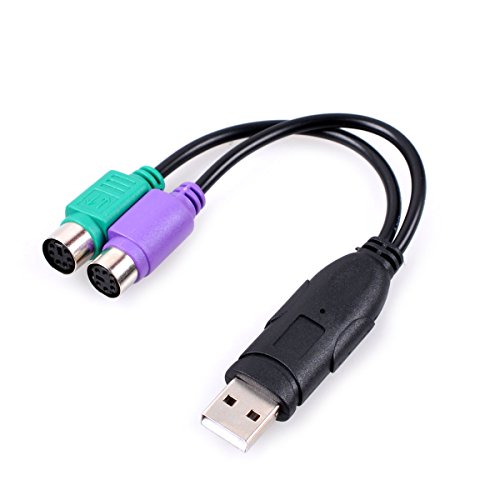
The UCEC PS/2 to USB adapter features two PS/2 ports and dual compatibility with PS/2 keyboards and mice. It is designed to work across Windows, Mac, Linux, and barcode scanners, with purple for keyboard and green for mouse. This broad compatibility makes it a versatile option for mixed environments, labs, or retrocomputing projects where PS/2 devices must interface with USB hosts.
Key considerations include the level of driver support on different OS versions and ensuring the adapter aligns with your device’s PS/2 signaling. For setups requiring stable, straightforward input devices, UCEC offers a solid plug-and-play option.
LEIHONG USB to PS/2 Adapter (GELRHONR)

The LEIHONG USB to PS/2 adapter (GELRHONR) highlights cost-effectiveness and compatibility with older keyboards and mice. It aims to extend the life of legacy peripherals by enabling use with modern USB-only systems. The product emphasizes broad OS compatibility, including Linux and Windows, and notes instant recognition with minimal setup.
Buyers should assess whether their specific keyboard or mouse is PS/2-based and ensure the adapter visibly supports the needed keyboard and mouse PS/2 ports. It can be a practical, wallet-friendly option for homes and small offices looking to reuse existing peripherals.
MECCANIXITY PS/2 to USB Port Adapters

The MECCANIXITY set includes two PS/2 to USB adapters in green and purple, designed to broaden device compatibility and extend USB functionality for wired keyboards and mice. The adapters feature nylon-coated construction and a compact form factor for easy travel or desk setup. They emphasize durable construction and straightforward operation, suitable for mixed hardware environments.
When considering this option, users should verify that their devices are PS/2-based and that the PS/2 signaling is appropriately supported by the USB host. This pair can be valuable for multi-computer workstations and shared setups requiring stable PS/2 connectivity.
Buying Guide: Key Purchase Considerations For USB To PS/2 Adapters
- Device Compatibility: Check whether your keyboard or mouse uses a PS/2 protocol that the adapter supports and confirm any specific signaling requirements for USB hosts.
- Plug-and-Play vs Driver Dependency: Driver-free models are easier to deploy, but some devices may require drivers or firmware updates for optimal performance on certain OS versions.
- Single-Port vs Multi-Port: If you need to connect multiple PS/2 devices or share across a KVM, consider adapters with built-in hub or KVM support.
- Build Quality and Durability: Look for adapters with durable connectors and robust housings, especially if you frequently unplug and replug peripherals.
- Operating System Support: Ensure the adapter is compatible with Windows, macOS, Linux, or other systems you use, including any barcode scanners or specialized peripherals.
- Signal Integrity and Latency: For gaming keyboards or precision mice, verify that the adapter provides reliable, low-latency input with consistent response.
- Port Availability: If your PC has limited USB ports, a PS/2 adapter can relieve USB port pressure, but ensure your host supports PS/2 bridging as needed.
- Packaging and Value: Multi-packs offer cost efficiency for multiple machines, while single adapters can be ideal for targeted upgrades or one-off uses.