The following article highlights top USB to ExpressCard adapters that expand modern laptops with ExpressCard slots. Each item supports USB 3.0/3.2 and ExpressCard 34mm or 54mm formats, providing extra USB ports, easy plug-and-play, and reliable performance for data transfer tasks. A quick summary table is included to help compare key features at a glance.
| Product | Interface | Ports | Key Benefit |
|---|---|---|---|
| JMT 3 Ports Hidden Inside USB 3.0 to Expresscard 54mm | USB 3.0 to ExpressCard 54mm | 3 USB 3.0 | Hidden design with easy expansion |
| StarTech.com 2 Port Flush Mount ExpressCard 54mm USB 3.0 | ExpressCard 54mm, USB 3.0 | 2 USB 3.0 | Flush mount for a neat setup |
| Mustpoint 5Gbps 2 Port Hidden Inside USB 3.0 HUB to Express Card | USB 3.0 to ExpressCard | 2 USB 3.0 | Compact hidden design with high speed |
| Mustpoint 2 Port USB 3.0 to Express Card (34mm) Hidden | USB 3.0 to ExpressCard 34mm | 2 USB 3.0 | 34mm form factor, broad compatibility |
| StarTech 2 Port USB 3.0 ExpressCard 5Gbps | ExpressCard, USB 3.0 | 2 USB 3.0 | High transfer speeds with UASP support |
Note: All items listed are ExpressCard adapters designed to expand USB connectivity on laptops that include an ExpressCard slot. When possible, verify compatibility with your device’s ExpressCard version and slot size (34mm vs 54mm) before purchase.
JMT 3 Ports Hidden Inside USB 3.0 to ExpressCard 54mm

This adapter offers a hidden 3-port USB 3.0 hub integrated into a 54mm ExpressCard form factor. It is compatible with USB 2.0 and 1.1 devices and follows the ExpressCard 1.0/54mm standard. The package includes a QR code for driver downloads, enabling quick setup on compatible laptops. Plug-and-play operation with hot-swapping is supported, making it convenient for on-the-go use and expanding notebook USB capability without clutter.
StarTech.com 2 Port Flush Mount ExpressCard 54mm USB 3.0

Designed for a clean, space-saving setup, this flush-mount ExpressCard addon provides two SuperSpeed USB 3.0 ports with transfer rates up to 5 Gbps. It supports UASP for efficient data transfer and is compatible with 54mm ExpressCard slots. The integrated design reduces protrusion and helps maintain a tidy laptop edge, useful in compact workstations or travel scenarios where cable clutter is a concern.
Mustpoint 5Gbps 2 Port Hidden Inside USB 3.0 HUB
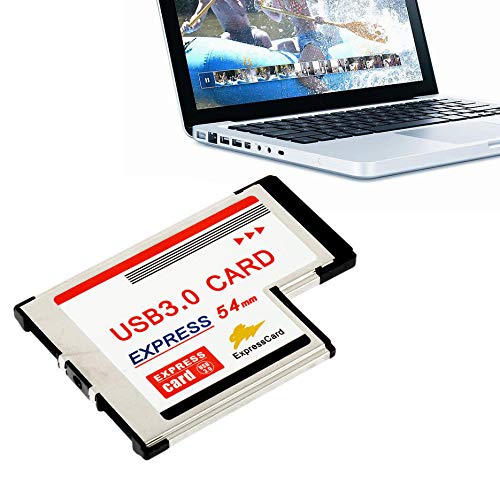
This adapter emphasizes a compact, hidden design that fits inside the ExpressCard slot while providing two USB 3.0 ports. It uses an ASM chipset for stable performance and supports high-speed data transfers. It is suitable for users who want to keep a slim laptop profile while expanding USB capabilities for peripherals like external drives, mice, and keyboards.
Mustpoint 2 Port USB 3.0 to Express Card (34mm) Hidden

This 34mm ExpressCard adapter provides two USB 3.0 ports with a stable NEC UPD720202 chipset, ensuring dependable compatibility with notebook-class ExpressCard slots. The device targets users who require a compact 34mm form factor and broad laptop compatibility, including desktops that feature ExpressCard expansion through a compatible adapter slot.
StarTech 2 Port USB 3.0 ExpressCard 5Gbps

Offering two USB 3.0 ports with transfer rates up to 5 Gbps, this ExpressCard adapter emphasizes a side-by-side port layout and UASP support for efficient data handling. It is designed for laptops with ExpressCard slots seeking reliable, high-speed peripheral connections while maintaining a compact exterior footprint.
Jkjhbhged High-Speed Dual 2 Port USB 3.0 Express Card 34mm

This 34mm ExpressCard adapter provides two USB 3.0 ports with a stable UPD720202 chipset. It supports ExpressCard slots (34mm or 54mm) on compatible notebooks and aims to deliver reliable expansion for external drives, peripherals, and storage devices in thin laptop configurations.
Buying Guide: How To Choose The Right USB To ExpressCard Adapter
- Slot size compatibility: Confirm whether your laptop uses a 34mm or 54mm ExpressCard slot and choose an adapter that fits. Some models support both sizes, but many are dedicated to one width.
- USB speed and protocols: Look for USB 3.0/3.2 Gen 1 with speeds up to 5 Gbps and UASP support for efficient data transfer, especially when using external SSDs or fast storage devices.
- Chipset reliability: Reputable chipsets (such as NEC UPD720202) tend to offer stable operation and broad compatibility with various USB devices and operating systems.
- Form factor and design: Decide between hidden/compact designs and flush-mount options based on how much protrusion you can tolerate on your laptop’s edge and your portability needs.
- Power requirements: Most ExpressCard adapters are bus-powered; ensure your laptop can supply adequate power for connected USB devices, or plan to use powered hubs if needed.
- Driver availability: Some adapters provide driver downloads via QR codes or online resources. Check whether drivers are readily available for your OS version to prevent setup delays.
- Port layout: If you frequently connect multiple devices, consider whether the adapters place ports side-by-side or in a linear arrangement, as this affects cable routing and accessibility.
- Build quality and durability: Aluminum housings and robust connectors tend to offer better heat dissipation and longer life in mobile environments.
- Use case alignment: For photographers, videographers, or data transfer tasks, prioritize higher throughput, UASP, and reliable power delivery to minimize bottlenecks.
- Compatibility checks: Review product specifications to ensure compatibility with your laptop model, operating system, and any existing ExpressCard expansion scenarios.