When you need a seamless link between USB-C devices and DisplayPort displays at high refresh rates, the right USB-C to DisplayPort cable makes all the difference. This guide highlights five top options that support 144Hz or higher, offering plug‑and‑play setup, robust build quality, and reliable performance for laptops, tablets, and desktops. Compare lengths, materials, and tech notes to find the best match for your home office, gaming setup, or studio workstation.
| Product | Brand | Key Strength |
|---|---|---|
| Belkin USB C to DisplayPort 1.4 Cable | Belkin | 8K @ 60Hz, 4K @ 144Hz |
| BENFEI USB-C to DisplayPort 6 Feet Cable (4K@60Hz, 2K@144Hz) | BENFEI | Unidirectional USB-C to DP, 2K@144Hz support |
| BENFEI 2 Pack USB-C to DisplayPort 6 Feet (8K@60Hz, 4K@144Hz) | BENFEI | Dual pack, Thunderbolt compatibility |
| UVOOI USB C to DisplayPort 1.4 Adapter | UVOOI | 8K@60Hz, 4K@240Hz |
| BENFEI USB C to DisplayPort 1.8 Meter (8K@60Hz, 4K@144Hz) | BENFEI | Extended length, Thunderbolt 3/4 compatible |
Belkin USB C To DisplayPort 1.4 Cable

Belkin’s USB-C to DisplayPort 1.4 cable delivers high-end video performance with support for up to 8K at 60Hz and 4K at 144Hz, enabling immersive visuals for demanding content. It requires no software, offering a straightforward plug-and-play experience. The cable uses a durable 6-foot length and features HDCP 2.2 compatibility for protected content and impressive data integrity with a 32.4 Gbps bandwidth. This option is ideal for users seeking reliable video fidelity on Windows, macOS, and ChromeOS devices.
BENFEI USB-C to DisplayPort 6 Feet Cable

BENFEI’s 6‑foot USB-C to DisplayPort cable supports 4K up to 60Hz and 2K up to 144Hz, providing a reliable bridge from USB-C sources to DP displays. It is crafted with an aluminum shell and nylon braided jacket for heat dissipation and durability. The product emphasizes a unidirectional transfer—from USB-C source to DisplayPort display—so ensure your setup aligns with this direction. It includes a nickel-plated connector and a robust internal IC to maintain signal integrity during long sessions.
BENFEI 2 Pack USB-C to DisplayPort 6 Feet

This 2-pack from BENFEI offers two identical USB-C to DP cables, each capable of delivering 4K@144Hz and 8K@60Hz compatibility in a Thunderbolt‑friendly package. The included cables feature a sturdy aluminum housing and nylon-braided jacket for long-term use, plus a practical design that minimizes signal loss through thicker copper conductors. They’re ideal for users who want multiple displays or a spare cable for travel, with a focus on stable performance in busy workspaces.
UVOOI USB C to DisplayPort 1.4 Adapter
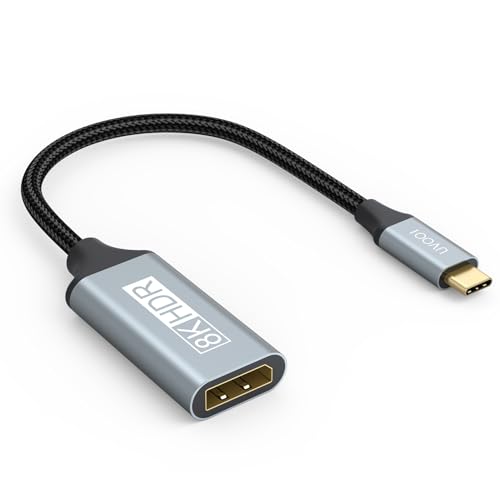
UVOOI’s USB-C to DisplayPort 1.4 adapter targets high‑resolution outputs with 8K at 60Hz and 4K at 240Hz, supporting Thunderbolt 5/4/3 compatibility. It is a unidirectional adapter, designed to send USB‑C source video to a DisplayPort monitor. The device emphasizes a 32.4 Gbps bandwidth and features advanced DisplayPort 1.4 features like DSC and HDCP 2.3, which helps preserve image quality for high‑end gaming or professional graphics work. It’s suitable for users looking to maximize display fidelity on capable DP displays.
BENFEI USB C To DisplayPort 1.8 Meter Cable

This BENFEI model extends to 1.8 meters, maintaining 8K@60Hz and 4K@144Hz support, with Thunderbolt 3/4 compatibility. It notes that some configurations may require DisplayPort Alt Mode support on the host device. The cable’s design emphasizes a robust build with an aluminum shell and a durable cable jacket, ensuring reliable signal transmission over longer runs. It’s a practical option when desk setup requires extra length without sacrificing performance.
Buying Guide: Key Purchase Considerations
When choosing a USB-C to DisplayPort cable for 144Hz or higher, consider the following:
- Bandwidth and standards: Look for DP 1.4 or DP 2.0 compatibility, HDR support, and DSC features to secure high refresh rates and color depth at 4K or 8K resolutions.
- Unidirectional vs. bidirectional: Many USB-C to DP cables are unidirectional (USB-C source to DP display). Confirm the direction matches your setup to avoid nonfunctional cables.
- Length and routing: Choose a length that fits your desk and cable management needs. Longer runs may introduce slight signal loss if not well shielded.
- Build quality: Aluminum housing, nickel-plated contacts, and nylon braided jackets improve durability, heat dissipation, and longevity in busy workspaces or gaming rigs.
- Compatibility: Ensure your host device supports USB-C DisplayPort Alt Mode and, if needed, Thunderbolt compatibility (TB3/TB4) for full bandwidth.
- Multi-monitor support: If you plan to daisy-chain or run multiple displays, verify MST (Multi-Stream Transport) support and compatibility with your operating system.
- Plug-and-play: Many options advertise no driver installation; this simplifies setup but verify that your OS and device generations support the cable’s features.
These picks provide a spectrum of lengths, performance, and form factors to suit various American setups—from compact home offices to larger gaming stations. Each option emphasizes high-refresh performance and solid construction, helping users maximize the potential of DisplayPort displays when fed from USB-C sources.