For users needing to capture or view analog video via USB, a USB to composite out adapter can bridge older AV equipment with modern computers. The following picks prioritize compatibility, ease of use, and clear video recording capabilities. Each product below includes essential features to help you compare and decide which adapter best fits your setup.
| Product | Brand | Key Benefit | Notes |
|---|---|---|---|
| HOLIKA USB to 3RCA Cable | HOLIKA | Plug-and-play USB to RCA capture | Three RCA ports for video and stereo audio; one-pack |
| StarTech.com USB Video Capture Adapter Cable | StarTech.com | TWAIN-compatible capture for Windows | Supports S-Video/Composite; 30fps at SD resolutions |
| XMSJSIY RCA AV to USB C Converter | XMSJSIY | Versatile AV capture from RCA/S-Video | NTSC/PAL support; plug-and-play |
| Cubilux RCA to USB Line In Cable | Cubilux | RCA line-in capture to USB on laptop | Designed for audio capture |
| Halokny USB to 3 RCA Cable | Halokny | Compact USB to RCA capture option | Video viewing only; no data transfer |
HOLIKA USB To 3RCA Cable Review

HOLIKA’s USB to 3RCA adapter converts a USB A male connection to three RCA jacks, color-coded for red, white, and yellow. The device is intended to connect AV gear to a computer or USB-enabled TV for viewing camcorder footage or other AV content. It supports standard USB 2.0 interfaces and provides a simple pathway from USB to RCA, designed for a quick setup in home entertainment centers or basic capture workflows.
- 1 x USB plug to 3 x RCA female jacks
- Plug-and-play use with compatible devices
- Best suited for viewing rather than high-bandwidth capture
StarTech USB Video Capture Adapter Cable
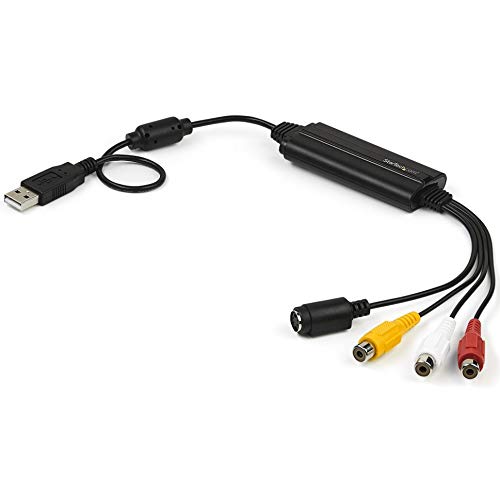
StarTech’s USB capture cable converts composite and S-Video with 2-channel audio into digital media. It delivers SD video capture at up to 30fps and supports NTSC and PAL formats. The device is TWAIN-compatible, allowing straightforward use with a wide range of third-party software on Windows 7 through 10. It’s a reliable option for archiving old footage to digital formats or streaming SD content with basic editing tools.
- SD capture at 720x480i/720x576i
- TWAIN-compliant drivers; Windows ready
- Out-of-the-box solution for basic capture and sharing
XMSJSIY RCA AV To USB C Converter

This converter targets a broader range of video sources, enabling transfer or capture from devices with RCA/S-Video outputs to a Mac or PC. It emphasizes synchronization between audio and video during capture, and supports multiple video inputs. The plug-and-play approach makes it compatible with common video capture workflows, including streaming or offline archiving, and it supports NTSC and PAL formats for wide compatibility.
- Video out via RCA and S-Video inputs
- Sync’d audio and video capture
- Supports NTSC/PAL; cross-platform use
Cubilux RCA To USB Line In Cable

Cubilux markets an RCA line-in capture cable designed to bring analog audio from line-out sources into a USB-equipped laptop. It is positioned for audio capture rather than video playback, making it suitable for digitizing cassette or analog music sources while connected to a computer. It is important to note compatibility with devices that explicitly support USB-based audio capture to ensure proper operation.
- RCA line-in capture to USB
- Primarily for audio capture on laptops/computers
- Not intended for TV playback or general USB-to-video capture
Halokny USB To 3 RCA Cable

Halokny offers a compact USB to 3RCA setup featuring one USB A female to three RCA connections. The product emphasizes viewing images from camcorders on USB-enabled TVs and PCs. It is designed for simple viewing, not for data transfer, making it suitable for quick display of AV content without capturing or encoding to a computer.
- USB A to 3RCA (video and stereo audio)
- Designed for viewing rather than data transfer
- Simple, compact option for basic AV viewing
Herfair USB To RCA Cable (5ft)

Herfair’s USB to RCA cable emphasizes the need for compatible signal conversion. It notes that USB carries digital signals while RCA is analog, requiring both the source and display side to perform signal conversion. It’s a one-way signal transmitter rather than a true converter, so proper operation hinges on devices with built-in conversion capabilities. This product is best when used with equipment that can convert signals internally.
- USB A to 3RCA (video plus stereo audio)
- One-way signal transmitter; requires device-side conversion
- Includes guidance on compatibility and signal conversion needs
Kuuleyn Video Out Adapter

Kuuleyn presents a USB to CVBS (RCA) video and audio adapter aimed at enabling external displays from Android navigation systems or other USB-enabled devices. It focuses on HD output via RCA connections, with the convenience of easy plug-and-play setup. The device is positioned for vehicle or portable use, enabling navigation maps and multimedia on external screens with simple USB connectivity.
- USB to CVBS with RCA audio/video output
- Intended for external displays in vehicles and portable setups
- Simple connection without complex configuration
Buying Guide: Key Considerations For USB To Composite Adapters
When choosing a USB to composite out adapter, consider signal type, transfer direction, and software support. If you need to capture video, prioritize devices that explicitly support SD capture at standard resolutions (NTSC/PAL) and offer TWAIN or compatible drivers for your operating system. For viewing only, some adapters emphasize one-way signal transmission from USB to RCA with minimal processing.
- Signal conversion vs. transmission: Determine whether your devices can perform analog-to-digital conversion themselves or require the adapter to handle it.
- Video formats and frame rates: SD formats (720×480 or 720×576) at 30fps (NTSC) or 25fps (PAL) are common; ensure compatibility with your capture software.
- Software compatibility: Look for TWAIN, UVC, or widely supported capture software (OBS, VLC, Windows Photos, etc.).
- Input/output compatibility: Confirm RCA colors (red/white for audio, yellow for composite video) and whether S-Video is needed.
- Power and USB version: USB 2.0 is typical; ensure sufficient bandwidth for your capture needs and available ports on your computer.
- Device reliability and driver availability: Check manufacturer support, driver updates, and user reviews for stability across Windows and Mac.
- Cable length and build: Longer cables may introduce signal degradation for high-bandwidth video; balance length with quality.
In summary, choose a device whose primary function matches your use case: if you plan to capture video, favor models with explicit SD capture support and driver compatibility; if you only need to view footage, a straightforward transmission adapter may suffice. Always verify that your source device can perform any required signal conversion when using non-converter cables.