Sharing a single printer between two computers can streamline small offices or home workstations. The right USB splitter switch makes switching control fast, avoids frequent replugging, and preserves printer compatibility across devices. This article highlights five reliable options, based on performance, ease of use, and long cable reach. Each product supports USB 2.0 speeds and provides a straightforward way to assign the printer to the active computer without driver fuss.
Product selections focus on compatibility with common printers and scanners, clear toggle switching, and sturdy construction. If you need additional guidance, the Buying Guide later in this article outlines important considerations such as connection type, switch mechanism, and cable length to match your setup. The table below offers a concise snapshot of the featured items for quick reference.
| Product | Brand | Length | Connection |
|---|---|---|---|
| Biaze Printer Cable Splitter 2 in 1 | biaze | 11.5 ft | USB A to B, Dual-PC Share |
| Herfair Printer Splitter 1 in 2 Out | Herfair | 5 ft + 5 ft | USB A to USB B, Dual-PC Share |
| Printer Cable Splitter 2 in 1 Out | HOXIBSL | 5 ft | USB A to USB B, Dual-PC Share |
| Printer Cable Splitter 1 in 2 Out | Herfair | 5 ft | USB B to USB A, Dual-PC Share |
| IOGEAR 2 Port USB 2.0 Switch | IOGEAR | Standard USB | Automatic/Manual, Printer Share |
Biaze Printer Cable Splitter 2 in 1 Out
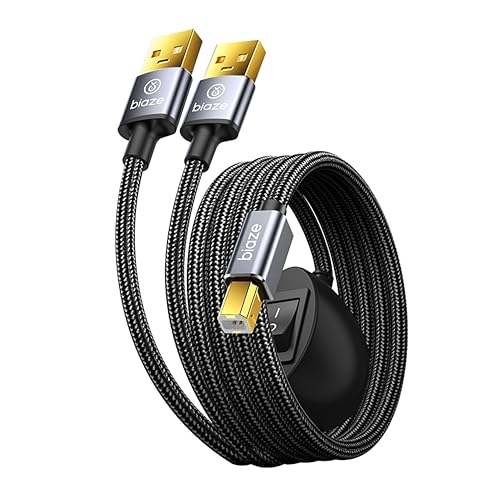
The Biaze USB splitter enables dual-PC sharing of a single USB device such as a printer, scanner, or keyboard. It uses a USB 2.0 interface with data transfer up to 480 Mbps, suitable for smooth printing and peripheral use. The included 11.5-foot cable length provides flexible placement on larger desks or shared workstations. The device is plug-and-play, requiring no complex setup, and supports stable connections for common office peripherals.
Key features include a dual-PC sharing design, a reliable USB 2.0 data path for printers and scanners, and an extended cable to accommodate multi-monitor or distributed workstations. This option helps keep multiple computers ready to print without swapping cables, while preserving compatibility with most USB printers and devices.
In practical terms, you can designate one computer as the primary printing source and switch to the other PC when needed. This reduces cable clutter and simplifies daily print tasks in small offices or busy home offices.
Herfair Printer Splitter 1 in 2 Out

The Herfair solution is designed to share one printer between two computers with a 1-in-2-out configuration. It includes a 5-foot USB B to USB A cable and a 5-foot USB A to USB A cable, enabling straightforward connections. A switch lets you control which PC uses the printer at any given moment, making it suitable for environments where printers are shared but printing must be managed without replugging cables. Data transfer is USB 2.0 compliant, delivering up to 480 Mbps.
Note that only one computer can print at a time, which helps prevent conflicts when multiple devices attempt to send jobs simultaneously. The setup emphasizes reliability and ease of use, keeping the printing workflow simple in small offices or home labs.
Use cases include sharing a laser or inkjet printer, scanners, or other USB peripherals. The bundled cables support quick setup, and the switch provides immediate control over print jobs without removing cables from the active computer.
Printer Cable Splitter 2 in 1 Out

This two-in-one USB splitter is designed to share one printer across two computers with a toggle switch to choose the active computer. It claims compatibility with a range of inkless printers, along with major brands like Samsung, HP, Canon, and Brother. USB 2.0 speeds (up to 480 Mbps) support reliable data transfer and faster print operations compared with wireless connections. The device is described as straightforward to install and operate, with a focus on stable connections and simple switching.
The setup supports both Windows and MacOS environments, and is marketed as a universal solution for home offices and small workspaces where multiple machines need access to a single printer or scanner. The emphasis is on ease of switching and minimal setup effort.
IOGEAR 2 Port USB 2.0 Switch
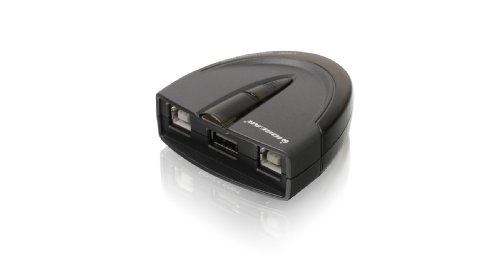
The IOGEAR 2 Port USB 2.0 Switch provides an auto or manual approach to sharing a printer between two workstations. It supports data rates up to 480 Mbps and remains backward compatible with USB 1.1 devices. The automatic switching feature can route print tasks to the active computer automatically, while manual switching is accessible via a physical button. LEDs indicate the active port, helping users monitor which computer is printing.
This option is favored for its plug-and-play simplicity and the ability to minimize interruptions during high-demand print tasks. For mixed environments with older USB devices, the device’s compatibility and straightforward control make it a practical choice for shared printers in small offices or classrooms.
HOXIBSL 14.7FT Printer Cable Splitter
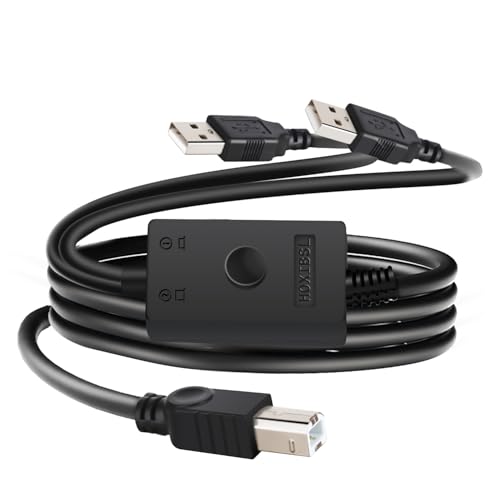
This longer 14.7-foot cable splitter is designed for two computers sharing a printer, fax, or other USB devices. It features a toggle switch to select the active computer and supports USB 2.0 speeds up to 480 Mbps for faster print and transfer tasks. No external power or drivers are required, making it a true plug-and-play solution for larger desks or rooms where printers are positioned farther from the computers.
The device emphasizes convenient one-click switching and reliable data transfer, suitable for users who need flexible printer access while maintaining a clean, cable-managed workspace. It’s compatible with standard USB Type-A ports and widely used printers and peripherals.
GELRHONR USB B Printer Cable Splitter

The GELRHONR 14.7-foot USB B printer cable splitter converts a single printer connection into two USB A ends, enabling two computers to access one USB device. It operates as a time-sharing switch, where only one computer can print at a time, reducing conflicts and ensuring stable signals. The design is simple, with a one-button switch to toggle active printing and no driver installation required. It emphasizes efficiency and space savings for two-computer workflows.
Designed for USB 2.0 compatibility, this option works with most USB-enabled printers, scanners, and keyboards. The long cable length supports flexible desk layouts, while the toggle switch enables quick switching between workstations without frequent unplugging.
Buying Guide: Key Considerations For Two-Computer Printer Sharing
- Connection type and compatibility: The majority of these solutions use USB 2.0, which provides up to 480 Mbps. Ensure the plug types align with your printer (USB B or USB A) and your computers’ ports (USB A on modern devices).
- Switch mechanism: Toggle switches offer immediate control, while automatic switching can reduce hands-on management. Consider which approach fits your workflow and whether you need immediate manual override.
- Cable length: Longer cables (like 11.5 ft or 14.7 ft) give flexibility for distant printers or multi-person desks but may add clutter. Shorter cables reduce slack but require proximity between devices and printer.
- Number of outlets: Most options are 1-in-2-out, suitable for sharing a single printer. If you need more peripherals, verify whether a 2-port or multi-port solution is required.
- Compatibility and drivers: Most devices are plug-and-play and do not require drivers. Check printer compatibility lists if you rely on legacy printers or mixed operating systems (Windows/Mac/Linux).
- Build quality and reliability: Look for sturdy connectors, braided cables for longevity, and good shielding to minimize interference in busy office environments.
These considerations help you compare options beyond price, focusing on how well a splitter integrates with your existing printer, desk layout, and daily printing tasks. By evaluating switch type, cable reach, and device compatibility, you can select a setup that minimizes downtime and keeps two computers efficiently sharing one printer.