Elevate audio quality for recording, streaming, or video chats with USB sound cards that include line-in capabilities. This guide highlights five versatile options suitable for Windows, Mac, and various setups, from laptops to desktops and gaming consoles. Each model supports microphones, line-in sources, and headphone monitoring to fit different workflows, whether you’re podcasting, streaming, or editing music. Explore features, compatibility, and practical considerations to help you choose the right USB audio interface for your needs.
| Product | Brand | Key Feature |
|---|---|---|
| Cubilux CB5 USB Audio Interface | Cubilux | 2 mic inputs, line-in, line-out, headphone jack; 96 kHz/24-bit |
| UGREEN USB to Audio Jack | UGREEN | Dual 3.5mm jacks; plug-and-play; enhanced DAC |
| StarTech ICUSBAUDIO7D | StarTech.com | 7.1 surround, digital SPDIF, multiple analog I/O |
| Cubilux 7.1 USB Surround | Cubilux | 7.1/5.1 surround, 384kHz/24-bit headphone output |
| [Upgrade] 1Mii USB Sound Card | 1Mii | Virtual 7.1 surround, plug-and-play, mic mute control |
Introduction continues: The following sections examine five options that best align with a “usb sound card with line in jack” use case. They cover a range of features—from basic plug-and-play adapters to full-blown USB interfaces offering multi-channel outputs and digital options. Each entry includes a direct link to Amazon for quick comparison and a concise breakdown of what matters most for performance, compatibility, and setup.
Cubilux CB5 USB Audio Interface

The Cubilux CB5 converts a laptop USB port into multiple outputs: two stereo microphone inputs, one line-in, one line-out, and a headphone jack. This 5-in-1 hub enables flexible routing for microphones, instruments, and headphones, supporting multi-track projects by assigning independent device names to each interface. It emphasizes studio-quality sound with a 96 kHz/24-bit resolution, delivering crisp, clear audio for recording and streaming. Note that line-out and audio output cannot be used simultaneously, which informs how you structure monitoring and playback paths.
UGREEN USB To Audio Jack
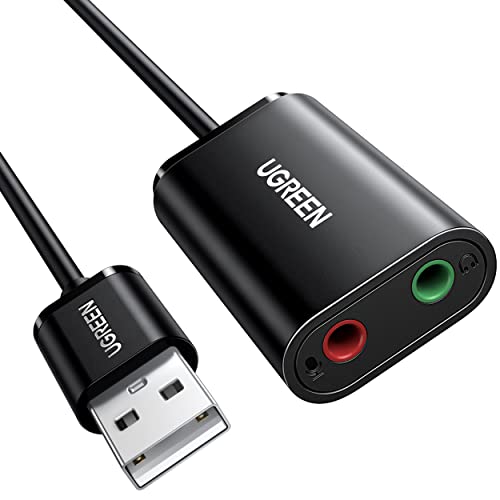
UGREEN’s dual 3.5mm USB audio adapter upgrades your device’s sound with a high-resolution DAC. It’s designed for plug-and-play use across Windows, Mac, Linux, PS5, Switch, and more, delivering improved audio output with reduced noise at 16-bit/48kHz. This is a straightforward solution when you need a simple line-in and line-out path without drivers or external power, ideal for casual listening, gaming, or quick audio enhancements on laptops and desktops.
StarTech ICUSBAUDIO7D
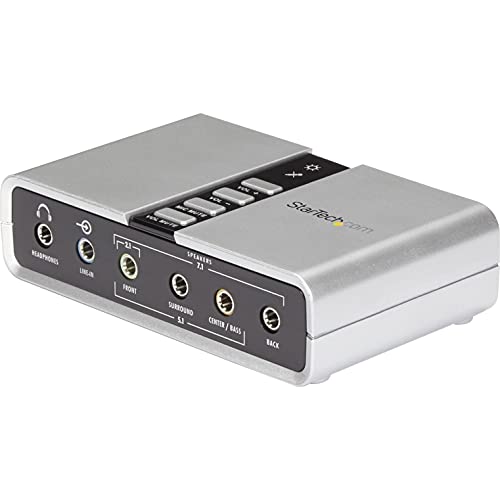
The StarTech ICUSBAUDIO7D adds up to 7.1 channels via USB, with composite analog outputs, a line-in, stereo microphone input, and a dedicated headphone port. It supports analog and digital audio outputs for versatile setups and includes a 1-meter USB cable. The device handles 44.1 kHz and 48 kHz sampling for analog playback and recording, with SPDIF digital output limited to 48 kHz. This model is well-suited for users needing multi-channel monitoring and digital audio connectivity.
Cubilux 7.1 USB Surround Sound Card

This Cubilux model delivers 7.1 surround sound with 44.1 kHz/16-bit to 384 kHz/24-bit capability for headphone output, plus line-in and mic inputs. It aims to serve gaming, multimedia, and hi-fi listening through a robust aluminum shell for interference isolation. The device supports 7.1/5.1 configurations and emphasizes high-resolution playback and microphone compatibility, making it a strong option for immersive audio environments and demanding headsets.
[Upgrade] 1Mii USB Sound Card

The 1Mii USB sound card offers virtual 7.1 surround sound and broad compatibility, including Windows 10/7/XP and various gaming setups. It features a multi-function controller for volume adjustment and mic muting, along with an indicator LED to show 7.1 status. This plug-and-play device suits gamers and content creators who want immersive audio without complex setup, while supporting both line-in and microphone inputs for flexible input options.
Buying Guide: Key Purchase Considerations
When choosing a USB sound card with line-in capabilities, consider the following:
- Input and output options: Determine how many mic inputs, line-in ports, line-outs, and headphone jacks you need. Some models offer multi-channel surround and SPDIF, while others focus on basic stereo.
- Sampling rate and bit depth: Higher rates (up to 96 kHz or more) and 24-bit depth provide crisper recordings and clearer playback, especially for music or podcasts.
- Latency and drivers: Plug-and-play designs are simplest, but some setups benefit from dedicated drivers or software to adjust latency, gain, and monitoring.
- Build quality and shielding: Aluminum housings and robust connectors reduce interference and noise, important for professional-sounding results.
- Compatibility: Verify compatibility with your operating system (Windows, macOS, Linux) and devices (laptops, desktops, consoles, or mobile setups).
- Monitoring and direct monitoring options: Look for direct monitoring, zero-latency paths, or headphone monitoring if you record or stream live.
- Price-to-performance balance: If you require multiple inputs or surround capabilities, expect higher cost but gain more flexibility for projects.
In summary, USB sound cards with line-in jacks span a spectrum from compact, driver-free adapters to feature-rich interfaces suitable for multi-track recording and immersive playback. Choose based on the number of inputs you need, desired audio fidelity, and how you plan to monitor or share your output. The five products reviewed here provide a range of options to fit varied workflows, from casual listening to professional-sounding streams and recordings.