Upgrade your desktop experience with USB-powered WiFi adapters that deliver faster speeds, stronger signals, and easier setup. The following selections emphasize dual-band and WiFi 6 options, high-gain antennas, and broad OS compatibility to optimize gaming, streaming, and online work from a desktop or laptop.
| Product | Brand | WiFi Standard | Antenna Gain | OS Support |
|---|---|---|---|---|
| TP-Link Archer T4U Plus | TP-Link | WiFi 5 (AC1300) | Dual High-Gain Antennas | Windows, macOS |
| WAVLINK AX5400 USB WiFi 6E Adapter | WAVLINK | WiFi 6E (AX5400) | 4×5 dBi antennas | Windows 11/10 |
| Nineplus 1300Mbps USB WiFi Adapter | Nineplus | WiFi 5/AC1300 | 2x 5dBi antennas | Windows 11/10/8/7/Vista/XP |
| BrosTrend AX1800 USB WiFi Adapter | BrosTrend | WiFi 6 (AX1800) | 2x 5dBi antennas | Windows 11/10 |
| UGREEN AX900 USB WiFi 6 Adapter | UGREEN | WiFi 6 (AX900) | 6dBi built-in antenna | Windows 10/11 |
Note: All products listed are USB-powered adapters designed to upgrade wireless performance on desktops and laptops. Features vary by model, including speed, antenna configuration, and driver support. The table above summarizes key distinctions to help choose the best option for your setup.
TP-Link Archer T4U Plus: AC1300 Dual-Band USB Adapter
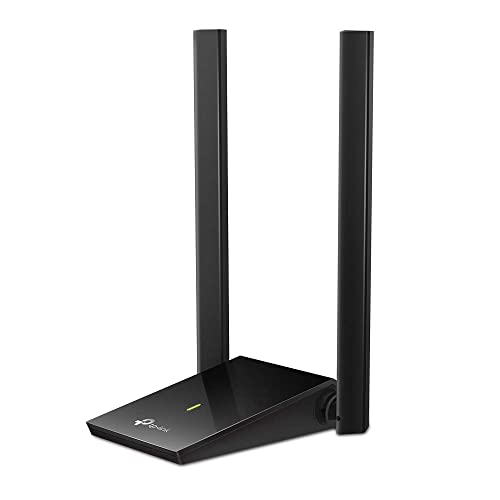
The Archer T4U Plus provides AC1300 wireless speeds across 2.4GHz and 5GHz bands. With dual high-gain antennas, it improves range and signal quality for desktop PCs in challenging layouts. The adapter is suitable for gaming, streaming, and fast downloads, and supports Windows 11/10 and macOS 10.9–10.14. Its MU-MIMO capability helps maximize router throughput when multiple devices are active, making it a versatile upgrade for mixed-network environments.
WAVLINK AX5400 USB WiFi 6E Adapter

The WAVLINK AX5400 is a WiFi 6E tri-band adapter offering speeds up to 573Mbps on 2.4GHz, 2402Mbps on 5GHz, and 2402Mbps on 6GHz. It supports OFDMA and MU-MIMO for efficient multi-device performance. Built for Windows 11/10, it targets households with demanding streaming and online gaming needs, delivering improved capacity and range via four 5dBi antennas. The setup includes after-sales support to address common installation questions quickly.
Nineplus 1300Mbps USB WiFi Adapter

Nineplus offers 1300Mbps total throughput with dual-band operation. It highlights a 2.4GHz band up to 400Mbps and a 5GHz band up to 867Mbps, supported by dual 5dBi antennas to improve reception and range. The driver-free setup is designed to work with Windows 11/10/8/7/Vista/XP, emphasizing straightforward installation while maintaining stable connections for HD video calls, gaming, and streaming across longer distances.
BrosTrend AX1800 USB Wireless Adapter

The BrosTrend AX1800 delivers up to 1800Mbps combined in its WiFi 6 implementation. It uses two high-gain antennas to improve reception and reach through walls. This adapter targets Windows 11/10 users, emphasizing easy setup with pre-loaded drivers for quick online access. Its emphasis on broader coverage makes it suitable for rooms with signal challenges and for households with multiple streaming and gaming devices on the same network.
UGREEN AX900 USB WiFi 6 Adapter

The UGREEN AX900 combines WiFi 6 speeds with built-in driver support for Windows 10/11. It delivers up to 600Mbps on 5GHz and 287Mbps on 2.4GHz, with a 6dBi external antenna design to boost wall penetration and long-distance stability. The driver is pre-installed to simplify setup, although it does not list macOS or some Linux distributions as supported. This adapter focuses on reliable everyday performance for desktops and laptops in mixed-network environments.
Buying Guide: Key Purchase Considerations
When selecting a USB-powered WiFi adapter, consider the following factors to ensure the best fit for your needs:
- WiFi Standard and Speed: WiFi 6/6E offers higher throughput and capacity than WiFi 5. If you have a WiFi 6/6E router, prioritize AX models for future proofing.
- Frequency Bands and Throughput: Dual-band (2.4GHz and 5GHz) covers most setups; tri-band or 6GHz (WiFi 6E) benefits busy networks with many devices.
- Antenna Configuration: High-gain external antennas improve range and signal quality; look for 5dBi–6dBi or detachable antennas for flexibility.
- Interface and Speed: USB 3.0/3.1 ports maximize real-world throughput; USB 2.0 ports may bottleneck high-speed adapters.
- Driver Availability: Pre-installed drivers save setup time; verify compatibility with your OS version (Windows/macOS/Linux) before purchasing.
- MIMO and OFDMA: MU-MIMO and OFDMA enhance multi-device performance on busy networks; helpful for households with multiple devices streaming or gaming.
- Router Compatibility: Ensure your router supports the same or newer standards to realize full gains; older routers may not unlock top speeds.
- Installation and Support: Look for models with clear setup instructions and responsive support in case of connectivity issues.
- Use Case: Gaming, streaming, or general browsing have different requirements. Prioritize higher speeds and strong antennas for gaming and 4K streaming.
In sum, the best choice depends on your current router, environment, and whether you want WiFi 6/6E technology or a solid AC1300 upgrade. The options above balance performance, ease of use, and compatibility to address a variety of home and office needs.