Choosing the right USB portable flash drive means weighing speed, compatibility, and capacity. This guide highlights top options that pair solid performance with broad device compatibility. Each pick is evaluated for real-world transfers, ease of use, and practical storage capacity, helping you move files quickly and securely.
style=”display:none”>Summary Table of Chosen Products
| Product | Brand | Capacity | Key Speed Claim | Notes |
|---|---|---|---|---|
| SanDisk 128GB Ultra Flair USB 3.0 | Sandisk | 128 GB | Up to 150 MB/s read | USB 3.0, strong everyday performance |
| JOIOT 128GB USB C Flash Drive | JOIOT | 128 GB | Read up to 70 MB/s; write up to 20 MB/s | 2-in-1 USB-C / USB-A, wide compatibility |
| Amazon Basics 256 GB Ultra Fast USB 3.1 | Amazon Basics | 256 GB | Read up to 130 MB/s | High capacity, USB 3.1 |
| SSK 1TB USB Drive | SSK | 1 TB | Up to 550 MB/s read | Dual USB-C + USB-A, fast performance |
| JOIOT 256GB USB C Flash Drive | JOIOT | 256 GB | Read up to 80 MB/s; write up to 25 MB/s | 2-in-1 USB-C / USB-A, USB 3.0 tech |
SanDisk 128GB Ultra Flair USB 3.0 Flash Drive

SanDisk’s Ultra Flair line delivers solid USB 3.0 performance with advertised read speeds up to 150 MB/s. The 128 GB capacity suits everyday file storage, media backups, and quick transfers. Real-world results vary by host device and usage, but the drive remains a reliable option for students and professionals seeking dependable, portable storage. The USB 3.0 interface keeps compatibility broad for older computers and newer laptops alike.
JOIOT 128GB USB C Flash Drive Dual USB 3.0

This 2-in-1 USB-C and USB-A flash drive targets modern devices with Type-C ports while staying backward compatible with USB-A. With read speeds up to 70 MB/s and write speeds up to 20 MB/s, it isn’t the sprint champion, but its versatility makes it convenient for students and professionals who move data between phones, tablets, and laptops. Plug-and-play operation minimizes software needs, supporting Windows, Android, Mac OS, and Linux ecosystems.
Amazon Basics 256 GB Ultra Fast USB 3.1
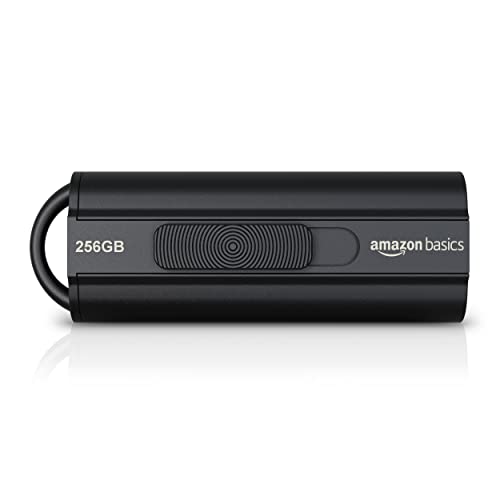
Amazon Basics offers a high-capacity 256 GB USB 3.1 flash drive with advertised read speeds up to 130 MB/s. This drive is well-suited for users who need substantial portable storage for videos, backups, and large data sets. The capably fast transfer rates help move sizable files quickly, while the USB 3.1 standard ensures good compatibility with newer devices and laptops.
SSK 1TB USB Drive

SSK combines dual USB-C and USB-A interfaces with a solid-state drive’s performance profile. Promising up to 550 MB/s read and 500 MB/s write speeds, this model targets fast transfers of high-resolution photos and 4K videos. It is designed for quick data movement across smartphones, tablets, and computers, and its plug-and-play approach reduces setup complexity for everyday use.
JOIOT 256GB USB C Flash Drive

The 256 GB JOIOT USB-C flash drive features a dual USB-C and USB-A design, suitable for a wide range of devices—from newer laptops to type-C smartphones. It advertises up to 80 MB/s read and 25 MB/s write speeds, which balances speed with generous storage. Its USB 3.0 lineage ensures better performance on supported hosts, while the plug-and-play setup keeps usage straightforward across platforms.
Buying Guide: Key Purchase Considerations for USB Portable Flash Drives
- Storage capacity: Choose容量 based on your typical file sizes. Higher capacities are ideal for media libraries, backups, or large project files, while smaller drives are adequate for documents and portable apps.
- Interface and speed: USB 3.0/3.1/Gen 2 drives offer faster transfers than USB 2.0. Dual-interface drives (USB-C and USB-A) maximize compatibility with modern and older devices.
- Device compatibility: Ensure the drive supports your ecosystem—Windows, macOS, Linux, Android, or iOS. Some drives are plug-and-play on most OSes, while others may need format tweaks for specific devices.
- Durability and form factor: Consider metal or rugged builds for travel. Small, capless designs reduce loss risk, while swiveling or retractable designs help protect the connector.
- Security features: Some drives offer software-based encryption or hardware protections. If sensitive data is a concern, look for encryption and password protection options.
- Reliability and warranty: Reputable brands often provide warranties and data-recovery considerations. Review reviews and manufacturer guarantees to gauge long-term reliability.
- Price-to-capacity balance: Large-capacity drives are cost-efficient per gigabyte but may carry higher upfront costs. Balance your budget with your storage needs.
- For mixed devices: If you frequently move data between USB-C devices and older USB-A machines, prioritize dual-interface drives to minimize adapters and hassle.