For Mac users, a compact USB hub can dramatically increase productivity by adding essential connections without clutter. The following selections are tailored for MacBooks and other USB-C laptops, balancing speed, power delivery, and portability. Each option supports multiple devices, from keyboards and mice to external drives and SD cards, while keeping power needs and compatibility front and center.
| Product | Brand | Key Feature |
|---|---|---|
| LENTION USB C Hub CB-CE18 | LENTION | 100W PD, 4K HDMI, SD/TF, USB 3.0 |
| Hiearcool USB C Hub | Hiearcool | 4K HDMI, 100W PD, SD/TF |
| BERLAT 7-in-1 USB C Hub | BERLAT | 5Gbps USB 3.0, 4 x USB 2.0, 2 USB-C |
| P9 USB C Hub 9-in-1 | intpw | 4K HDMI, PD 100W, SD/TF |
| Acer USB C Hub 7-in-1 | Acer | HDMI 4K, PD 100W, SD/CF |
LENTION USB C Hub CB-CE18 — 7-in-1 with 100W PD and 4K HDMI
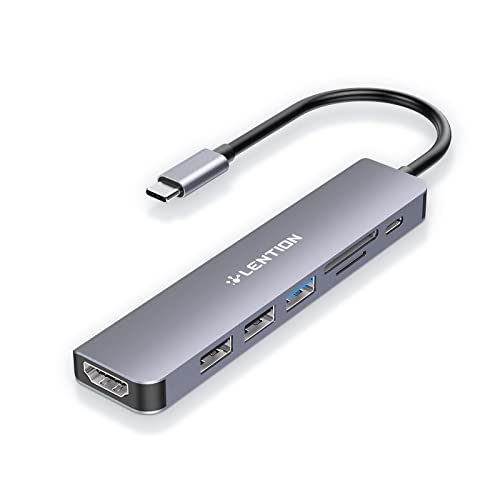
The LENTION CB-CE18 stands out with a robust power delivery design that passes up to 100W to a host device, making it suitable for MacBooks during long work sessions. It blends a 4K HDMI output with USB 3.0 and two USB 2.0 ports for flexible peripheral use. Readers will appreciate the SD and Micro SD card slots that support up to 2TB cards, expanding media handling without extra dongles. Note that this hub emphasizes data and display support while delivering steady PD pass-through, which can be essential for keeping a MacBook charged during heavy workloads.
In daily use, the hub supports convenient expansion for presentations, external drives, and standard peripherals. The HDMI output is designed for UHD viewing, enabling crisp screen sharing with monitors and projectors. The combination of USB 3.0 and USB 2.0 ports caters to both high-speed data devices and legacy peripherals. The build is compact, and the 100W PD passthrough helps prevent throttling when docked to power-hungry devices. Suitable for MacBook Pro and Air users who need reliable multiport expansion on the go.
Pros: solid PD support, 4K HDMI, SD/TF card readers, versatile port mix. Cons: some older Mac models may require careful cable management to maximize performance. Overall, a balanced option for users prioritizing display and card reading alongside standard USB connectivity.
Hiearcool USB C Hub — 7-in-1 With 4K HDMI And SD/TF Slots

The Hiearcool hub is designed for MacBooks and USB-C laptops that demand a compact, feature-rich expansion station. It offers a 4K HDMI output for crisp presentations and media playback, along with a 100W PD pass-through to keep the host powered during long meetings. The USB 3.0 port and dual USB 2.0 slots cover everyday peripherals, while SD/TF card readers simplify media transfers from cameras and drones. With its space-gray body and simple layout, it’s a practical choice for travel, classrooms, and home offices.
Users benefit from stable performance during extended work sessions, avoiding performance dips when multiple devices are attached. The PD pass-through is a standout feature, ensuring uninterrupted laptop operation while using multiple USB devices. However, some users may require a powered charger to maximize peak performance when running power-hungry peripherals. Overall, a versatile, office-friendly option for Mac users who want a single hub for display, data, and media tasks.
BERLAT Aluminum 7-in-1 USB C Hub

The BERLAT hub emphasizes high-speed data and broad compatibility. With one USB 3.0 port and four USB 2.0 ports, plus two USB-C connections, it delivers a wide range of connectivity options for MacBooks, iPads, and other Type-C devices. The claimed 5Gbps transfer speed on USB 3.0 supports quick file transfers, while the USB 2.0 ports handle lower-bandwidth peripherals. Compatibility extends across Windows, macOS, Android, and Chrome OS, making it a flexible option for mixed ecosystems. The aluminum enclosure helps with heat dissipation during extended use.
Notable considerations include ensuring proper PD support for charging, as some users may rely on the hub for PD passthrough to their laptops. The BERLAT hub is well-suited for users who require multiple USB-A devices and stable data transfer in a single compact dock. It balances performance with portability for MacBook users and students alike.
P9 USB C Hub, 9-in-1 With 4K HDMI and 100W PD

The P9 USB C Hub packs a comprehensive suite of ports into a single, portable dongle. It includes a 4K HDMI output, a 100W PD charging path, and multiple USB-A ports (3 x USB 3.0 and 2 x USB 2.0), plus SD/TF card readers. This makes it a strong choice for MacBook or iPad owners who need to connect cameras, external drives, and a display while maintaining power delivery. A notable caveat is ensuring your host device supports DisplayPort Alt Mode for the HDMI output to function at 4K. The included 19.7-inch USB-C cable provides ample reach for most setups.
Practical uses include traveling presenters, remote workers, and students who require a single compact dock that handles high-speed data transfers and media expansion. While PD support is strong, users should verify device compatibility for 4K output and be mindful of power needs when running graphics-heavy tasks alongside multiple peripherals.
Acer USB C Hub — 7-in-1 Multi-Port Adapter

The Acer hub expands a USB-C port to seven ports, including HDMI 4K output, two USB 3.1 ports, a USB-C data/PD port, SD and MicroSD card readers, and a PD charging port. It’s designed with a metal enclosure to help with heat management and rugged use, making it a solid option for MacBook Pro or Air users who need reliable, all-in-one connectivity. Note that 4K output is capped at 4K@30Hz on some configurations, and a power source is recommended via the PD port to ensure peak performance when multiple devices are attached.
For Mac users who regularly connect to external displays, drives, and memory cards, this Acer hub offers a familiar balance of performance and portability. It’s particularly well-suited for home offices or classrooms where a single dock simplifies cable management while delivering robust everyday functionality.
Buying Guide: Key Purchase Considerations For Mac Users
- Power delivery: If you plan to charge your MacBook or run power-hungry peripherals, choose a hub with substantial PD passthrough (ideally 60W or more) to maintain performance without draining the host’s battery.
- Display support: For presentations or external displays, ensure the hub offers a reliable 4K HDMI output and verify the required HDMI version and refresh rate (4K@30Hz is common; 4K@60Hz is less common on smaller hubs).
- Port mix and speeds: A good mix includes USB 3.0/3.1 ports for fast data transfer and USB-A/USB-C options for broader compatibility with peripherals like cameras and keyboards. SD/TF readers are a plus for photographers and content creators.
- Device compatibility: Check macOS compatibility and whether the hub requires a host device to support DP Alt Mode for video output. Some readers may require software or firmware updates for full compatibility.
- Build and cooling: Aluminum or metal housings help with heat dissipation during long sessions. Compact form factors improve portability but consider cable length to fit your workspace.
- Charging vs data: Some hubs explicitly prohibit charging devices through their USB-A ports to protect internal components. If charging is essential, look for a model that notes PD passthrough capabilities and recommendations.
- Cable length and ergonomics: A longer cable provides flexibility for seating arrangements, but longer cables may add clutter. Choose a hub with a cable length that matches your desk setup.
- Future-proofing: If you frequently swap between devices (MacBook, iPad, PC), select a hub with wide compatibility across USB standards and card readers to extend its usefulness beyond a single device ecosystem.
In summary, the right USB port hub for a Mac balances PD support, display capability, and a versatile port mix. Whether you’re a student, remote worker, or creative professional, there are options that bundle high-speed data transfer with convenient media expansion, all in a compact form factor designed for MacBooks and other USB-C laptops.