When you need to quickly add USB 2.0 ports to a laptop or desktop, a multi-port USB 2.0 hub offers a simple, affordable solution. The hubs below prioritize reliable transfer speeds up to 480 Mbps, compact designs, and practical features like individual power switches or surge protection. This guide highlights five solid options, with quick comparisons to help American readers choose the right hub for work, travel, or home use.
style=”font-weight:bold;”>Product Overview
- SABRENT 4 Port USB 2.0 Data Hub with Individual LED Lit Power Switches (HB-UMLS)
- Herfair 4 Port USB 2.0 Hub
- l’aise vie 7 Port USB 2.0 Hub
- Targus 4-Port USB 2.0 Hub
- SABRENT 13 Port High Speed USB 2.0 Hub (HB-U14P)
Product Summary Table
| Product | Brand | Ports | Key Feature | Amazon Link |
|---|---|---|---|---|
| SABRENT HB-UMLS | SABRENT | 4 | Individual LED power switches | Link |
| Herfair 4 Port Hub | Herfair | 4 | Strong compatibility across OS | Link |
| l’aise vie 7 Port Hub | l’aise vie | 7 | Multiple ports with surge protection | Link |
| Targus 4-Port Hub | Targus | 4 | Self-powered design | Link |
| SABRENT HB-U14P | SABRENT | 13 | Power adapter and dual control switches | Link |
SABRENT 4 Port USB 2.0 Data Hub
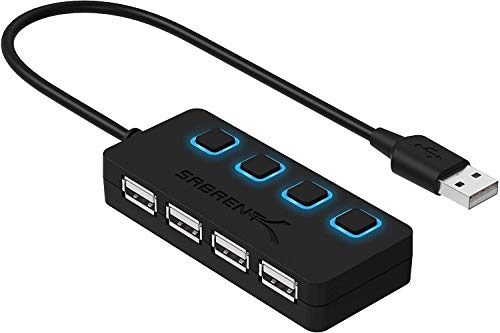
The SABRENT HB-UMLS adds four USB 2.0 ports to a single USB connection, turning a laptop or PC into a ready-made workstation. Each port has an LED indicator to show power status, and individual on/off switches allow quick connection management without unplugging devices. The hub supports data transfer speeds up to 480 Mbps (USB 2.0) and 12 Mbps (USB 1.1), making it suitable for standard peripherals such as keyboards, mice, printers, and flash drives. It’s designed for Mac and PC use and is compact enough for travel or desk setups.
Herfair 4 Port USB 2.0 USB Hub

Herfair’s 4-port hub emphasizes broad compatibility across Windows, macOS, Linux, and Chrome OS. It supports a range of devices from laptops to printers and cameras, with all four ports usable simultaneously. Built to manage heat within a moderate range, the hub features a slim, portable form factor that fits neatly in a bag or on a compact desk. It’s designed for plug-and-play use and does not require external drivers, helping to streamline setup for everyday USB peripherals.
l’aise vie 7 Port USB 2.0 Hub
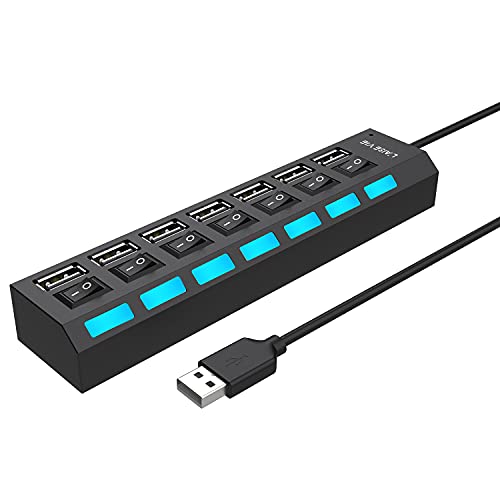
The l’aise vie hub expands a single USB port into seven, including ports for flash drives, keyboards, mice, and printers. It includes built-in overvoltage, overcurrent, leakage, and short-circuit protection with an integrated surge protector. Each port adheres to USB 2.0 speeds up to 480 Mbps, and the design prioritizes reliability with no driver installation required. It’s backward compatible with USB 1.0/2.0 devices, making it a versatile option for mixed-age gear or older accessories.
Targus 4-Port USB 2.0 Hub

The Targus 4-Port USB 2.0 Hub offers a compact, travel-friendly solution for expanding USB connectivity. It supports up to 4 devices at once with 480 Mbps per port, improving workflow efficiency for laptops and desktops. The hub is self-powered through the attached USB cable, eliminating the need for an external power adapter in most setups. Its straightforward plug-and-play operation makes it suitable for travelers and casual users who need reliable peripheral access on the go.
SABRENT 13 Port USB 2.0 Hub (HB-U14P)

The SABRENT HB-U14P expands a single USB connection into 13 USB 2.0 downstream ports, offering broad compatibility and high-speed hub performance at USB 2.0 standards. It features dual control switches and a power adapter to ensure stable operation across many connected devices, including keyboards, printers, external drives, and other USB 2.0 peripherals. Plug-and-play setup and hot-swappable capability simplify use in busy workspaces or classrooms where multiple devices are shared.
Buying Guide
- Port count and needs: Choose a hub with enough ports for your devices. If you only need occasional expansion, 4-port hubs are often sufficient. For larger setups, consider 7-port or 13-port options.
- Power and charging: Some hubs are self-powered via USB, while others require a separate power adapter. For high-load peripherals or simultaneous charging, a powered hub stabilizes performance.
- Data speed and compatibility: USB 2.0 hubs offer up to 480 Mbps. If you frequently transfer large files or use USB 3.0 devices, a 3.0 hub may be more appropriate, but USB 2.0 hubs remain reliable for standard peripherals.
- Power switches and indicators: Individual on/off switches and LED indicators aid device management and troubleshooting in busy environments.
- Build and portability: Slim, lightweight designs are ideal for travel, while larger hubs with robust construction suit desk setups and shared workstations.
- OS compatibility and drivers: Most USB 2.0 hubs work with Windows, macOS, Linux, and Chrome OS with plug-and-play simplicity. No driver installation is a plus for quick setup.
- Heat management: Hubs should stay within safe temperature ranges when multiple devices are connected. Built-in surge protection helps protect connected gear.
- Long-term reliability: Look for hubs from established brands with clear warranty terms and positive real-world reviews to reduce the risk of failure in critical tasks.
These considerations help balance price, performance, and durability. For mixed-use environments—travel, classrooms, or shared offices—prioritize powered hubs with adequate port count and robust safety features. For personal desks with keyboards and mice, a compact, 4-port or 7-port hub may be the most convenient choice.